---
title: Quickstart
---
# Build Your First MCP App
This tutorial walks you through building an MCP App—a tool with an interactive **View** (a UI that renders inside an iframe) that displays in MCP hosts like Claude Desktop.
> [!TIP]
> Feel like vibe coding instead? Try the [MCP Apps agent skills](./agent-skills.md).
## What You'll Build
A simple app that fetches the current server time and displays it in an interactive View. You'll learn the core pattern: **MCP Apps = Tool + UI Resource**. The complete example is available in [`examples/quickstart`](https://github.com/modelcontextprotocol/ext-apps/tree/main/examples/quickstart).
## Prerequisites
This tutorial assumes you've built an MCP server before and are comfortable with [Tools](https://modelcontextprotocol.io/docs/learn/server-concepts#tools) and [Resources](https://modelcontextprotocol.io/docs/learn/server-concepts#resources). If not, the [official MCP quickstart](https://modelcontextprotocol.io/docs/develop/build-server) is a good place to start.
We'll use the [MCP TypeScript SDK](https://github.com/modelcontextprotocol/typescript-sdk) to build the server.
You'll also need Node.js 18+.
## 1. Set up the project
We'll set up a minimal TypeScript project with Vite for bundling.
Start by creating a project directory:
```bash
mkdir my-mcp-app && cd my-mcp-app
```
Install the dependencies you'll need:
```bash
npm init -y
npm install @modelcontextprotocol/ext-apps @modelcontextprotocol/sdk express cors
npm install -D typescript vite vite-plugin-singlefile @types/express @types/cors @types/node tsx concurrently cross-env
```
Configure your [`package.json`](https://github.com/modelcontextprotocol/ext-apps/blob/main/examples/quickstart/package.json):
```bash
npm pkg set type=module
npm pkg set scripts.build="tsc --noEmit && tsc -p tsconfig.server.json && cross-env INPUT=mcp-app.html vite build"
npm pkg set scripts.start='concurrently "cross-env NODE_ENV=development INPUT=mcp-app.html vite build --watch" "tsx watch main.ts"'
```
> [!NOTE]
> Windows `cmd.exe` users will need to convert quotes in the above command: `npm pkg set scripts.start="concurrently ""cross-env NODE_ENV=development INPUT=mcp-app.html vite build --watch"" ""tsx watch main.ts"""`.
Create tsconfig.json:
```json source="../examples/quickstart/tsconfig.json"
{
"compilerOptions": {
"target": "ESNext",
"lib": ["ESNext", "DOM", "DOM.Iterable"],
"module": "ESNext",
"moduleResolution": "bundler",
"allowImportingTsExtensions": true,
"resolveJsonModule": true,
"isolatedModules": true,
"verbatimModuleSyntax": true,
"noEmit": true,
"strict": true,
"skipLibCheck": true,
"noUnusedLocals": true,
"noUnusedParameters": true,
"noFallthroughCasesInSwitch": true
},
"include": ["src", "server.ts", "main.ts"]
}
```
Create tsconfig.server.json — for compiling server-side code:
```json source="../examples/quickstart/tsconfig.server.json"
{
"compilerOptions": {
"target": "ES2022",
"lib": ["ES2022"],
"module": "NodeNext",
"moduleResolution": "NodeNext",
"declaration": true,
"emitDeclarationOnly": true,
"outDir": "./dist",
"rootDir": ".",
"strict": true,
"esModuleInterop": true,
"skipLibCheck": true,
"noUnusedLocals": true,
"noUnusedParameters": true,
"noFallthroughCasesInSwitch": true
},
"include": ["server.ts", "main.ts"]
}
```
Create vite.config.ts — bundles UI into a single HTML file:
```ts source="../examples/quickstart/vite.config.ts"
import { defineConfig } from "vite";
import { viteSingleFile } from "vite-plugin-singlefile";
const INPUT = process.env.INPUT;
if (!INPUT) {
throw new Error("INPUT environment variable is not set");
}
const isDevelopment = process.env.NODE_ENV === "development";
export default defineConfig({
plugins: [viteSingleFile()],
build: {
sourcemap: isDevelopment ? "inline" : undefined,
cssMinify: !isDevelopment,
minify: !isDevelopment,
rollupOptions: {
input: INPUT,
},
outDir: "dist",
emptyOutDir: false,
},
});
```
Your `my-mcp-app` directory should now contain:
```
my-mcp-app/
├── package.json
├── tsconfig.json
├── tsconfig.server.json
└── vite.config.ts
```
With the project scaffolded, let's write the server code.
## 2. Register the tool and UI resource
MCP Apps use a **two-part registration**:
1. A **tool** that the LLM/host calls
2. A **resource** that contains the View HTML
The tool's `_meta` field links them together via the resource's URI. When an MCP Apps-capable host calls the tool, it will also read the resource and render the View.
Create [`server.ts`](https://github.com/modelcontextprotocol/ext-apps/blob/main/examples/quickstart/server.ts), which registers the tool and its UI resource:
```ts source="../examples/quickstart/server.ts"
import {
registerAppResource,
registerAppTool,
RESOURCE_MIME_TYPE,
} from "@modelcontextprotocol/ext-apps/server";
import { McpServer } from "@modelcontextprotocol/sdk/server/mcp.js";
import fs from "node:fs/promises";
import path from "node:path";
const DIST_DIR = path.join(import.meta.dirname, "dist");
/**
* Creates a new MCP server instance with tools and resources registered.
*/
export function createServer(): McpServer {
const server = new McpServer({
name: "Quickstart MCP App Server",
version: "1.0.0",
});
// Two-part registration: tool + resource, tied together by the resource URI.
const resourceUri = "ui://get-time/mcp-app.html";
// Register a tool with UI metadata. When the host calls this tool, it reads
// `_meta.ui.resourceUri` to know which resource to fetch and render as an
// interactive UI.
registerAppTool(
server,
"get-time",
{
title: "Get Time",
description: "Returns the current server time.",
inputSchema: {},
_meta: { ui: { resourceUri } }, // Links this tool to its UI resource
},
async () => {
const time = new Date().toISOString();
return { content: [{ type: "text", text: time }] };
},
);
// Register the resource, which returns the bundled HTML/JavaScript for the UI.
registerAppResource(
server,
resourceUri,
resourceUri,
{ mimeType: RESOURCE_MIME_TYPE },
async () => {
const html = await fs.readFile(path.join(DIST_DIR, "mcp-app.html"), "utf-8");
return {
contents: [
{ uri: resourceUri, mimeType: RESOURCE_MIME_TYPE, text: html },
],
};
},
);
return server;
}
```
Create main.ts — the entry point that starts the server:
```ts source="../examples/quickstart/main.ts"
import { createMcpExpressApp } from "@modelcontextprotocol/sdk/server/express.js";
import type { McpServer } from "@modelcontextprotocol/sdk/server/mcp.js";
import { StdioServerTransport } from "@modelcontextprotocol/sdk/server/stdio.js";
import { StreamableHTTPServerTransport } from "@modelcontextprotocol/sdk/server/streamableHttp.js";
import cors from "cors";
import type { Request, Response } from "express";
import { createServer } from "./server.js";
/**
* Starts an MCP server with Streamable HTTP transport in stateless mode.
*
* @param createServer - Factory function that creates a new McpServer instance per request.
*/
export async function startStreamableHTTPServer(
createServer: () => McpServer,
): Promise {
const port = parseInt(process.env.PORT ?? "3001", 10);
const app = createMcpExpressApp({ host: "0.0.0.0" });
app.use(cors());
app.all("/mcp", async (req: Request, res: Response) => {
const server = createServer();
const transport = new StreamableHTTPServerTransport({
sessionIdGenerator: undefined,
});
res.on("close", () => {
transport.close().catch(() => {});
server.close().catch(() => {});
});
try {
await server.connect(transport);
await transport.handleRequest(req, res, req.body);
} catch (error) {
console.error("MCP error:", error);
if (!res.headersSent) {
res.status(500).json({
jsonrpc: "2.0",
error: { code: -32603, message: "Internal server error" },
id: null,
});
}
}
});
const httpServer = app.listen(port, (err) => {
if (err) {
console.error("Failed to start server:", err);
process.exit(1);
}
console.log(`MCP server listening on http://localhost:${port}/mcp`);
});
const shutdown = () => {
console.log("\nShutting down...");
httpServer.close(() => process.exit(0));
};
process.on("SIGINT", shutdown);
process.on("SIGTERM", shutdown);
}
/**
* Starts an MCP server with stdio transport.
*
* @param createServer - Factory function that creates a new McpServer instance.
*/
export async function startStdioServer(
createServer: () => McpServer,
): Promise {
await createServer().connect(new StdioServerTransport());
}
async function main() {
if (process.argv.includes("--stdio")) {
await startStdioServer(createServer);
} else {
await startStreamableHTTPServer(createServer);
}
}
main().catch((e) => {
console.error(e);
process.exit(1);
});
```
Your `my-mcp-app` directory should now contain:
```
my-mcp-app/
├── main.ts
├── package.json
├── server.ts
├── tsconfig.json
├── tsconfig.server.json
└── vite.config.ts
```
Let's verify everything compiles:
```bash
npx tsc --noEmit
```
No output means success! If you see errors, check for typos in `server.ts` or `main.ts`.
The server can return the current time when the tool is called. Now let's build the UI to display it.
## 3. Build the View
The View consists of an HTML page and a script that connects to the host.
Create [`mcp-app.html`](https://github.com/modelcontextprotocol/ext-apps/blob/main/examples/quickstart/mcp-app.html), the HTML for your View:
```html source="../examples/quickstart/mcp-app.html"
Get Time App
Server Time:Loading...
```
Create [`src/mcp-app.ts`](https://github.com/modelcontextprotocol/ext-apps/blob/main/examples/quickstart/src/mcp-app.ts), which connects to the host and handles user interactions:
```ts source="../examples/quickstart/src/mcp-app.ts"
import { App } from "@modelcontextprotocol/ext-apps";
// Get element references
const serverTimeEl = document.getElementById("server-time")!;
const getTimeBtn = document.getElementById("get-time-btn")!;
// Create app instance
const app = new App({ name: "Get Time App", version: "1.0.0" });
// Handle tool results from the server. Set before `app.connect()` to avoid
// missing the initial tool result.
app.ontoolresult = (result) => {
const time = result.content?.find((c) => c.type === "text")?.text;
serverTimeEl.textContent = time ?? "[ERROR]";
};
// Wire up button click
getTimeBtn.addEventListener("click", async () => {
// `app.callServerTool()` lets the UI request fresh data from the server
const result = await app.callServerTool({ name: "get-time", arguments: {} });
const time = result.content?.find((c) => c.type === "text")?.text;
serverTimeEl.textContent = time ?? "[ERROR]";
});
// Connect to host
app.connect();
```
Your `my-mcp-app` directory should now contain:
```
my-mcp-app/
├── main.ts
├── mcp-app.html
├── package.json
├── server.ts
├── src/
│ └── mcp-app.ts
├── tsconfig.json
├── tsconfig.server.json
└── vite.config.ts
```
Now let's build the bundled View:
```bash
npm run build
```
This produces `dist/mcp-app.html`:
```console
$ ls dist/
mcp-app.html
```
The View will connect to the host, receive the tool result, and display it. Let's see it in action!
## 4. See it in action
You'll need two terminal windows.
**Terminal 1** — Start your server (with watch mode):
```bash
npm start
```
You should see:
```console
MCP server listening on http://localhost:3001/mcp
```
**Terminal 2** — Run the test host (from the [ext-apps repo](https://github.com/modelcontextprotocol/ext-apps)):
```bash
git clone https://github.com/modelcontextprotocol/ext-apps.git
cd ext-apps
npm install
cd examples/basic-host
npm start
```
Open http://localhost:8080 in your browser:
1. Select **get-time** from the "Tool Name" dropdown
2. Click **Call Tool**
3. Your View renders in the sandbox below
4. Click **Get Server Time** — the current time appears!
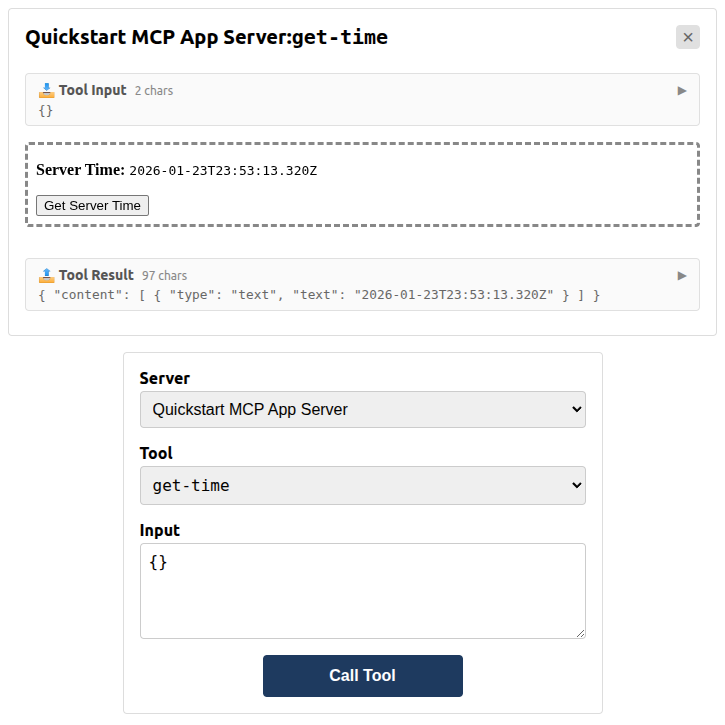
You've built your first MCP App!
## Next Steps
- **Continue learning**: The [`basic-server-vanillajs`](https://github.com/modelcontextprotocol/ext-apps/tree/main/examples/basic-server-vanillajs) example builds on this quickstart with host communication, theming, and lifecycle handlers
- **React version**: Compare with [`basic-server-react`](https://github.com/modelcontextprotocol/ext-apps/tree/main/examples/basic-server-react) for a React-based UI
- **Other frameworks**: See also [Vue](https://github.com/modelcontextprotocol/ext-apps/tree/main/examples/basic-server-vue), [Svelte](https://github.com/modelcontextprotocol/ext-apps/tree/main/examples/basic-server-svelte), [Preact](https://github.com/modelcontextprotocol/ext-apps/tree/main/examples/basic-server-preact), and [Solid](https://github.com/modelcontextprotocol/ext-apps/tree/main/examples/basic-server-solid) examples
- **API reference**: See the full [API documentation](https://modelcontextprotocol.github.io/ext-apps/api/)