| Filename | Latest commit message | Latest commit date |
|---|---|---|
 2be172defb
npm normalizes the bare https URL to git+https://….git at publish time and warns about it on every package. Storing the canonical form removes the warning and matches what npm's trusted-publisher check compares against the repository. |
||
| .. | ||
| src | ||
| .gitignore | ||
| grid-cell.png | ||
| main.ts | ||
| mcp-app.html | ||
| package.json | ||
| README.md | ||
| screenshot.png | ||
| server.ts | ||
| tsconfig.json | ||
| tsconfig.server.json | ||
| vite.config.ts | ||


Example: SaaS Scenario Modeler
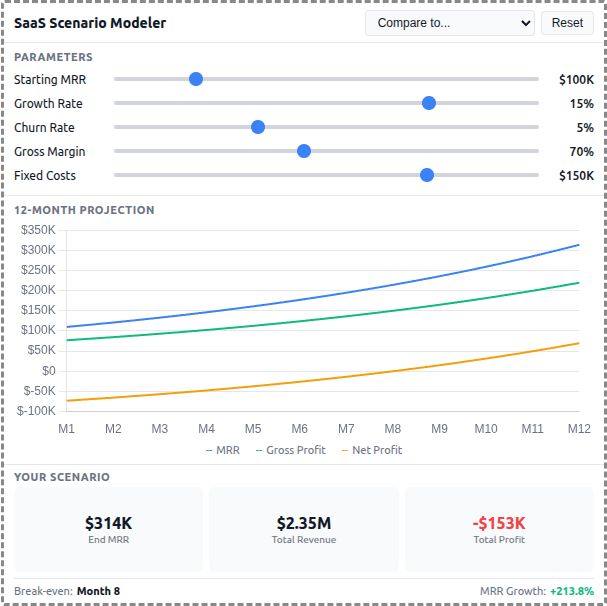
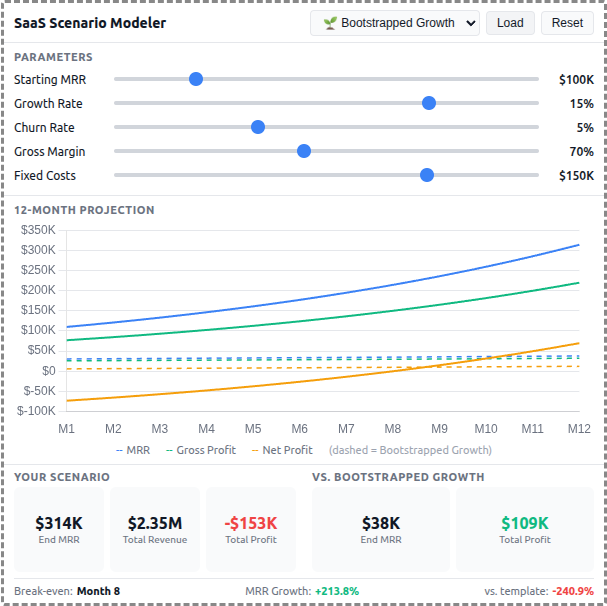
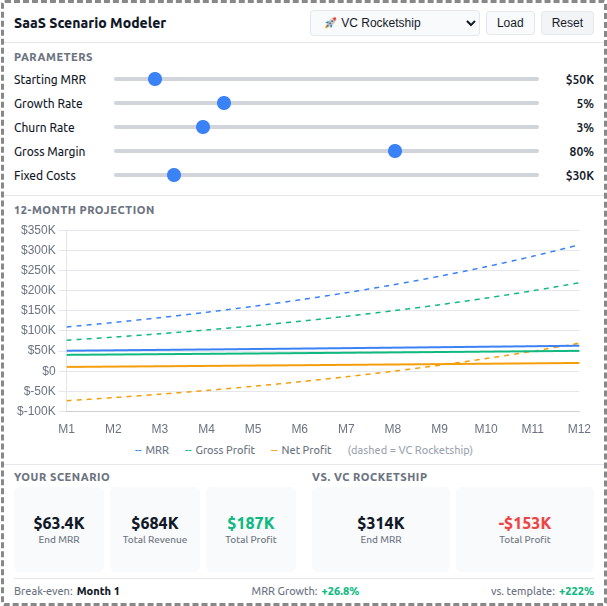
A React-based demo MCP App that lets users adjust SaaS business parameters and see real-time 12-month projections of revenue, costs, and profitability with comparison against pre-built scenario templates.
 |
 |
 |
MCP Client Configuration
Add to your MCP client configuration (stdio transport):
{
  "mcpServers": {
    "scenario-modeler": {
      "command": "npx",
      "args": [
        "-y",
        "--silent",
        "--registry=https://registry.npmjs.org/",
        "@modelcontextprotocol/server-scenario-modeler",
        "--stdio"
      ]
    }
  }
}
Local Development
To test local modifications, use this configuration (replace ~/code/ext-apps with your clone path):
{
  "mcpServers": {
    "scenario-modeler": {
      "command": "bash",
      "args": [
        "-c",
        "cd ~/code/ext-apps/examples/scenario-modeler-server && npm run build >&2 && node dist/index.js --stdio"
      ]
    }
  }
}
Features
- Interactive Parameters: 5 sliders for Starting MRR, Growth Rate, Churn Rate, Gross Margin, and Fixed Costs
- 12-Month Projections: Line chart showing MRR, Gross Profit, and Net Profit over time
- Scenario Templates: 5 pre-built business strategies (Bootstrapped, VC Rocketship, Cash Cow, Turnaround, Efficient Growth)
- Template Comparison: Overlay dashed lines to compare your scenario against any template
- Summary Metrics: Key metrics including Ending MRR, Total Revenue, Total Profit, and break-even month
- Theme Support: Adapts to light/dark mode preferences
Running
-
Install dependencies:
npm install -
Build and start the server:
npm run start:http # for Streamable HTTP transport # OR npm run start:stdio # for stdio transport -
View using the
basic-hostexample or another MCP Apps-compatible host.
Architecture
Server (server.ts)
Exposes a single get-scenario-data tool that returns:
- 5 pre-built scenario templates with parameters, projections, and summaries
- Default input values for the sliders
- Optionally computes custom projections when
customInputsare provided
The tool is linked to a UI resource via _meta.ui.resourceUri.
App (src/)
- Built with React for reactive slider updates and derived state management
- Uses Chart.js for the line chart visualization
- All projection calculations run client-side for instant slider feedback
- Components:
SliderRow,MetricCard,ProjectionChart - Template comparison shown as dashed overlay lines on the chart