| Filename | Latest commit message | Latest commit date |
|---|---|---|
 89a684546b
* fix(examples): resolve DIST_DIR path for npm package execution When servers are compiled to dist/server.js and published to npm, `import.meta.dirname` already points to dist/, so joining with "dist" results in dist/dist/ which doesn't exist. This fix detects whether we're running from TypeScript source or compiled JavaScript and adjusts the path accordingly: - From source (server.ts): use dist/ subdirectory - From compiled (dist/server.js): use current directory Fixes ENOENT errors like: "ENOENT: no such file or directory, open '.../dist/dist/mcp-app.html'" 🤖 Generated with [Claude Code](https://claude.com/claude-code) Co-Authored-By: Claude Opus 4.5 <noreply@anthropic.com> * fix(pdf-server): mark pdfjs-dist as external in bundle The pdf.worker.mjs file wasn't being found when running from npm because bun bundled pdfjs-dist but didn't include the worker file. By marking pdfjs-dist as external, it uses the installed package from node_modules at runtime where the worker is available. 🤖 Generated with [Claude Code](https://claude.com/claude-code) Co-Authored-By: Claude Opus 4.5 <noreply@anthropic.com> --------- Co-authored-by: Claude Opus 4.5 <noreply@anthropic.com> |
||
| .. | ||
| src | ||
| grid-cell.png | ||
| main.ts | ||
| mcp-app.html | ||
| package.json | ||
| README.md | ||
| screenshot.png | ||
| server.ts | ||
| tsconfig.json | ||
| tsconfig.server.json | ||
| vite.config.ts | ||


Transcript Server
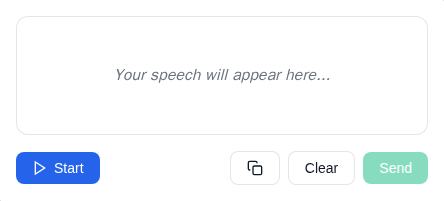
An MCP App Server for live speech transcription using the Web Speech API.
Features
- Live Transcription: Real-time speech-to-text using browser's Web Speech API
- Transitional Model Context: Streams interim transcriptions to the model via
ui/update-model-context, allowing the model to see what the user is saying as they speak - Audio Level Indicator: Visual feedback showing microphone input levels
- Send to Host: Button to send completed transcriptions as a
ui/messageto the MCP host - Start/Stop Control: Toggle listening on and off
- Clear Transcript: Reset the transcript area
Setup
Prerequisites
- Node.js 18+
- Chrome, Edge, or Safari (Web Speech API support)
Installation
npm install
Running
# Development mode (with hot reload)
npm run dev

# Production build and serve
npm run start
Usage
The server exposes a single tool:
transcribe
Opens a live speech transcription interface.
Parameters: None
Example:
{
  "name": "transcribe",
  "arguments": {}
}
How It Works
- Click Start to begin listening
- Speak into your microphone
- Watch your speech appear as text in real-time (interim text is streamed to model context via
ui/update-model-context) - Click Send to send the transcript as a
ui/messageto the host (clears the model context) - Click Clear to reset the transcript
Architecture
transcript-server/
├── server.ts          # MCP server with transcribe tool
├── server-utils.ts    # HTTP transport utilities
├── mcp-app.html       # Transcript UI entry point
├── src/
│   ├── mcp-app.ts     # App logic, Web Speech API integration
│   ├── mcp-app.css    # Transcript UI styles
│   └── global.css     # Base styles
└── dist/              # Built output (single HTML file)
Notes
- Microphone Permission: Requires
allow="microphone"on the sandbox iframe (configured viapermissions: { microphone: {} }in the resource_meta.ui) - Browser Support: Web Speech API is well-supported in Chrome/Edge, with Safari support. Firefox has limited support.
- Continuous Mode: Recognition automatically restarts when it ends, for seamless transcription
Future Enhancements
- Language selection dropdown
- Whisper-based offline transcription (see TRANSCRIPTION.md)
- Export transcript to file
- Timestamps toggle