| Filename | Latest commit message | Latest commit date |
|---|---|---|
 83d82a1caa
* Fix touch gesture conflicts in WebGL example apps on mobile * Format with prettier * fix(examples): improve mobile support for map, pdf, and threejs examples - map-server: fullscreen button respects safe area insets, hover/opacity pattern with always-visible on touch devices - pdf-server: fit-to-width scale for narrow viewports, responsive toolbar with compact controls on mobile, safe area in fullscreen toolbar via CSS custom properties - threejs-server: fullscreen button respects safe area and always visible on touch, ResizeObserver for responsive width, host containerDimensions for fullscreen height, no container padding in fullscreen, replace useHostStyles with inline style application to avoid overwriting onhostcontextchanged handler |
||
| .. | ||
| src | ||
| .gitignore | ||
| grid-cell.png | ||
| main.ts | ||
| mcp-app.html | ||
| package.json | ||
| README.md | ||
| screenshot.png | ||
| server.ts | ||
| test-standalone.html | ||
| tsconfig.json | ||
| tsconfig.server.json | ||
| vite.config.ts | ||


Example: Interactive Map
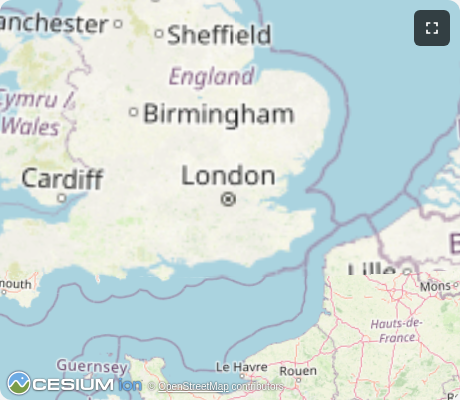
Interactive 3D globe viewer using CesiumJS with OpenStreetMap tiles. Demonstrates geocoding integration and full MCP App capabilities.
MCP Client Configuration
Add to your MCP client configuration (stdio transport):
{
  "mcpServers": {
    "map": {
      "command": "npx",
      "args": [
        "-y",
        "--silent",
        "--registry=https://registry.npmjs.org/",
        "@modelcontextprotocol/server-map",
        "--stdio"
      ]
    }
  }
}
Local Development
To test local modifications, use this configuration (replace ~/code/ext-apps with your clone path):
{
  "mcpServers": {
    "map": {
      "command": "bash",
      "args": [
        "-c",
        "cd ~/code/ext-apps/examples/map-server && npm run build >&2 && node dist/index.js --stdio"
      ]
    }
  }
}
Features
- 3D Globe Rendering: Interactive CesiumJS globe with rotation, zoom, and 3D perspective
- Geocoding: Search for places using OpenStreetMap Nominatim (no API key required)
- OpenStreetMap Tiles: Uses free OSM tile server (no Cesium Ion token needed)
- Dynamic Loading: CesiumJS loaded from CDN at runtime for smaller bundle size
Running
-
Install dependencies:
npm install -
Build and start the server:
npm run start:http # for Streamable HTTP transport # OR npm run start:stdio # for stdio transport -
View using the
basic-hostexample or another MCP Apps-compatible host.
Tools
geocode
Search for places by name or address. Returns coordinates and bounding boxes.
{
  "query": "Eiffel Tower"
}
Returns up to 5 matches with lat/lon coordinates and bounding boxes.
show-map
Display the 3D globe zoomed to a bounding box.
{
  "west": 2.29,
  "south": 48.85,
  "east": 2.3,
  "north": 48.86,
  "label": "Eiffel Tower"
}
Defaults to London if no coordinates provided.
Architecture
Server (server.ts)
Exposes two tools:
geocode- Queries OpenStreetMap Nominatim API with rate limitingshow-map- Renders the CesiumJS globe UI at a specified location
Configures Content Security Policy to allow fetching tiles from OSM and Cesium CDN.
App (src/mcp-app.ts)
Vanilla TypeScript app that:
- Dynamically loads CesiumJS from CDN
- Initializes globe with OpenStreetMap imagery (no Ion token)
- Receives tool inputs via the MCP App SDK
- Handles camera navigation to specified bounding boxes
Key Files
server.ts- MCP server with geocode and show-map toolsmcp-app.html/src/mcp-app.ts- CesiumJS globe UIserver-utils.ts- HTTP server utilities
Notes
- Rate limiting is applied to Nominatim requests (1 request per second per their usage policy)
- The globe works in sandboxed iframes with appropriate CSP configuration
- No external API keys required - uses only open data sources