| Filename | Latest commit message | Latest commit date |
|---|---|---|
 96daa46a1d
* feat(pdf-server): Interactive PDF viewer example
PDF viewer with PDF.js featuring:
- Chunked binary loading with progress bar
- Text extraction for AI context
- arXiv paper support (fetch by ID)
- Page navigation with keyboard shortcuts
- Zoom controls (including Ctrl+0 reset)
- Fullscreen mode support
- Horizontal swipe for page changes (disabled when zoomed)
- Page persistence in localStorage
- Text selection via PDF.js TextLayer
- Clickable title link to source URL
- Rounded corners and subtle border styling
* chore: Add pdf-server to screenshot generation list
* refactor(pdf-server): Simplify and generalize PDF loading
- Accept any HTTP(s) URLs instead of ArXiv-only
- Use HTTP Range requests for chunked binary loading
- Remove ArXiv-specific code (arxiv.ts, metadata fetching)
- Remove CLAUDE.md index generation
- Flatten hierarchical folder structure to simple entries list
- Remove dead code: getPdfSummary, httpFileSizes
- Simplify base64 encoding using Buffer
- Simplify chunk extraction using slice()
- Consolidate DEFAULT_PDF_URL constant
The server now works with any PDF URL, not just arXiv papers.
HTTP Range requests stream chunks on-demand when supported.
* feat(pdf-server): Include title and selection in model context
- Add pdfTitle to updateModelContext structuredContent
- Include selection position (text, start, end) when text is selected
- Add debounced selectionchange listener to update context on selection
* fix(pdf-server): Restore default URL in view_pdf schema
The UI needs the default value in the schema to show it properly.
* refactor(pdf-server): Further simplifications
- Remove hard-coded test paths from main()
- Remove unused resources: pdfs://metadata/{pdfId}, pdfs://content/{pdfId}
- Remove unused metadata fields: subject, creator, producer, creationDate, modDate
- Remove unused entry fields: relativePath, estimatedTextSize
- Remove filterEntriesByFolder and folder filter from list_pdfs
- Remove redundant output schema validation (trust typed returns)
- Simplify scanDirectory and createLocalEntry signatures
Total: 1836 → 1666 lines (-170 lines, -9%)
* refactor(pdf-server): Major simplification for didactic focus
Simplified the example to focus on key MCP Apps SDK patterns:
- Chunked data through size-limited tool calls
- Model context updates (page text + selection)
- Display modes (fullscreen vs inline)
- External links (openLink)
Changes:
- Remove local file support (HTTP URLs only)
- Restrict dynamic URLs to arxiv.org for security
- Simplify types: url instead of sourcePath/sourceType
- Simplify indexer: 168 → 44 lines
- Simplify loader: 318 → 171 lines
- Simplify server: 337 → 233 lines
- Fix selection text normalization
- Rewrite README with didactic focus
Total: 1836 → 1236 lines (-33%)
* feat(pdf-server): Add file:// URL support for local files
- Local paths are converted to file:// URLs on startup
- file:// URLs must be in the initial list (strict validation)
- Dynamic URLs still restricted to arxiv.org only
- Updated README with local file examples
* fix(pdf-server): Improve selection detection with logging
- Add logging to selectionchange handler to verify it fires
- Add fallback matching without spaces (TextLayer spans may lack spaces)
- Log selection detection success/failure for debugging
The issue: PDF.js TextLayer renders text as positioned spans without
space characters between them. When selecting across spans:
- pageText has spaces (items joined with ' ')
- sel.toString() may not have spaces
- indexOf fails to match
The fix tries exact match first, then falls back to spaceless matching.
* feat(pdf-server): Format model context as markdown with front matter
Model context now looks like:
```markdown
---
url: https://arxiv.org/pdf/...
page: 5/144
---
Page text with <pdf-selection>selected text</pdf-selection> inline.
```
This is cleaner for the model to parse and includes the source URL.
* refactor(pdf-server): Extract smart truncation helpers
Added two well-designed helpers:
formatPageContent(text, maxLength, selection?)
- Centers truncation window around selection if present
- Adds <truncated-content/> markers at elision points
- Wraps selection in <pdf-selection> tags
- Allocates 60% context before, 40% after for readability
findSelectionInText(pageText, selectedText)
- Tries exact match first
- Falls back to spaceless match for TextLayer quirks
- Returns { start, end } or undefined
Example output with selection:
```
<truncated-content/>
...context before... <pdf-selection>selected text</pdf-selection> ...context after...
<truncated-content/>
```
* fix(pdf-server): Truncate inside selection tags when selection too long
When selection is too large for the budget:
<truncated-content/><pdf-selection><truncated-content/>start...end<truncated-content/></pdf-selection><truncated-content/>
This keeps the selection structure intact while showing beginning and end.
* refactor(pdf-server): Remove unused read_pdf_text, use Attention paper as default
- Remove read_pdf_text tool (viewer extracts text client-side with pdfjs)
- Remove PdfTextChunk and ReadPdfTextInput types
- Remove loadPdfTextChunk from pdf-loader
- Change default PDF to 'Attention Is All You Need' (1706.03762)
- Update README with modest language
* refactor(pdf-server): Simplify to use URL as ID, rename view_pdf to display_pdf
Major simplifications:
- Use URL directly as identifier (no hashing)
- Remove displayName - show elided URL with full URL as tooltip
- Rename view_pdf to display_pdf with better description
- Update all references from pdfId to url
- Simplify storage key and model context
The tool description now explains it displays an interactive viewer in the chat.
* feat(pdf-server): Normalize arxiv URLs to PDF format
arxiv.org/abs/... -> arxiv.org/pdf/...
Applied both at startup and when loading dynamic URLs.
* docs(pdf-server): Add prompt engineering to display_pdf description
* fix(pdf-server): Sharp rendering on retina displays
Account for devicePixelRatio when rendering canvas:
- Scale canvas dimensions by dpr
- Scale context by dpr
- Keep CSS size at logical pixels
* fix(pdf-server): Normalize arxiv URLs in read_pdf_bytes too
* add to e2e spec
* add to e2e spec
* add to e2e spec
* add to e2e spec
* regen
* chore: regenerate package-lock.json and fix hono vulnerability
* docs: add pdf-server screenshot to READMEs
* regen
* ci: add missing examples to pkg-pr-new publish
* ci: add pdf-server to npm publish examples
* Update README.md
* pdf-server: improve tool response text for better model context
* revert unrelated screenshot changes
* pdf-server: dynamically add arxiv URLs in read_pdf_bytes
Fixes 'PDF not found' error when server restarts between display_pdf
(which adds the entry) and read_pdf_bytes (which previously only looked
up existing entries). Now read_pdf_bytes mirrors display_pdf's logic
and dynamically adds arxiv URLs to the index.
|
||
| .. | ||
| src | ||
| grid-cell.png | ||
| mcp-app.html | ||
| package.json | ||
| README.md | ||
| screenshot.png | ||
| server-utils.ts | ||
| server.ts | ||
| tsconfig.json | ||
| vite.config.ts | ||


PDF Server
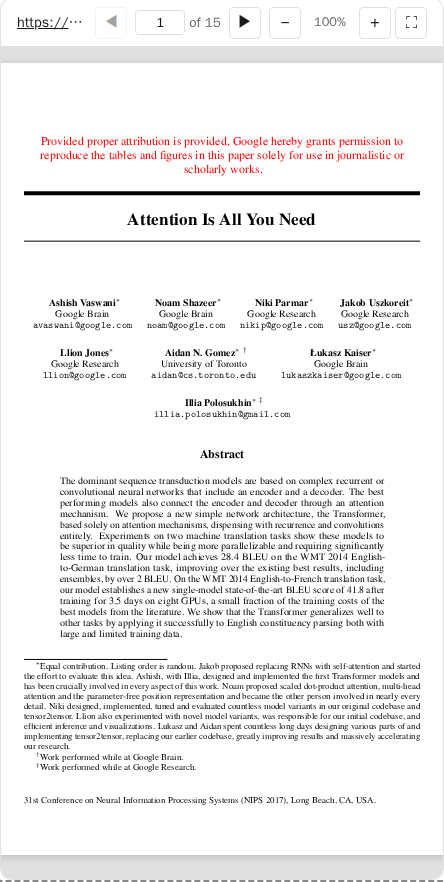
A simple interactive PDF viewer that uses PDF.js. Launch it w/ a few PDF files and/or URLs as CLI args (+ support loading any additional pdf from arxiv.org).
What This Example Demonstrates
1. Chunked Data Through Size-Limited Tool Calls
On some host platforms, tool calls have size limits, so large PDFs cannot be sent in a single response. This example shows a possible workaround:
Server side (pdf-loader.ts):
// Returns chunks with pagination metadata
async function loadPdfBytesChunk(entry, offset, byteCount) {
  return {
    bytes: base64Chunk,
    offset,
    byteCount,
    totalBytes,
    hasMore: offset + byteCount < totalBytes,
  };
}
Client side (mcp-app.ts):
// Load in chunks with progress
while (hasMore) {
  const chunk = await app.callServerTool("read_pdf_bytes", { pdfId, offset });
  chunks.push(base64ToBytes(chunk.bytes));
  offset += chunk.byteCount;
  hasMore = chunk.hasMore;
  updateProgress(offset, chunk.totalBytes);
}
2. Model Context Updates
The viewer keeps the model informed about what the user is seeing:
app.updateModelContext({
  structuredContent: {
    title: pdfTitle,
    currentPage,
    totalPages,
    pageText: pageText.slice(0, 5000),
    selection: selectedText ? { text, start, end } : undefined,
  },
});
This enables the model to answer questions about the current page or selected text.
3. Display Modes: Fullscreen vs Inline
- Inline mode: App requests height changes to fit content
- Fullscreen mode: App fills the screen with internal scrolling
// Request fullscreen
app.requestDisplayMode({ mode: "fullscreen" });

// Listen for mode changes
app.ondisplaymodechange = (mode) => {
  if (mode === "fullscreen") enableScrolling();
  else disableScrolling();
};
4. External Links (openLink)
The viewer demonstrates opening external links (e.g., to the original arxiv page):
titleEl.onclick = () => app.openLink(sourceUrl);
Usage
# Default: loads a sample arxiv paper
bun examples/pdf-server/server.ts

# Load local files (converted to file:// URLs)
bun examples/pdf-server/server.ts ./docs/paper.pdf /path/to/thesis.pdf

# Load from URLs
bun examples/pdf-server/server.ts https://arxiv.org/pdf/2401.00001.pdf

# Mix local and remote
bun examples/pdf-server/server.ts ./local.pdf https://arxiv.org/pdf/2401.00001.pdf

# stdio mode for MCP clients
bun examples/pdf-server/server.ts --stdio ./papers/
Security: Dynamic URLs (via view_pdf tool) are restricted to arxiv.org. Local files must be in the initial list.
Tools
| Tool | Visibility | Purpose |
|---|---|---|
list_pdfs |
Model | List indexed PDFs |
display_pdf |
Model + UI | Display interactive viewer in chat |
read_pdf_bytes |
App only | Chunked binary loading |
Architecture
server.ts           # MCP server (233 lines)
├── src/
│   ├── types.ts        # Zod schemas (75 lines)
│   ├── pdf-indexer.ts  # URL-based indexing (44 lines)
│   ├── pdf-loader.ts   # Chunked loading (171 lines)
│   └── mcp-app.ts      # Interactive viewer UI
Key Patterns Shown
| Pattern | Implementation |
|---|---|
| App-only tools | _meta: { ui: { visibility: ["app"] } } |
| Chunked responses | hasMore + offset pagination |
| Model context | app.updateModelContext() |
| Display modes | app.requestDisplayMode() |
| External links | app.openLink() |
| Size negotiation | app.sendSizeChanged() |
Dependencies
pdfjs-dist: PDF rendering@modelcontextprotocol/ext-apps: MCP Apps SDK