| Filename | Latest commit message | Latest commit date |
|---|---|---|
 974862237b
* fix: Windows compatibility for npm scripts and cross-platform CI Fixes #142 - Windows PowerShell install bug Changes: - Replace single quotes with escaped double quotes in generate:schemas (cmd.exe passes single quotes literally, breaking prettier glob matching) - Simplify prettier scripts: remove redundant --ignore-path flags (prettier auto-loads .gitignore and .prettierignore by default) - Remove $(pwd) from prettier scripts (bash-only syntax) - Add cross-platform CI matrix: Linux x64, Windows x64, macOS ARM64, macOS x64 - Use shell: bash for grep commands in CI (not available in Windows cmd.exe) 🤖 Generated with [Claude Code](https://claude.com/claude-code) Co-Authored-By: Claude <noreply@anthropic.com> * fix: remove bun npm package from all workspaces The bun npm package tries to install platform-specific binaries which fails on Windows CI. Since bun is installed via oven-sh/setup-bun action in CI (and developers install it globally), we don't need the npm package. 🤖 Generated with [Claude Code](https://claude.com/claude-code) Co-Authored-By: Claude <noreply@anthropic.com> * fix: skip examples:build on Windows (uses Unix-only INPUT=... syntax) The examples use `INPUT=mcp-app.html vite build` which is bash syntax for setting environment variables. This doesn't work on Windows cmd.exe. Since examples aren't published to npm, we can skip building them on Windows. 🤖 Generated with [Claude Code](https://claude.com/claude-code) Co-Authored-By: Claude <noreply@anthropic.com> * fix: force LF line endings for cross-platform prettier consistency Git on Windows auto-converts line endings to CRLF, causing prettier to report formatting issues. Force LF for all text files. 🤖 Generated with [Claude Code](https://claude.com/claude-code) Co-Authored-By: Claude <noreply@anthropic.com> * ci: add test for git-based npm install (cross-platform) This verifies that `npm install git+https://...` works on all platforms, which triggers the prepare script and requires bun to be available. 🤖 Generated with [Claude Code](https://claude.com/claude-code) Co-Authored-By: Claude <noreply@anthropic.com> * ci: add Linux ARM64 and Windows ARM64 to CI matrix - Added ubuntu-24.04-arm (Linux ARM64) - Added windows-11-arm (Windows ARM64) Note: WSL is not available on GitHub-hosted runners (requires nested virtualization which isn't supported). 🤖 Generated with [Claude Code](https://claude.com/claude-code) Co-Authored-By: Claude <noreply@anthropic.com> * ci: disable Windows ARM64 (Bun lacks stable ARM64 binaries) The oven-sh/setup-bun action fails with 404 when trying to download Bun for Windows ARM64. Re-enable when Bun adds proper support. 🤖 Generated with [Claude Code](https://claude.com/claude-code) Co-Authored-By: Claude <noreply@anthropic.com> * ci: add Windows WSL build test Uses Vampire/setup-wsl action to install Ubuntu-24.04 in WSL and run the full build/test cycle. This tests the Linux-in-Windows scenario that was reported in issue #142. 🤖 Generated with [Claude Code](https://claude.com/claude-code) Co-Authored-By: Claude <noreply@anthropic.com> * ci: fix WSL build - install unzip for Bun installer 🤖 Generated with [Claude Code](https://claude.com/claude-code) Co-Authored-By: Claude <noreply@anthropic.com> * ci: add setup-bun to publish.yml workflow The pkg-pr-new publish workflow was missing bun setup, causing "bun: not found" errors during npm ci (which triggers prepare script). 🤖 Generated with [Claude Code](https://claude.com/claude-code) Co-Authored-By: Claude <noreply@anthropic.com> * ci: enable Windows ARM64 with x64-baseline Bun (via emulation) Windows ARM64 can run x64 binaries via emulation. Use bun-download-url to force x64-baseline build since native ARM64 Bun isn't available yet. Reference: https://github.com/oven-sh/bun/issues/9824 🤖 Generated with [Claude Code](https://claude.com/claude-code) Co-Authored-By: Claude <noreply@anthropic.com> * ci: remove macOS x64 (macos-13 runner retired) The macos-13 based runner images are now retired. 🤖 Generated with [Claude Code](https://claude.com/claude-code) Co-Authored-By: Claude <noreply@anthropic.com> * docs: add Bun installation instructions per platform Documents that Bun is required for development, with platform-specific install commands in collapsible sections. 🤖 Generated with [Claude Code](https://claude.com/claude-code) Co-Authored-By: Claude <noreply@anthropic.com> * docs: note Bun requirement in README examples section 🤖 Generated with [Claude Code](https://claude.com/claude-code) Co-Authored-By: Claude <noreply@anthropic.com> * feat: add bun as optional dependency (no global install required) - Add @oven/bun-* platform packages as optionalDependencies - Create postinstall script to set up bun binary from optional deps - Handle Windows ARM64 by downloading x64-baseline for emulation - Remove setup-bun from CI workflows (npm install handles it now) - Remove manual Bun install instructions from docs This alternative approach eliminates the need for global Bun installation or setup-bun action in CI. npm install automatically installs the platform-appropriate bun binary. 🤖 Generated with [Claude Code](https://claude.com/claude-code) Co-Authored-By: Claude <noreply@anthropic.com> * chore: add debug logging to setup-bun script 🤖 Generated with [Claude Code](https://claude.com/claude-code) Co-Authored-By: Claude <noreply@anthropic.com> * chore: force stdout flush in setup-bun for CI debugging 🤖 Generated with [Claude Code](https://claude.com/claude-code) Co-Authored-By: Claude <noreply@anthropic.com> * chore: add more debugging to setup-bun 🤖 Generated with [Claude Code](https://claude.com/claude-code) Co-Authored-By: Claude <noreply@anthropic.com> * chore: remove accidental test artifacts 🤖 Generated with [Claude Code](https://claude.com/claude-code) Co-Authored-By: Claude <noreply@anthropic.com> * chore: run setup-bun in prepare script (before build) 🤖 Generated with [Claude Code](https://claude.com/claude-code) Co-Authored-By: Claude <noreply@anthropic.com> * feat: use cross-env for Windows-compatible example builds - Add cross-env to devDependencies - Update all example package.json scripts to use cross-env for INPUT and NODE_ENV - Enable examples:build on Windows in CI (no longer Unix-only) - Add examples:build to WSL CI job 🤖 Generated with [Claude Code](https://claude.com/claude-code) Co-Authored-By: Claude <noreply@anthropic.com> * chore: remove unused imports in setup-bun.mjs Address github-code-quality bot comments. 🤖 Generated with [Claude Code](https://claude.com/claude-code) Co-Authored-By: Claude <noreply@anthropic.com> * fix: use run-bun.mjs wrapper for prepare hook compatibility During npm install's prepare hook, node_modules/.bin is not in PATH, so calling 'bun' directly fails. The new run-bun.mjs wrapper finds bun at node_modules/.bin/bun and runs it with the correct path. 🤖 Generated with [Claude Code](https://claude.com/claude-code) Co-Authored-By: Claude <noreply@anthropic.com> * ci: restore setup-bun action for build jobs - Add setup-bun action to build and test-git-install jobs - Disable Windows ARM64 (Bun doesn't support this platform) - Add bun installation to WSL build 🤖 Generated with [Claude Code](https://claude.com/claude-code) Co-Authored-By: Claude <noreply@anthropic.com> * fix: remove bun devDep, add libc detection for Linux ARM64 - Remove 'bun' from devDependencies (its postinstall fails on Windows ARM64) - Add libc detection (glibc vs musl) to setup-bun.mjs - Only try compatible binaries based on detected libc - Re-enable Windows ARM64 in CI (now uses x64 emulation fallback) - Remove setup-bun action from CI (no longer needed) 🤖 Generated with [Claude Code](https://claude.com/claude-code) Co-Authored-By: Claude <noreply@anthropic.com> * ci: simplify WSL build - let setup-bun.mjs handle bun installation 🤖 Generated with [Claude Code](https://claude.com/claude-code) Co-Authored-By: Claude <noreply@anthropic.com> --------- Co-authored-by: Claude <noreply@anthropic.com> |
||
| .. | ||
| src | ||
| mcp-app.html | ||
| package.json | ||
| README.md | ||
| server.ts | ||
| tsconfig.json | ||
| vite.config.ts | ||
Example: Customer Segmentation Explorer
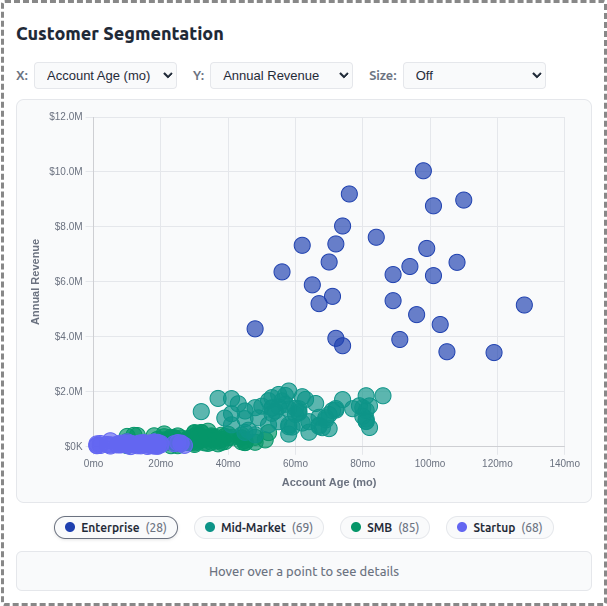
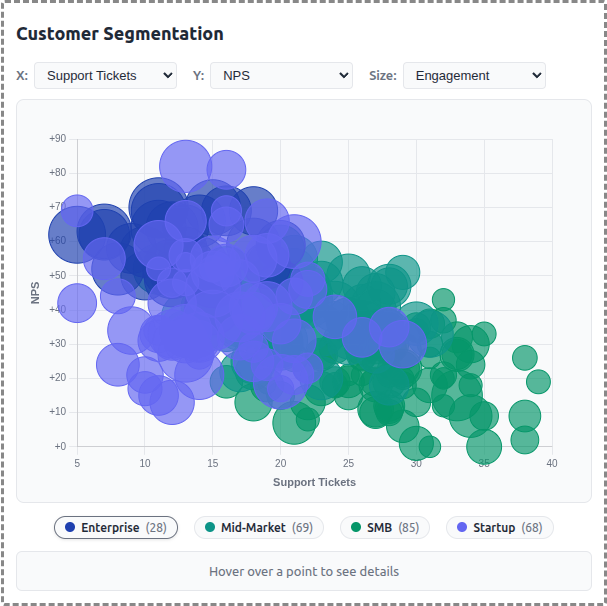
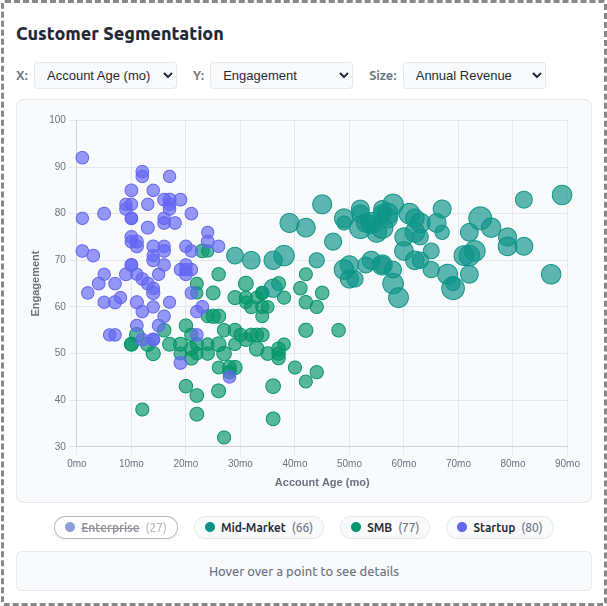
A demo MCP App that displays customer data as an interactive scatter/bubble chart with segment-based clustering. Users can explore different metrics, filter by segment, and click to see detailed customer information.
 |
 |
 |
Features
- Interactive Scatter Plot: Bubble chart visualization using Chart.js with configurable X/Y axes
- Segment Clustering: 250 customers grouped into 4 segments (Enterprise, Mid-Market, SMB, Startup)
- Axis Selection: Choose from 6 metrics for each axis (Revenue, Employees, Account Age, Engagement, Tickets, NPS)
- Size Mapping: Optional bubble sizing by a third metric for additional data dimension
- Legend Filtering: Click segment pills to show/hide customer groups
- Detail Panel: Hover or click customers to see name, segment, revenue, engagement, and NPS
- Theme Support: Adapts to light/dark mode preferences
Running
-
Install dependencies:
npm install -
Build and start the server:
npm run start:http # for Streamable HTTP transport # OR npm run start:stdio # for stdio transport -
View using the
basic-hostexample or another MCP Apps-compatible host.
Architecture
Server (server.ts)
Exposes a single get-customer-data tool that returns:
- Array of 250 generated customer records with segment assignments
- Segment summary with counts and colors for each group
- Optional segment filter parameter
The tool is linked to a UI resource via _meta[RESOURCE_URI_META_KEY].
App (src/mcp-app.ts)
- Uses Chart.js bubble chart for the visualization
- Fetches data once on connection
- Dropdown controls update chart axes and bubble sizing
- Custom legend with clickable segment toggles
- Detail panel updates on hover/click interactions
Data Generator (src/data-generator.ts)
- Generates realistic customer data with Gaussian clustering around segment centers
- Each segment has characteristic ranges for revenue, employees, engagement, etc.
- Company names generated from word-list combinations (e.g., "Apex Data Corp")
- Data cached in memory for session consistency