| Filename | Latest commit message | Latest commit date |
|---|---|---|
 974862237b
* fix: Windows compatibility for npm scripts and cross-platform CI Fixes #142 - Windows PowerShell install bug Changes: - Replace single quotes with escaped double quotes in generate:schemas (cmd.exe passes single quotes literally, breaking prettier glob matching) - Simplify prettier scripts: remove redundant --ignore-path flags (prettier auto-loads .gitignore and .prettierignore by default) - Remove $(pwd) from prettier scripts (bash-only syntax) - Add cross-platform CI matrix: Linux x64, Windows x64, macOS ARM64, macOS x64 - Use shell: bash for grep commands in CI (not available in Windows cmd.exe) 🤖 Generated with [Claude Code](https://claude.com/claude-code) Co-Authored-By: Claude <noreply@anthropic.com> * fix: remove bun npm package from all workspaces The bun npm package tries to install platform-specific binaries which fails on Windows CI. Since bun is installed via oven-sh/setup-bun action in CI (and developers install it globally), we don't need the npm package. 🤖 Generated with [Claude Code](https://claude.com/claude-code) Co-Authored-By: Claude <noreply@anthropic.com> * fix: skip examples:build on Windows (uses Unix-only INPUT=... syntax) The examples use `INPUT=mcp-app.html vite build` which is bash syntax for setting environment variables. This doesn't work on Windows cmd.exe. Since examples aren't published to npm, we can skip building them on Windows. 🤖 Generated with [Claude Code](https://claude.com/claude-code) Co-Authored-By: Claude <noreply@anthropic.com> * fix: force LF line endings for cross-platform prettier consistency Git on Windows auto-converts line endings to CRLF, causing prettier to report formatting issues. Force LF for all text files. 🤖 Generated with [Claude Code](https://claude.com/claude-code) Co-Authored-By: Claude <noreply@anthropic.com> * ci: add test for git-based npm install (cross-platform) This verifies that `npm install git+https://...` works on all platforms, which triggers the prepare script and requires bun to be available. 🤖 Generated with [Claude Code](https://claude.com/claude-code) Co-Authored-By: Claude <noreply@anthropic.com> * ci: add Linux ARM64 and Windows ARM64 to CI matrix - Added ubuntu-24.04-arm (Linux ARM64) - Added windows-11-arm (Windows ARM64) Note: WSL is not available on GitHub-hosted runners (requires nested virtualization which isn't supported). 🤖 Generated with [Claude Code](https://claude.com/claude-code) Co-Authored-By: Claude <noreply@anthropic.com> * ci: disable Windows ARM64 (Bun lacks stable ARM64 binaries) The oven-sh/setup-bun action fails with 404 when trying to download Bun for Windows ARM64. Re-enable when Bun adds proper support. 🤖 Generated with [Claude Code](https://claude.com/claude-code) Co-Authored-By: Claude <noreply@anthropic.com> * ci: add Windows WSL build test Uses Vampire/setup-wsl action to install Ubuntu-24.04 in WSL and run the full build/test cycle. This tests the Linux-in-Windows scenario that was reported in issue #142. 🤖 Generated with [Claude Code](https://claude.com/claude-code) Co-Authored-By: Claude <noreply@anthropic.com> * ci: fix WSL build - install unzip for Bun installer 🤖 Generated with [Claude Code](https://claude.com/claude-code) Co-Authored-By: Claude <noreply@anthropic.com> * ci: add setup-bun to publish.yml workflow The pkg-pr-new publish workflow was missing bun setup, causing "bun: not found" errors during npm ci (which triggers prepare script). 🤖 Generated with [Claude Code](https://claude.com/claude-code) Co-Authored-By: Claude <noreply@anthropic.com> * ci: enable Windows ARM64 with x64-baseline Bun (via emulation) Windows ARM64 can run x64 binaries via emulation. Use bun-download-url to force x64-baseline build since native ARM64 Bun isn't available yet. Reference: https://github.com/oven-sh/bun/issues/9824 🤖 Generated with [Claude Code](https://claude.com/claude-code) Co-Authored-By: Claude <noreply@anthropic.com> * ci: remove macOS x64 (macos-13 runner retired) The macos-13 based runner images are now retired. 🤖 Generated with [Claude Code](https://claude.com/claude-code) Co-Authored-By: Claude <noreply@anthropic.com> * docs: add Bun installation instructions per platform Documents that Bun is required for development, with platform-specific install commands in collapsible sections. 🤖 Generated with [Claude Code](https://claude.com/claude-code) Co-Authored-By: Claude <noreply@anthropic.com> * docs: note Bun requirement in README examples section 🤖 Generated with [Claude Code](https://claude.com/claude-code) Co-Authored-By: Claude <noreply@anthropic.com> * feat: add bun as optional dependency (no global install required) - Add @oven/bun-* platform packages as optionalDependencies - Create postinstall script to set up bun binary from optional deps - Handle Windows ARM64 by downloading x64-baseline for emulation - Remove setup-bun from CI workflows (npm install handles it now) - Remove manual Bun install instructions from docs This alternative approach eliminates the need for global Bun installation or setup-bun action in CI. npm install automatically installs the platform-appropriate bun binary. 🤖 Generated with [Claude Code](https://claude.com/claude-code) Co-Authored-By: Claude <noreply@anthropic.com> * chore: add debug logging to setup-bun script 🤖 Generated with [Claude Code](https://claude.com/claude-code) Co-Authored-By: Claude <noreply@anthropic.com> * chore: force stdout flush in setup-bun for CI debugging 🤖 Generated with [Claude Code](https://claude.com/claude-code) Co-Authored-By: Claude <noreply@anthropic.com> * chore: add more debugging to setup-bun 🤖 Generated with [Claude Code](https://claude.com/claude-code) Co-Authored-By: Claude <noreply@anthropic.com> * chore: remove accidental test artifacts 🤖 Generated with [Claude Code](https://claude.com/claude-code) Co-Authored-By: Claude <noreply@anthropic.com> * chore: run setup-bun in prepare script (before build) 🤖 Generated with [Claude Code](https://claude.com/claude-code) Co-Authored-By: Claude <noreply@anthropic.com> * feat: use cross-env for Windows-compatible example builds - Add cross-env to devDependencies - Update all example package.json scripts to use cross-env for INPUT and NODE_ENV - Enable examples:build on Windows in CI (no longer Unix-only) - Add examples:build to WSL CI job 🤖 Generated with [Claude Code](https://claude.com/claude-code) Co-Authored-By: Claude <noreply@anthropic.com> * chore: remove unused imports in setup-bun.mjs Address github-code-quality bot comments. 🤖 Generated with [Claude Code](https://claude.com/claude-code) Co-Authored-By: Claude <noreply@anthropic.com> * fix: use run-bun.mjs wrapper for prepare hook compatibility During npm install's prepare hook, node_modules/.bin is not in PATH, so calling 'bun' directly fails. The new run-bun.mjs wrapper finds bun at node_modules/.bin/bun and runs it with the correct path. 🤖 Generated with [Claude Code](https://claude.com/claude-code) Co-Authored-By: Claude <noreply@anthropic.com> * ci: restore setup-bun action for build jobs - Add setup-bun action to build and test-git-install jobs - Disable Windows ARM64 (Bun doesn't support this platform) - Add bun installation to WSL build 🤖 Generated with [Claude Code](https://claude.com/claude-code) Co-Authored-By: Claude <noreply@anthropic.com> * fix: remove bun devDep, add libc detection for Linux ARM64 - Remove 'bun' from devDependencies (its postinstall fails on Windows ARM64) - Add libc detection (glibc vs musl) to setup-bun.mjs - Only try compatible binaries based on detected libc - Re-enable Windows ARM64 in CI (now uses x64 emulation fallback) - Remove setup-bun action from CI (no longer needed) 🤖 Generated with [Claude Code](https://claude.com/claude-code) Co-Authored-By: Claude <noreply@anthropic.com> * ci: simplify WSL build - let setup-bun.mjs handle bun installation 🤖 Generated with [Claude Code](https://claude.com/claude-code) Co-Authored-By: Claude <noreply@anthropic.com> --------- Co-authored-by: Claude <noreply@anthropic.com> |
||
| .. | ||
| src | ||
| mcp-app.html | ||
| package.json | ||
| README.md | ||
| server.ts | ||
| tsconfig.json | ||
| vite.config.ts | ||
Example: Wiki Explorer
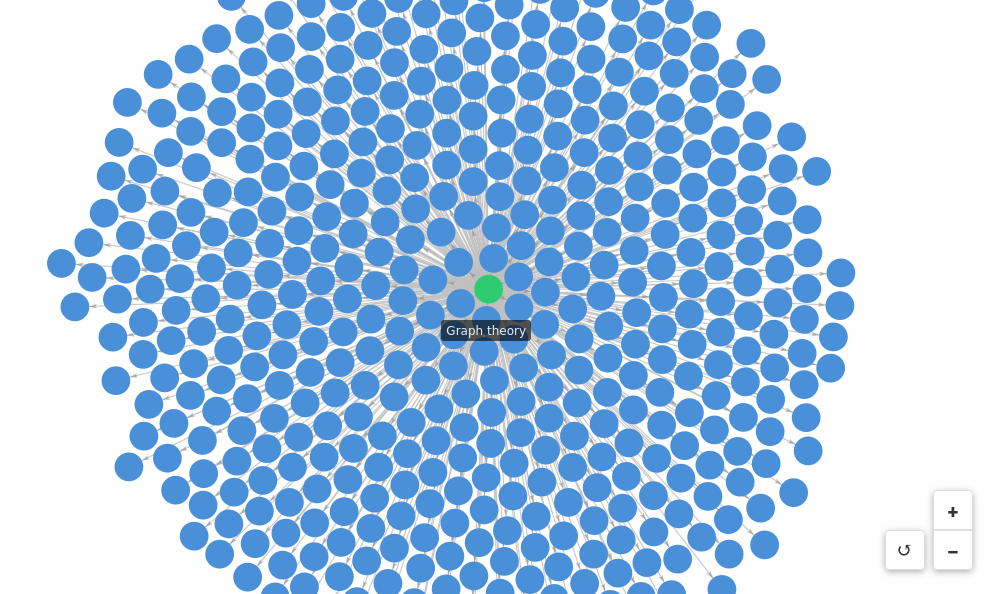
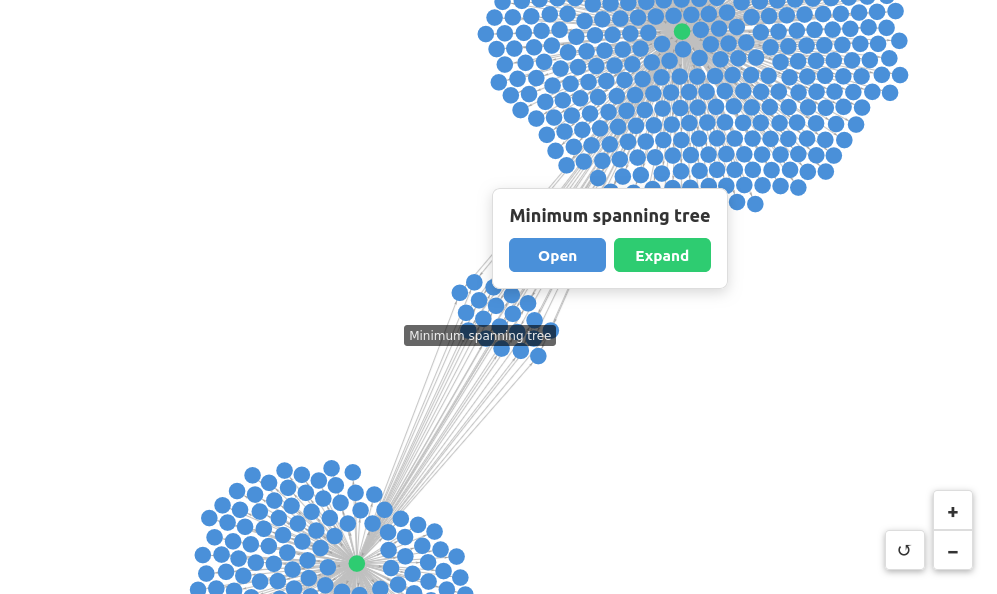
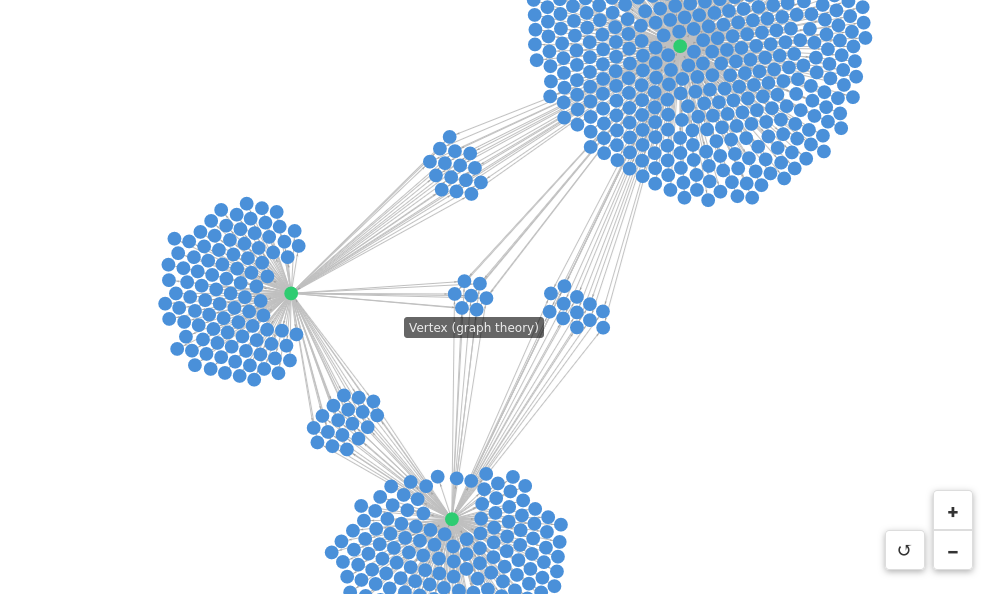
Visualizes Wikipedia link graphs using a force-directed layout. Explore how Wikipedia pages are connected by expanding nodes to reveal first-degree links.
 |
 |
 |
Features
- Force-directed graph visualization: Interactive graph powered by
force-graph - Node expansion: Click any node to expand and see all pages it links to
- Visual state tracking: Nodes change color based on state (blue = default, green = expanded, red = error)
- Direct page access: Open any Wikipedia page in your browser
Running
-
Install dependencies:
npm install -
Build and start the server:
npm run start:http # for Streamable HTTP transport # OR npm run start:stdio # for stdio transport -
View using the
basic-hostexample or another MCP Apps-compatible host.
Tool Input
To test the example, call the get-first-degree-links tool with a Wikipedia URL:
{
  "url": "https://en.wikipedia.org/wiki/Graph_theory"
}
Click nodes in the graph to Open (view in browser) or Expand (visualize linked pages).
Architecture
Server (server.ts)
MCP server that fetches Wikipedia pages and extracts internal links.
Exposes one tool:
get-first-degree-links- Returns links to other Wikipedia pages from a given page
App (src/mcp-app.ts)
Vanilla TypeScript app using force-graph for visualization that:
- Receives tool inputs via the MCP App SDK
- Renders an interactive force-directed graph
- Supports node expansion to explore link relationships