| Filename | Latest commit message | Latest commit date |
|---|---|---|
 3a30e94501
* feat(examples): add SSE transport support to all example servers Add backwards-compatible SSE transport support alongside the current Streamable HTTP transport. Each server now exposes: - /mcp (GET, POST, DELETE) - Streamable HTTP transport (current spec) - /sse (GET) - Legacy SSE transport stream endpoint - /messages (POST) - Legacy SSE transport message endpoint This enables older clients using the deprecated HTTP+SSE protocol (version 2024-11-05) to connect to the example servers. 🤖 Generated with [Claude Code](https://claude.com/claude-code) Co-Authored-By: Claude <noreply@anthropic.com> * refactor(examples): migrate 6 servers to use shared server utility Refactored the following example servers to use the shared startServer utility from examples/shared/server-utils.ts: - threejs-server - system-monitor-server - cohort-heatmap-server - budget-allocator-server - customer-segmentation-server - scenario-modeler-server Changes for each server: - Removed direct imports: SSEServerTransport, StdioServerTransport, StreamableHTTPServerTransport, cors, express - Removed PORT constant (now handled by shared utility) - Added import for startServer from ../shared/server-utils.js - Replaced entire async main() function with single startServer() call - Preserved all business logic (tool registration, resource registration, helper functions) This reduces code duplication by ~700 lines and ensures consistent transport handling across all example servers. 🤖 Generated with [Claude Code](https://claude.com/claude-code) Co-Authored-By: Claude <noreply@anthropic.com> * refactor(examples): migrate remaining servers to shared utility Complete the migration of example servers to use the shared server-utils.ts module for transport setup: - basic-server-react - basic-server-vanillajs - wiki-explorer-server - Add shared/server-utils.ts This centralizes all transport handling (stdio, Streamable HTTP, SSE) in one place, reducing code duplication across ~500 lines. 🤖 Generated with [Claude Code](https://claude.com/claude-code) Co-Authored-By: Claude <noreply@anthropic.com> * fix(examples): improve server-utils with stateful sessions and security Address critical issues in the shared server utility: 1. Stateful sessions: Use sessionIdGenerator + onsessioninitialized to persist StreamableHTTPServerTransport across requests 2. Unified session store: Single Map for both transport types with proper type discrimination 3. Error handling: Try/catch on all endpoints with JSON-RPC errors 4. DNS rebinding protection: Use SDK's createMcpExpressApp helper 🤖 Generated with [Claude Code](https://claude.com/claude-code) Co-Authored-By: Claude <noreply@anthropic.com> * fix(examples): allow connections from any host for development Use host: "0.0.0.0" in createMcpExpressApp to disable DNS rebinding protection, allowing connections from Android emulators and other devices on the network. Also re-add CORS middleware. 🤖 Generated with [Claude Code](https://claude.com/claude-code) Co-Authored-By: Claude <noreply@anthropic.com> * refactor(examples): use getPort() helper for transport selection - Add getPort() helper that returns undefined for --stdio, else port - Caller now explicitly passes port to startServer() - port: undefined → stdio mode, port: number → HTTP mode This makes the transport selection explicit at the call site. 🤖 Generated with [Claude Code](https://claude.com/claude-code) Co-Authored-By: Claude <noreply@anthropic.com> * fix(examples): startServer returns promise that resolves/rejects on listen Use httpServer.on('listening') and httpServer.on('error') events to properly resolve or reject the returned promise. 🤖 Generated with [Claude Code](https://claude.com/claude-code) Co-Authored-By: Claude <noreply@anthropic.com> * fix(examples): add error handling to startServer calls Exit with code 1 if server fails to start (e.g., port in use). 🤖 Generated with [Claude Code](https://claude.com/claude-code) Co-Authored-By: Claude <noreply@anthropic.com> * refactor(examples): update server files to use main() pattern with stdio support Update all example server files to use the new main() pattern that supports both HTTP and stdio transports: - Add StdioServerTransport import - Remove getPort import (replaced with direct env var parsing) - Replace direct startServer call with async main() function - Add --stdio flag detection to choose between transports - Use PORT env var with default 3001 for HTTP mode Updated servers: - basic-server-vanillajs - wiki-explorer-server - threejs-server - system-monitor-server - cohort-heatmap-server - budget-allocator-server - customer-segmentation-server - scenario-modeler-server Generated with [Claude Code](https://claude.com/claude-code) Co-Authored-By: Claude <noreply@anthropic.com> * fix(examples): use correct default ports matching run-all.ts Each server now defaults to its assigned port from run-all.ts: - basic-server-react: 3101 - basic-server-vanillajs: 3102 - budget-allocator-server: 3103 - cohort-heatmap-server: 3104 - customer-segmentation-server: 3105 - scenario-modeler-server: 3106 - system-monitor-server: 3107 - threejs-server: 3108 - wiki-explorer-server: 3109 🤖 Generated with [Claude Code](https://claude.com/claude-code) Co-Authored-By: Claude <noreply@anthropic.com> * fix(examples): expose mcp-session-id header for CORS requests Without exposedHeaders in the CORS config, browsers block JavaScript from reading the mcp-session-id response header. This caused the SDK's StreamableHTTPClientTransport to never capture the session ID, breaking all subsequent requests with "Bad request: not initialized" errors. 🤖 Generated with [Claude Code](https://claude.com/claude-code) Co-Authored-By: Claude <noreply@anthropic.com> * pretty:fix --------- Co-authored-by: Claude <noreply@anthropic.com> |
||
| .. | ||
| src | ||
| mcp-app.html | ||
| package.json | ||
| README.md | ||
| server.ts | ||
| test-input.json | ||
| tsconfig.json | ||
| vite.config.ts | ||
Example: Three.js App
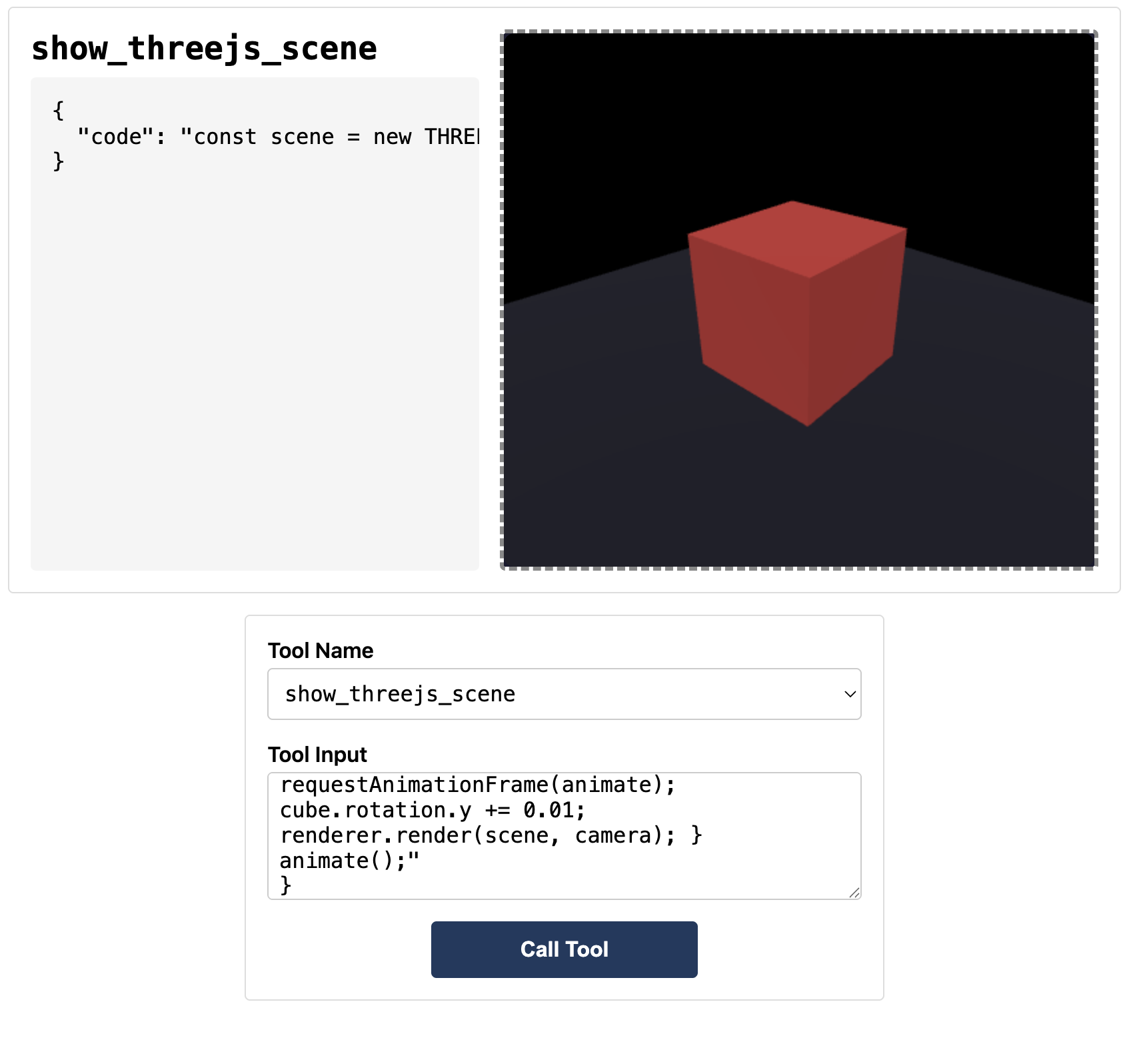
Interactive 3D scene renderer using Three.js. Demonstrates streaming code preview and full MCP App integration.
 |
Features
- Interactive 3D Rendering: Execute JavaScript code to create and animate Three.js scenes
- Streaming Preview: See the scene build in real-time as code is being written
- Built-in Helpers: Pre-configured
OrbitControls, post-processing effects (bloom), and render passes - Documentation Tool:
learn_threejsprovides API docs and code examples on demand
Running
-
Install dependencies:
npm install -
Build and start the server:
npm run start:http # for Streamable HTTP transport # OR npm run start:stdio # for stdio transport -
View using the
basic-hostexample or another MCP Apps-compatible host.
Tool Input
To test the example, copy the contents of test-input.json into the tool input field in basic-host.
The test input creates a simple scene with a rotating cube:
const scene = new THREE.Scene();
const camera = new THREE.PerspectiveCamera(60, width / height, 0.1, 100);
camera.position.set(2, 2, 2);

const renderer = new THREE.WebGLRenderer({ canvas, antialias: true });
renderer.setSize(width, height);
renderer.shadowMap.enabled = true;

const cube = new THREE.Mesh(
  new THREE.BoxGeometry(),
  new THREE.MeshStandardMaterial({ color: 0x00ff88 }),
);
cube.castShadow = true;
cube.position.y = 0.5;
scene.add(cube);

const floor = new THREE.Mesh(
  new THREE.PlaneGeometry(5, 5),
  new THREE.MeshStandardMaterial({ color: 0x222233 }),
);
floor.rotation.x = -Math.PI / 2;
floor.receiveShadow = true;
scene.add(floor);

const light = new THREE.DirectionalLight(0xffffff, 2);
light.position.set(3, 5, 3);
light.castShadow = true;
scene.add(light);
scene.add(new THREE.AmbientLight(0x404040));

function animate() {
  requestAnimationFrame(animate);
  cube.rotation.y += 0.01;
  renderer.render(scene, camera);
}
animate();
Available Three.js Globals
When writing custom code, these globals are available:
THREE; // Three.js library
canvas; // Pre-created canvas element
width; // Canvas width
height; // Canvas height
OrbitControls; // Camera controls
EffectComposer; // Post-processing composer
RenderPass; // Render pass
UnrealBloomPass; // Bloom effect
Architecture
Server (server.ts)
Exposes two tools:
show_threejs_scene- Renders a 3D scene from JavaScript codelearn_threejs- Returns documentation and code examples for Three.js APIs
Supports Streamable HTTP and stdio transports.
App (src/threejs-app.tsx)
React component that:
- Receives tool inputs via the MCP App SDK
- Displays streaming preview from
toolInputsPartial.codeas code arrives - Executes final code from
toolInputs.codewhen complete - Renders to a pre-created canvas with configurable height