| Filename | Latest commit message | Latest commit date |
|---|---|---|
 621a70a724
* chore: bump ext-apps to 1.5.0 * style: auto-fix prettier formatting --------- Co-authored-by: github-actions[bot] <github-actions[bot]@users.noreply.github.com> |
||
| .. | ||
| .gitignore | ||
| grid-cell.png | ||
| package.json | ||
| README.md | ||
| server.py | ||

QR Code MCP Server
A minimal Python MCP server that generates customizable QR codes with an interactive view UI.
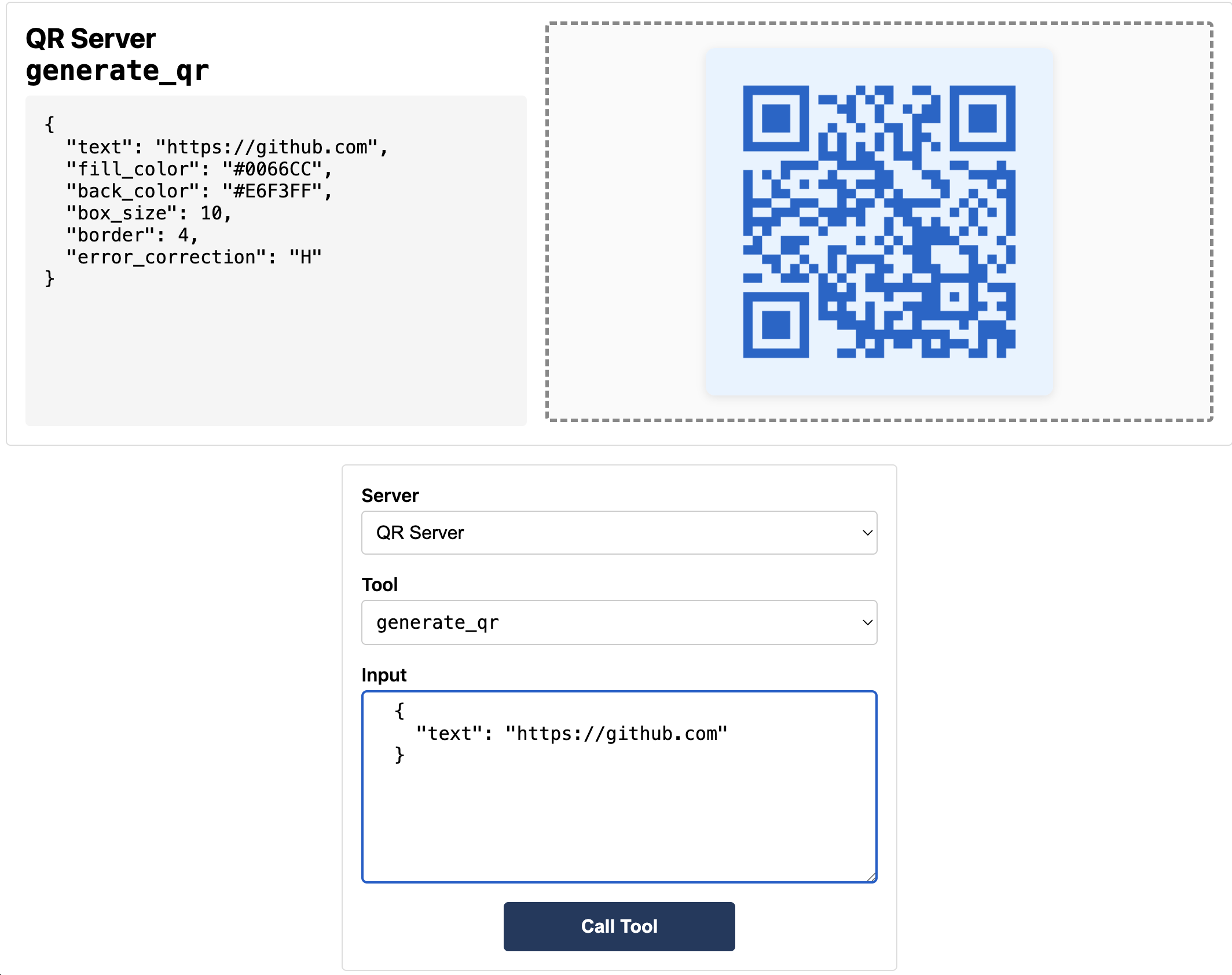
MCP Client Configuration
First, clone the repository:
git clone https://github.com/modelcontextprotocol/ext-apps.git
Then add to your MCP client configuration (stdio transport), replacing ~/code/ext-apps with your clone path:
{
  "mcpServers": {
    "qr": {
      "command": "bash",
      "args": [
        "-c",
        "uv run ~/code/ext-apps/examples/qr-server/server.py --stdio"
      ]
    }
  }
}
Features
- Generate QR codes from any text or URL
- Customizable colors, size, and error correction
- Interactive view that displays in MCP-UI enabled clients
- Supports both HTTP (for web clients) and stdio (for MCP clients)
Prerequisites
This server uses uv for dependency management. Install it first:
curl -LsSf https://astral.sh/uv/install.sh | sh
Quick Start
# Run server (HTTP mode) - uv handles dependencies automatically
uv run server.py
# → QR Code Server listening on http://localhost:3108/mcp
Usage
HTTP Mode (for basic-host / web clients)
uv run server.py
Connect from basic-host:
SERVERS='["http://localhost:3108/mcp"]' bun serve.ts
Stdio Mode (for MCP clients)
uv run server.py --stdio
See MCP Client Configuration above for how to add this server to your MCP client.
Docker (accessing host server from container)
http://host.docker.internal:3108/mcp
Tool: generate_qr
Generate a QR code with optional customization.
Parameters
| Parameter | Type | Default | Description |
|---|---|---|---|
text |
string | (required) | The text or URL to encode |
box_size |
int | 10 | Size of each box in pixels |
border |
int | 4 | Border size in boxes |
error_correction |
string | "M" | Error correction level: L/M/Q/H |
fill_color |
string | "black" | Foreground color (hex or name) |
back_color |
string | "white" | Background color (hex or name) |
Error Correction Levels
| Level | Recovery | Use Case |
|---|---|---|
| L | 7% | Clean environments |
| M | 15% | General use (default) |
| Q | 25% | Industrial/outdoor |
| H | 30% | Adding logos/damage-prone |
Example Inputs
Basic:
{ "text": "https://example.com" }
Styled:
{
  "text": "https://claude.ai",
  "fill_color": "#CC785C",
  "back_color": "#FFF8F5",
  "box_size": 12,
  "border": 3
}
Dark Mode:
{
  "text": "Hello World",
  "fill_color": "#E0E0E0",
  "back_color": "#1a1a1a",
  "box_size": 15,
  "border": 2
}
WiFi QR Code:
{
  "text": "WIFI:T:WPA;S:MyNetwork;P:MyPassword;;",
  "error_correction": "H",
  "box_size": 10
}
Architecture
qr-server/
├── server.py      # MCP server (FastMCP + uvicorn, deps inline via PEP 723)
├── view.html    # Interactive UI view
└── README.md
Protocol
The view uses MCP Apps SDK protocol:
- The view sends
ui/initializerequest - Host responds with capabilities
- The view sends
ui/notifications/initialized - Host sends
ui/notifications/tool-resultwith QR image - The view renders image and sends
ui/notifications/size-changed
Dependencies
Dependencies are declared inline in server.py using PEP 723 and managed by uv:
mcp- MCP Python SDK with FastMCPqrcode[pil]- QR code generation with Pillowuvicorn- ASGI serverstarlette- CORS middleware
License
MIT