| Filename | Latest commit message | Latest commit date |
|---|---|---|
 75cbf8612c
* basic-host: handle containerDimensions * feat(basic-host): Unified tool call layout with shared collapsible panels * snapshots * format |
||
| .. | ||
| src | ||
| .gitignore | ||
| grid-cell.png | ||
| mcp-app.html | ||
| package.json | ||
| README.md | ||
| screenshot.png | ||
| server-utils.ts | ||
| server.ts | ||
| tsconfig.json | ||
| vite.config.ts | ||


Example: Basic Server (React)
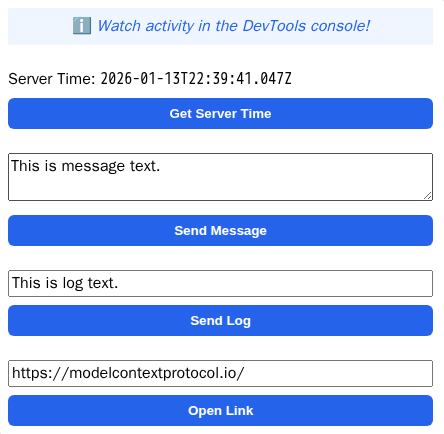
An MCP App example with a React UI.
Tip
Looking for a vanilla JavaScript example? See
basic-server-vanillajs!
Overview
- Tool registration with a linked UI resource
- React UI using the
useApp()hook - App communication APIs:
callServerTool,sendMessage,sendLog,openLink
Key Files
server.ts- MCP server with tool and resource registrationmcp-app.html/src/mcp-app.tsx- React UI usinguseApp()hook
Getting Started
npm install
npm run dev
How It Works
- The server registers a
get-timetool with metadata linking it to a UI HTML resource (ui://get-time/mcp-app.html). - When the tool is invoked, the Host renders the UI from the resource.
- The UI uses the MCP App SDK API to communicate with the host and call server tools.
Build System
This example bundles into a single HTML file using Vite with vite-plugin-singlefile — see vite.config.ts. This allows all UI content to be served as a single MCP resource. Alternatively, MCP apps can load external resources by defining _meta.ui.csp.resourceDomains in the UI resource metadata.