| Filename | Latest commit message | Latest commit date |
|---|---|---|
 65a62a9fae
* feat: compile example servers to JavaScript for npm consumption
Add TypeScript compilation for server code so the example packages can be
imported and used by consumers without requiring TypeScript compilation.
Changes:
- Add tsconfig.server.json to each example for compiling server code
- Update package.json exports to point to compiled dist/server/server.js
- Add types field pointing to dist/server/server.d.ts
- Update build scripts to include server compilation step
- Fix .ts import extensions to .js in customer-segmentation-server
This enables importing the createServer function from published packages:
import { createServer } from '@modelcontextprotocol/server-basic-react';
* fix: add type assertion for Nominatim API response
* chore: regenerate schemas
* refactor: split server examples into library and binary entry points
- server.ts: exports createServer() only (library entry point)
- main.ts: entry point with main() that runs the server (binary)
- package.json: adds bin field for npx support, uses inline bun build
- tsconfig.server.json: emitDeclarationOnly, outputs to dist/
This allows:
1. Importing the server as a library: import { createServer } from '@modelcontextprotocol/server-basic-react'
2. Running with npx: npx @modelcontextprotocol/server-basic-react [--stdio]
Added migration script at scripts/migrate-server-examples.ts
* refactor: migrate remaining server examples to library/binary structure
Apply the same refactoring to all 13 remaining server examples:
- scenario-modeler-server, shadertoy-server, map-server
- cohort-heatmap-server, customer-segmentation-server, video-resource-server
- system-monitor-server, budget-allocator-server, sheet-music-server
- threejs-server, integration-server, transcript-server, wiki-explorer-server
Each now has:
- server.ts: exports createServer() (library)
- main.ts: runs the server (binary with shebang)
- bin field in package.json for npx support
* chore: remove unused server-utils.ts from video-resource-server/src
* update
* fix(build): make Windows-compatible by removing chmod and fixing bun externals
- Remove 'chmod +x dist/index.js' which doesn't exist on Windows
- Add '--external ./server.js' to prevent bun from treating the import as a second entry point
* fix(build): use .ts import for bun compatibility
- Change import from './server.js' to './server.ts' in main.ts files
- Remove --external flag since bun should inline everything
- Fixes Windows build where bun couldn't resolve .js to .ts properly
* fix(build): use --external for Windows bun compatibility
Bun on Windows incorrectly treats imported .ts files as entry points.
Use --external './server.js' to work around this, creating a runtime
dependency between index.js and server.js.
* style: fix prettier formatting in pdf-server/main.ts
* fix(build): remove quotes from --external for Windows cmd.exe compatibility
* fix(build): use glob pattern for --external to work on all platforms
The literal path --external ./server.js was not matching the import.
Using glob pattern --external "./server*" correctly externalizes the server module.
* fix(build): use */server.js pattern for --external
The "./server*" pattern was not matching on Windows.
Using "*/server.js" matches any path ending in /server.js which works cross-platform.
* fix(build): use *server.js pattern without slash for Windows compatibility
* update package-lock
* chore: regenerate package-lock.json for cross-platform compatibility
* fix(build): use ./server.js instead of glob pattern for Windows compatibility
* fix(build): use double quotes for banner to fix Windows cmd.exe compatibility
---------
Co-authored-by: Olivier Chafik <ochafik@anthropic.com>
|
||
| .. | ||
| src | ||
| .gitignore | ||
| grid-cell.png | ||
| main.ts | ||
| mcp-app.html | ||
| package.json | ||
| README.md | ||
| screenshot.png | ||
| server.ts | ||
| tsconfig.json | ||
| tsconfig.server.json | ||
| vite.config.ts | ||


Example: SaaS Scenario Modeler
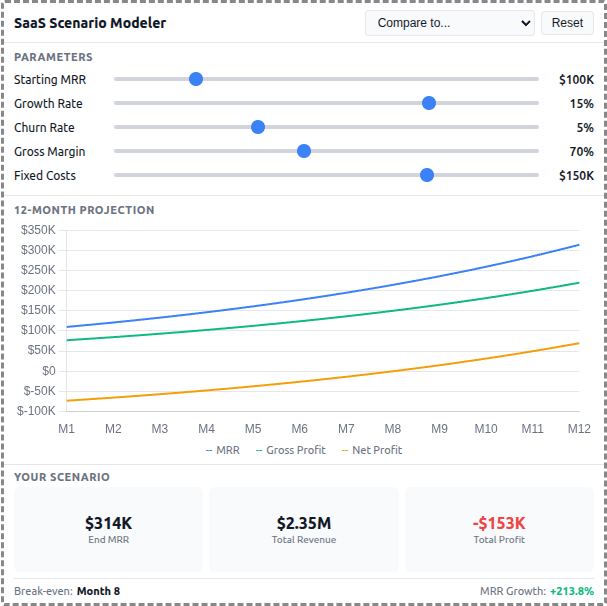
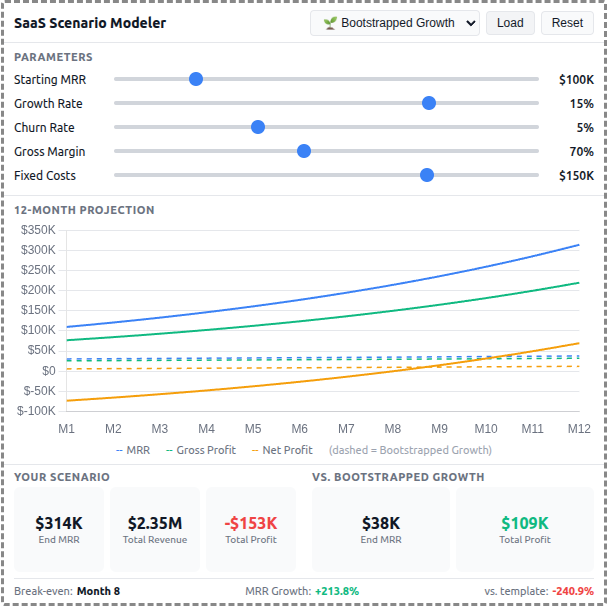
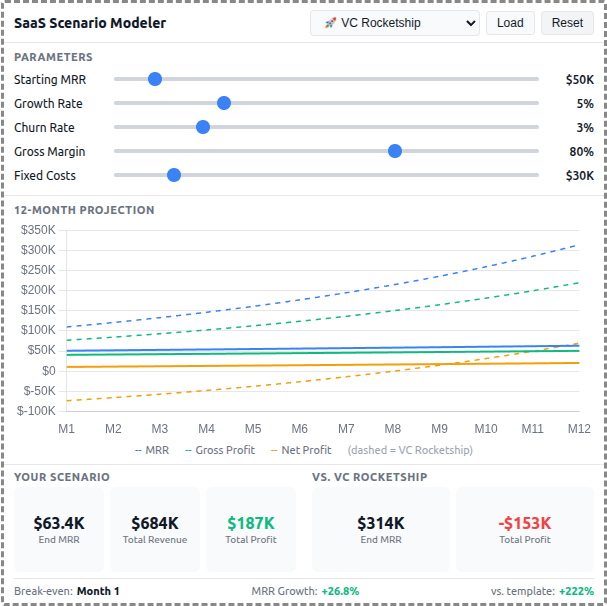
A React-based demo MCP App that lets users adjust SaaS business parameters and see real-time 12-month projections of revenue, costs, and profitability with comparison against pre-built scenario templates.
 |
 |
 |
Features
- Interactive Parameters: 5 sliders for Starting MRR, Growth Rate, Churn Rate, Gross Margin, and Fixed Costs
- 12-Month Projections: Line chart showing MRR, Gross Profit, and Net Profit over time
- Scenario Templates: 5 pre-built business strategies (Bootstrapped, VC Rocketship, Cash Cow, Turnaround, Efficient Growth)
- Template Comparison: Overlay dashed lines to compare your scenario against any template
- Summary Metrics: Key metrics including Ending MRR, Total Revenue, Total Profit, and break-even month
- Theme Support: Adapts to light/dark mode preferences
Running
-
Install dependencies:
npm install -
Build and start the server:
npm run start:http # for Streamable HTTP transport # OR npm run start:stdio # for stdio transport -
View using the
basic-hostexample or another MCP Apps-compatible host.
Architecture
Server (server.ts)
Exposes a single get-scenario-data tool that returns:
- 5 pre-built scenario templates with parameters, projections, and summaries
- Default input values for the sliders
- Optionally computes custom projections when
customInputsare provided
The tool is linked to a UI resource via _meta.ui.resourceUri.
App (src/)
- Built with React for reactive slider updates and derived state management
- Uses Chart.js for the line chart visualization
- All projection calculations run client-side for instant slider feedback
- Components:
SliderRow,MetricCard,ProjectionChart - Template comparison shown as dashed overlay lines on the chart