- TypeScript 76.4%
- MDX 19.3%
- JavaScript 4.3%
| Filename | Latest commit message | Latest commit date |
|---|---|---|
 89a684546b
* fix(examples): resolve DIST_DIR path for npm package execution When servers are compiled to dist/server.js and published to npm, `import.meta.dirname` already points to dist/, so joining with "dist" results in dist/dist/ which doesn't exist. This fix detects whether we're running from TypeScript source or compiled JavaScript and adjusts the path accordingly: - From source (server.ts): use dist/ subdirectory - From compiled (dist/server.js): use current directory Fixes ENOENT errors like: "ENOENT: no such file or directory, open '.../dist/dist/mcp-app.html'" 🤖 Generated with [Claude Code](https://claude.com/claude-code) Co-Authored-By: Claude Opus 4.5 <noreply@anthropic.com> * fix(pdf-server): mark pdfjs-dist as external in bundle The pdf.worker.mjs file wasn't being found when running from npm because bun bundled pdfjs-dist but didn't include the worker file. By marking pdfjs-dist as external, it uses the installed package from node_modules at runtime where the worker is available. 🤖 Generated with [Claude Code](https://claude.com/claude-code) Co-Authored-By: Claude Opus 4.5 <noreply@anthropic.com> --------- Co-authored-by: Claude Opus 4.5 <noreply@anthropic.com> |
||
| .github/workflows | ||
| .husky | ||
| docs | ||
| examples | ||
| plugins/mcp-apps | ||
| scripts | ||
| specification/draft | ||
| src | ||
| tests/e2e | ||
| .gitattributes | ||
| .gitignore | ||
| .prettierignore | ||
| .prettierrc.json | ||
| AGENTS.md | ||
| build.bun.ts | ||
| CLAUDE.md | ||
| CONTRIBUTING.md | ||
| LICENSE | ||
| package-lock.json | ||
| package.json | ||
| playwright.config.ts | ||
| README.md | ||
| RELEASES.md | ||
| tsconfig.json | ||
| typedoc.config.mjs | ||
@modelcontextprotocol/ext-apps


This repo contains the SDK and specification for MCP Apps Extension (SEP-1865).
MCP Apps are a proposed standard inspired by MCP-UI and OpenAI's Apps SDK to allow MCP Servers to display interactive UI elements in conversational MCP clients / chatbots.
How It Works
MCP Apps extend the Model Context Protocol to let servers deliver interactive UIs to MCP hosts. Here's how it works:
- Tool call — The LLM calls a tool on your server
- UI Resource — The tool's definition links to a predeclared
ui://resource containing its HTML interface - Host renders — The host fetches the resource and displays it in a sandboxed iframe
- Bidirectional communication — The host passes tool data to the UI via notifications, and the UI can call other tools through the host
This enables dashboards, forms, visualizations, and other rich experiences inside chat interfaces.
Overview
This SDK serves two audiences:
App Developers
Build interactive UIs that run inside MCP-enabled chat clients.
- SDK for Apps:
@modelcontextprotocol/ext-apps— API Docs - React hooks:
@modelcontextprotocol/ext-apps/react— API Docs
Host Developers
Embed and communicate with MCP Apps in your chat application.
- SDK for Hosts:
@modelcontextprotocol/ext-apps/app-bridge— API Docs
There's no supported host implementation in this repo (beyond the examples/basic-host example).
We have contributed a tentative implementation of hosting / iframing / sandboxing logic to the MCP-UI repository, and expect OSS clients may use it, while other clients might roll their own hosting logic.
Installation
npm install -S @modelcontextprotocol/ext-apps
Or edit your package.json manually:
{
  "dependencies": {
    "@modelcontextprotocol/ext-apps": "^0.0.1"
  }
}
Examples
 |
 |
 |
| Map | Three.js | ShaderToy |
 |
 |
 |
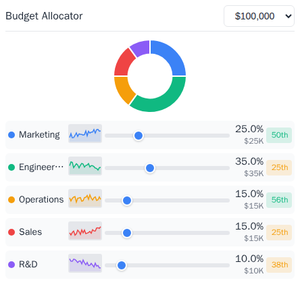
| Sheet Music | Wiki Explorer | Cohort Heatmap |
 |
 |
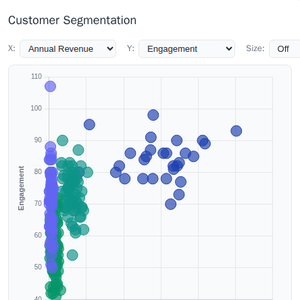 |
| Scenario Modeler | Budget Allocator | Customer Segmentation |
 |
 |
 |
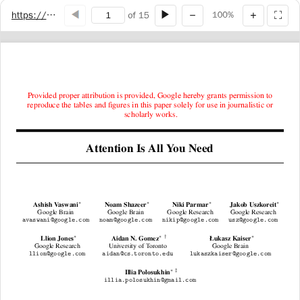
| System Monitor | Transcript | Video Resource |
 |
||
| PDF Server |
Starter Templates
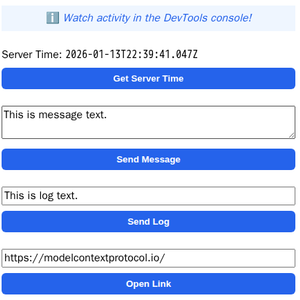 |
The same app built with different frameworks — pick your favorite! React · Vue · Svelte · Preact · Solid · Vanilla JS |
The examples/ directory contains additional demo apps showcasing real-world use cases.
To run all examples:
npm install
npm start
Then open http://localhost:8080/.