| Filename | Latest commit message | Latest commit date |
|---|---|---|
 27196b3b05
Single quotes in `concurrently` commands work on Unix shells but not on
Windows Command Shell (`cmd.exe`), causing the `INPUT` environment
variable to not be set and npm scripts to fail with errors like:
'cross-env' is not recognized as an internal or external command
Error: INPUT environment variable is not set
Replace single quotes with escaped double quotes (`\"`) in npm scripts
in all example `package.json` files.
Co-Authored-By: Claude Opus 4.5 <noreply@anthropic.com>
|
||
| .. | ||
| src | ||
| .gitignore | ||
| grid-cell.png | ||
| main.ts | ||
| mcp-app.html | ||
| package.json | ||
| README.md | ||
| screenshot.png | ||
| server.ts | ||
| tsconfig.json | ||
| tsconfig.server.json | ||
| vite.config.ts | ||


Example: System Monitor App
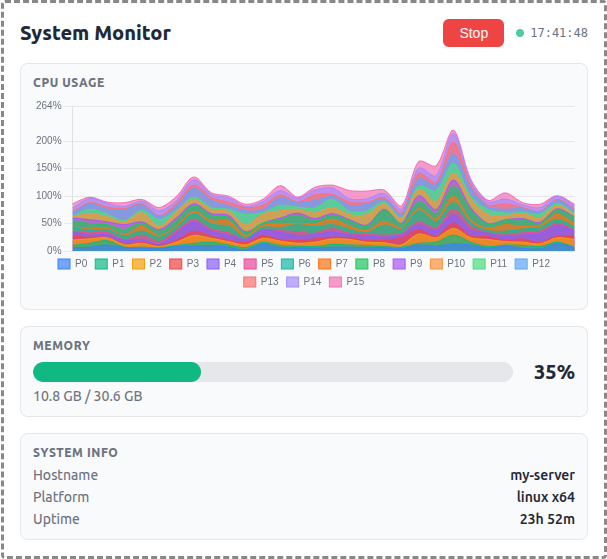
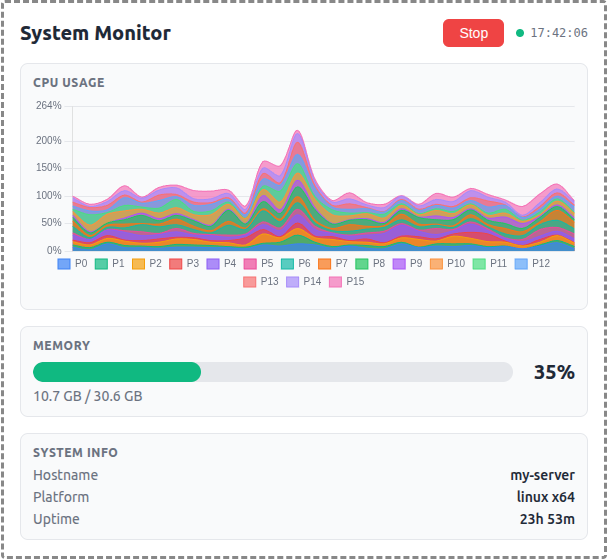
A demo MCP App that displays real-time OS metrics with a stacked area chart for per-core CPU usage and a bar gauge for memory.
 |
 |
 |
MCP Client Configuration
Add to your MCP client configuration (stdio transport):
{
  "mcpServers": {
    "system-monitor": {
      "command": "npx",
      "args": [
        "-y",
        "--silent",
        "--registry=https://registry.npmjs.org/",
        "@modelcontextprotocol/server-system-monitor",
        "--stdio"
      ]
    }
  }
}
Local Development
To test local modifications, use this configuration (replace ~/code/ext-apps with your clone path):
{
  "mcpServers": {
    "system-monitor": {
      "command": "bash",
      "args": [
        "-c",
        "cd ~/code/ext-apps/examples/system-monitor-server && npm run build >&2 && node dist/index.js --stdio"
      ]
    }
  }
}
Features
- Per-Core CPU Monitoring: Stacked area chart showing individual CPU core utilization over a 1-minute sliding window
- Memory Usage: Horizontal bar gauge with color-coded thresholds (green/yellow/red)
- System Info: Hostname, platform, and uptime display
- Auto-Polling: Automatically starts monitoring on load with 2-second refresh interval
- Theme Support: Adapts to light/dark mode preferences
Running
-
Install dependencies:
npm install -
Build and start the server:
npm run start:http # for Streamable HTTP transport # OR npm run start:stdio # for stdio transport -
View using the
basic-hostexample or another MCP Apps-compatible host.
Architecture
Server (server.ts)
Exposes two tools demonstrating a polling pattern:
-
get-system-info(Model-visible) — Returns static system configuration:- Hostname, platform, architecture
- CPU model and core count
- Total memory
-
poll-system-stats(App-only,visibility: ["app"]) — Returns dynamic metrics:- Per-core CPU timing data (idle/total counters)
- Memory usage (used/free/percentage)
- Uptime
The Model-visible tool is linked to a UI resource via _meta.ui.resourceUri.
App (src/mcp-app.ts)
- Receives static system info via
ontoolresultwhen the host sends theget-system-inforesult - Polls
poll-system-statsevery 2 seconds for dynamic metrics - Uses Chart.js for the stacked area chart visualization
- Computes CPU usage percentages client-side from timing deltas
- Maintains a 30-point history (1 minute at 2s intervals)