| Filename | Latest commit message | Latest commit date |
|---|---|---|
 30f79b9e3f
* security: ignore client roots by default in pdf-server When the pdf-server is started with --stdio, MCP clients may advertise roots that refer to directories on the *client's* file system. Because the server resolves those paths locally, accepting them by default would give the remote client access to arbitrary directories on the server's machine. This commit makes client roots opt-in via the --use-client-roots flag. Without the flag, the server logs a notice and skips roots setup entirely. The createServer() function now accepts a CreateServerOptions object with a `useClientRoots` boolean (defaults to false). https://claude.ai/code/session_014ohk5NMEPe8TBKpqp4ZRSw * Enable client roots by default for HTTP, keep off for stdio HTTP mode serves a local client so roots are safe. Stdio mode may have a remote client whose roots would resolve against the server's filesystem, so roots stay off unless --use-client-roots is passed. https://claude.ai/code/session_014ohk5NMEPe8TBKpqp4ZRSw * fix: correct transport-aware defaults for useClientRoots stdio = local client (e.g. Claude Desktop) → auto-enable roots HTTP = remote client → ignore roots unless --use-client-roots passed The previous commit had the logic inverted. https://claude.ai/code/session_014ohk5NMEPe8TBKpqp4ZRSw * refactor: inline useClientRoots per transport branch Remove the intermediate effectiveUseClientRoots variable — just pass `true` in the stdio branch and the flag value in the HTTP branch. https://claude.ai/code/session_014ohk5NMEPe8TBKpqp4ZRSw * docs: update README to match transport-aware client roots defaults Stdio always enables roots (client is local); HTTP ignores them by default. The previous README text had these reversed. https://claude.ai/code/session_014ohk5NMEPe8TBKpqp4ZRSw --------- Co-authored-by: Claude <noreply@anthropic.com> |
||
| .. | ||
| plugin | ||
| src | ||
| .gitignore | ||
| .mcpbignore | ||
| grid-cell.png | ||
| icon.png | ||
| main.ts | ||
| manifest.json | ||
| mcp-app.html | ||
| package.json | ||
| pdf-icon.svg | ||
| README.md | ||
| screenshot.png | ||
| server.test.ts | ||
| server.ts | ||
| tsconfig.json | ||
| tsconfig.server.json | ||
| vite.config.ts | ||


PDF Server
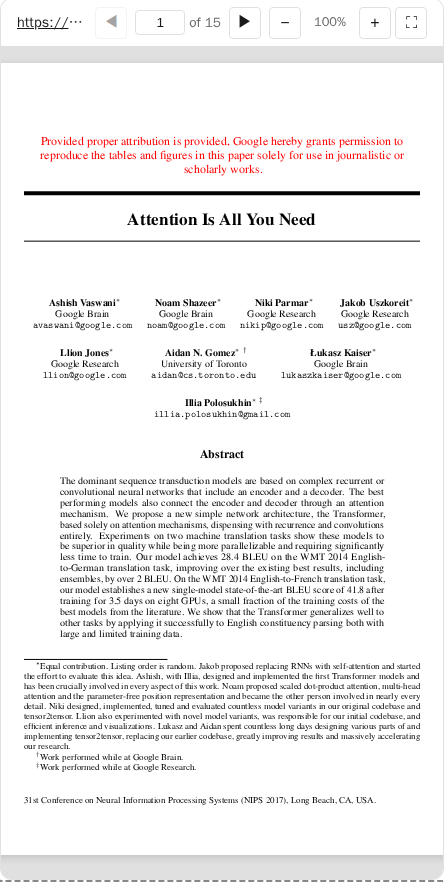
An interactive PDF viewer using PDF.js. Supports local files and remote URLs from academic sources (arxiv, biorxiv, zenodo, etc).
MCP Client Configuration
Add to your MCP client configuration (stdio transport):
{
  "mcpServers": {
    "pdf": {
      "command": "npx",
      "args": [
        "-y",
        "--silent",
        "--registry=https://registry.npmjs.org/",
        "@modelcontextprotocol/server-pdf",
        "--stdio"
      ]
    }
  }
}
Local Development
To test local modifications, use this configuration (replace ~/code/ext-apps with your clone path):
{
  "mcpServers": {
    "pdf": {
      "command": "bash",
      "args": [
        "-c",
        "cd ~/code/ext-apps/examples/pdf-server && npm run build >&2 && node dist/index.js --stdio"
      ]
    }
  }
}
What This Example Demonstrates
1. Chunked Data Through Size-Limited Tool Calls
On some host platforms, tool calls have size limits, so large PDFs cannot be sent in a single response. This example streams PDFs in chunks using HTTP Range requests:
Server side (server.ts):
// Returns chunks with pagination metadata
{
  (bytes, offset, byteCount, totalBytes, hasMore);
}
Client side (mcp-app.ts):
// Load in chunks with progress
while (hasMore) {
  const chunk = await app.callServerTool({
    name: "read_pdf_bytes",
    arguments: { url, offset },
  });
  chunks.push(base64ToBytes(chunk.bytes));
  offset += chunk.byteCount;
  hasMore = chunk.hasMore;
  updateProgress(offset, chunk.totalBytes);
}
2. Model Context Updates
The viewer keeps the model informed about what the user is seeing:
app.updateModelContext({
  content: [
    {
      type: "text",
      text: `PDF viewer | "${title}" | Current Page: ${page}/${total}\n\nPage content:\n${pageText}`,
    },
  ],
});
This enables the model to answer questions about the current page or selected text.
3. Display Modes: Fullscreen vs Inline
- Inline mode: App requests height changes to fit content
- Fullscreen mode: App fills the screen with internal scrolling
// Request fullscreen
app.requestDisplayMode({ mode: "fullscreen" });

// Listen for mode changes
app.ondisplaymodechange = (mode) => {
  if (mode === "fullscreen") enableScrolling();
  else disableScrolling();
};
4. External Links (openLink)
The viewer demonstrates opening external links (e.g., to the original arxiv page):
titleEl.onclick = () => app.openLink(sourceUrl);
5. View Persistence
Page position is saved per-view using viewUUID and localStorage.
6. Dark Mode / Theming
The viewer syncs with the host's theme using CSS light-dark() and the SDK's theming APIs:
app.onhostcontextchanged = (ctx) => {
  if (ctx.theme) applyDocumentTheme(ctx.theme);
  if (ctx.styles?.variables) applyHostStyleVariables(ctx.styles.variables);
};
Usage
# Default: loads a sample arxiv paper
bun examples/pdf-server/main.ts

# Load local files (converted to file:// URLs)
bun examples/pdf-server/main.ts ./docs/paper.pdf /path/to/thesis.pdf

# Load from URLs
bun examples/pdf-server/main.ts https://arxiv.org/pdf/2401.00001.pdf

# Mix local and remote
bun examples/pdf-server/main.ts ./local.pdf https://arxiv.org/pdf/2401.00001.pdf

# stdio mode for MCP clients
bun examples/pdf-server/main.ts --stdio ./papers/
Security: Client Roots
MCP clients may advertise roots — file:// URIs pointing to directories on the client's file system. The server uses these to allow access to local files under those directories.
- Stdio mode (
--stdio): Client roots are always enabled — the client is typically on the same machine (e.g. Claude Desktop), so the roots are safe. - HTTP mode (default): Client roots are ignored by default — the client may be remote, and its roots would be resolved against the server's filesystem. To opt in, pass
--use-client-roots:
# Trust that the HTTP client is local and its roots are safe
bun examples/pdf-server/main.ts --use-client-roots
When roots are ignored the server logs:
[pdf-server] Client roots are ignored (default for remote transports). Pass --use-client-roots to allow the client to expose local directories.
Allowed Sources
- Local files: Must be passed as CLI arguments (or via client roots when enabled)
- Remote URLs: arxiv.org, biorxiv.org, medrxiv.org, chemrxiv.org, zenodo.org, osf.io, hal.science, ssrn.com, and more
Tools
| Tool | Visibility | Purpose |
|---|---|---|
list_pdfs |
Model | List available local files and origins |
display_pdf |
Model + UI | Display interactive viewer |
read_pdf_bytes |
App only | Stream PDF data in chunks |
Architecture
server.ts      # MCP server + tools
main.ts        # CLI entry point
src/
└── mcp-app.ts # Interactive viewer UI (PDF.js)
Key Patterns Shown
| Pattern | Implementation |
|---|---|
| App-only tools | _meta: { ui: { visibility: ["app"] } } |
| Chunked responses | hasMore + offset pagination |
| Model context | app.updateModelContext() |
| Display modes | app.requestDisplayMode() |
| External links | app.openLink() |
| View persistence | viewUUID + localStorage |
| Theming | applyDocumentTheme() + CSS light-dark() |
Dependencies
pdfjs-dist: PDF rendering (frontend only)@modelcontextprotocol/ext-apps: MCP Apps SDK