| Filename | Latest commit message | Latest commit date |
|---|---|---|
 974862237b
* fix: Windows compatibility for npm scripts and cross-platform CI Fixes #142 - Windows PowerShell install bug Changes: - Replace single quotes with escaped double quotes in generate:schemas (cmd.exe passes single quotes literally, breaking prettier glob matching) - Simplify prettier scripts: remove redundant --ignore-path flags (prettier auto-loads .gitignore and .prettierignore by default) - Remove $(pwd) from prettier scripts (bash-only syntax) - Add cross-platform CI matrix: Linux x64, Windows x64, macOS ARM64, macOS x64 - Use shell: bash for grep commands in CI (not available in Windows cmd.exe) 🤖 Generated with [Claude Code](https://claude.com/claude-code) Co-Authored-By: Claude <noreply@anthropic.com> * fix: remove bun npm package from all workspaces The bun npm package tries to install platform-specific binaries which fails on Windows CI. Since bun is installed via oven-sh/setup-bun action in CI (and developers install it globally), we don't need the npm package. 🤖 Generated with [Claude Code](https://claude.com/claude-code) Co-Authored-By: Claude <noreply@anthropic.com> * fix: skip examples:build on Windows (uses Unix-only INPUT=... syntax) The examples use `INPUT=mcp-app.html vite build` which is bash syntax for setting environment variables. This doesn't work on Windows cmd.exe. Since examples aren't published to npm, we can skip building them on Windows. 🤖 Generated with [Claude Code](https://claude.com/claude-code) Co-Authored-By: Claude <noreply@anthropic.com> * fix: force LF line endings for cross-platform prettier consistency Git on Windows auto-converts line endings to CRLF, causing prettier to report formatting issues. Force LF for all text files. 🤖 Generated with [Claude Code](https://claude.com/claude-code) Co-Authored-By: Claude <noreply@anthropic.com> * ci: add test for git-based npm install (cross-platform) This verifies that `npm install git+https://...` works on all platforms, which triggers the prepare script and requires bun to be available. 🤖 Generated with [Claude Code](https://claude.com/claude-code) Co-Authored-By: Claude <noreply@anthropic.com> * ci: add Linux ARM64 and Windows ARM64 to CI matrix - Added ubuntu-24.04-arm (Linux ARM64) - Added windows-11-arm (Windows ARM64) Note: WSL is not available on GitHub-hosted runners (requires nested virtualization which isn't supported). 🤖 Generated with [Claude Code](https://claude.com/claude-code) Co-Authored-By: Claude <noreply@anthropic.com> * ci: disable Windows ARM64 (Bun lacks stable ARM64 binaries) The oven-sh/setup-bun action fails with 404 when trying to download Bun for Windows ARM64. Re-enable when Bun adds proper support. 🤖 Generated with [Claude Code](https://claude.com/claude-code) Co-Authored-By: Claude <noreply@anthropic.com> * ci: add Windows WSL build test Uses Vampire/setup-wsl action to install Ubuntu-24.04 in WSL and run the full build/test cycle. This tests the Linux-in-Windows scenario that was reported in issue #142. 🤖 Generated with [Claude Code](https://claude.com/claude-code) Co-Authored-By: Claude <noreply@anthropic.com> * ci: fix WSL build - install unzip for Bun installer 🤖 Generated with [Claude Code](https://claude.com/claude-code) Co-Authored-By: Claude <noreply@anthropic.com> * ci: add setup-bun to publish.yml workflow The pkg-pr-new publish workflow was missing bun setup, causing "bun: not found" errors during npm ci (which triggers prepare script). 🤖 Generated with [Claude Code](https://claude.com/claude-code) Co-Authored-By: Claude <noreply@anthropic.com> * ci: enable Windows ARM64 with x64-baseline Bun (via emulation) Windows ARM64 can run x64 binaries via emulation. Use bun-download-url to force x64-baseline build since native ARM64 Bun isn't available yet. Reference: https://github.com/oven-sh/bun/issues/9824 🤖 Generated with [Claude Code](https://claude.com/claude-code) Co-Authored-By: Claude <noreply@anthropic.com> * ci: remove macOS x64 (macos-13 runner retired) The macos-13 based runner images are now retired. 🤖 Generated with [Claude Code](https://claude.com/claude-code) Co-Authored-By: Claude <noreply@anthropic.com> * docs: add Bun installation instructions per platform Documents that Bun is required for development, with platform-specific install commands in collapsible sections. 🤖 Generated with [Claude Code](https://claude.com/claude-code) Co-Authored-By: Claude <noreply@anthropic.com> * docs: note Bun requirement in README examples section 🤖 Generated with [Claude Code](https://claude.com/claude-code) Co-Authored-By: Claude <noreply@anthropic.com> * feat: add bun as optional dependency (no global install required) - Add @oven/bun-* platform packages as optionalDependencies - Create postinstall script to set up bun binary from optional deps - Handle Windows ARM64 by downloading x64-baseline for emulation - Remove setup-bun from CI workflows (npm install handles it now) - Remove manual Bun install instructions from docs This alternative approach eliminates the need for global Bun installation or setup-bun action in CI. npm install automatically installs the platform-appropriate bun binary. 🤖 Generated with [Claude Code](https://claude.com/claude-code) Co-Authored-By: Claude <noreply@anthropic.com> * chore: add debug logging to setup-bun script 🤖 Generated with [Claude Code](https://claude.com/claude-code) Co-Authored-By: Claude <noreply@anthropic.com> * chore: force stdout flush in setup-bun for CI debugging 🤖 Generated with [Claude Code](https://claude.com/claude-code) Co-Authored-By: Claude <noreply@anthropic.com> * chore: add more debugging to setup-bun 🤖 Generated with [Claude Code](https://claude.com/claude-code) Co-Authored-By: Claude <noreply@anthropic.com> * chore: remove accidental test artifacts 🤖 Generated with [Claude Code](https://claude.com/claude-code) Co-Authored-By: Claude <noreply@anthropic.com> * chore: run setup-bun in prepare script (before build) 🤖 Generated with [Claude Code](https://claude.com/claude-code) Co-Authored-By: Claude <noreply@anthropic.com> * feat: use cross-env for Windows-compatible example builds - Add cross-env to devDependencies - Update all example package.json scripts to use cross-env for INPUT and NODE_ENV - Enable examples:build on Windows in CI (no longer Unix-only) - Add examples:build to WSL CI job 🤖 Generated with [Claude Code](https://claude.com/claude-code) Co-Authored-By: Claude <noreply@anthropic.com> * chore: remove unused imports in setup-bun.mjs Address github-code-quality bot comments. 🤖 Generated with [Claude Code](https://claude.com/claude-code) Co-Authored-By: Claude <noreply@anthropic.com> * fix: use run-bun.mjs wrapper for prepare hook compatibility During npm install's prepare hook, node_modules/.bin is not in PATH, so calling 'bun' directly fails. The new run-bun.mjs wrapper finds bun at node_modules/.bin/bun and runs it with the correct path. 🤖 Generated with [Claude Code](https://claude.com/claude-code) Co-Authored-By: Claude <noreply@anthropic.com> * ci: restore setup-bun action for build jobs - Add setup-bun action to build and test-git-install jobs - Disable Windows ARM64 (Bun doesn't support this platform) - Add bun installation to WSL build 🤖 Generated with [Claude Code](https://claude.com/claude-code) Co-Authored-By: Claude <noreply@anthropic.com> * fix: remove bun devDep, add libc detection for Linux ARM64 - Remove 'bun' from devDependencies (its postinstall fails on Windows ARM64) - Add libc detection (glibc vs musl) to setup-bun.mjs - Only try compatible binaries based on detected libc - Re-enable Windows ARM64 in CI (now uses x64 emulation fallback) - Remove setup-bun action from CI (no longer needed) 🤖 Generated with [Claude Code](https://claude.com/claude-code) Co-Authored-By: Claude <noreply@anthropic.com> * ci: simplify WSL build - let setup-bun.mjs handle bun installation 🤖 Generated with [Claude Code](https://claude.com/claude-code) Co-Authored-By: Claude <noreply@anthropic.com> --------- Co-authored-by: Claude <noreply@anthropic.com> |
||
| .. | ||
| src | ||
| mcp-app.html | ||
| package.json | ||
| README.md | ||
| server.ts | ||
| test-input.json | ||
| tsconfig.json | ||
| vite.config.ts | ||
Example: Three.js App
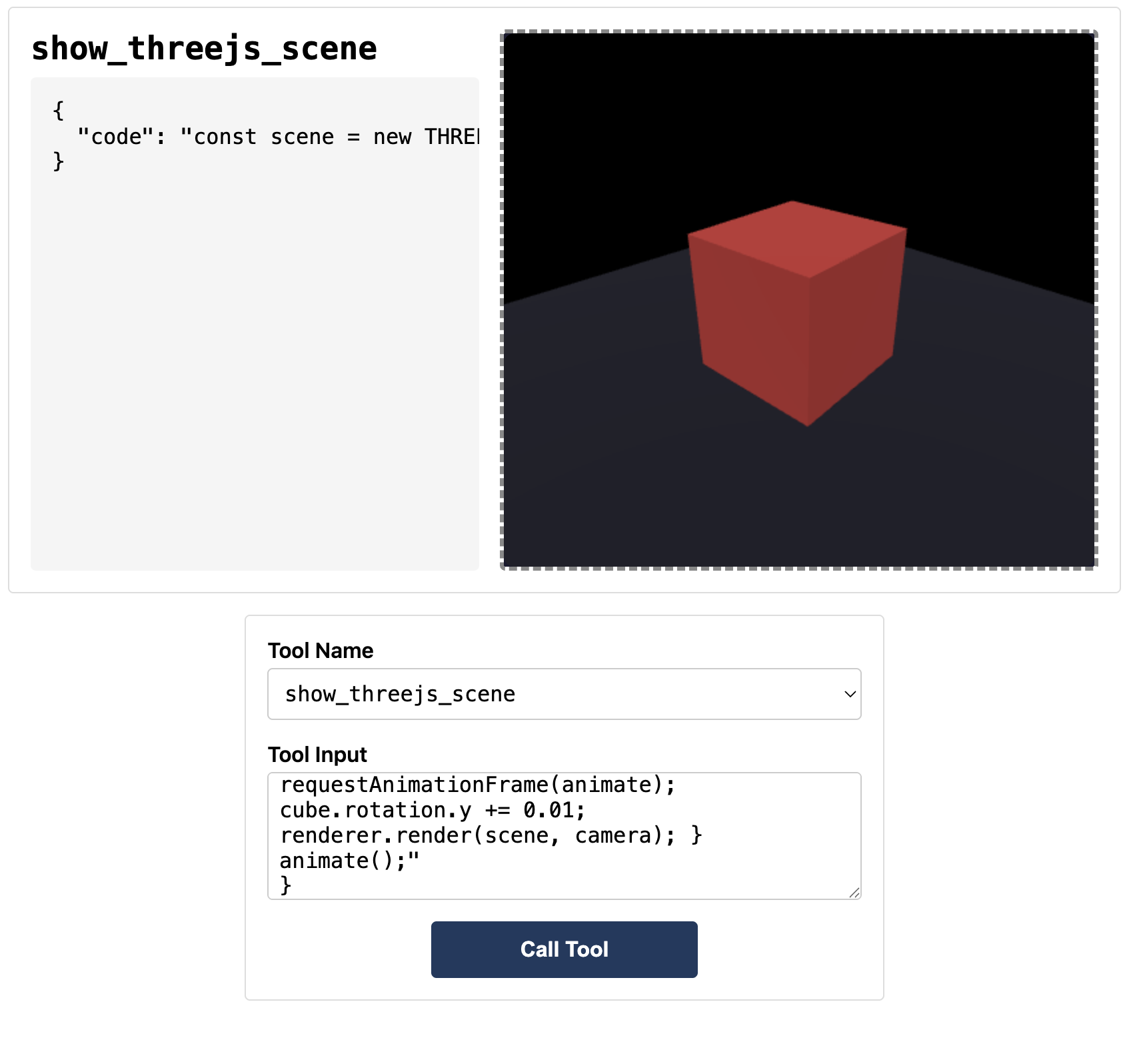
Interactive 3D scene renderer using Three.js. Demonstrates streaming code preview and full MCP App integration.
 |
Features
- Interactive 3D Rendering: Execute JavaScript code to create and animate Three.js scenes
- Streaming Preview: See the scene build in real-time as code is being written
- Built-in Helpers: Pre-configured
OrbitControls, post-processing effects (bloom), and render passes - Documentation Tool:
learn_threejsprovides API docs and code examples on demand
Running
-
Install dependencies:
npm install -
Build and start the server:
npm run start:http # for Streamable HTTP transport # OR npm run start:stdio # for stdio transport -
View using the
basic-hostexample or another MCP Apps-compatible host.
Tool Input
To test the example, copy the contents of test-input.json into the tool input field in basic-host.
The test input creates a simple scene with a rotating cube:
const scene = new THREE.Scene();
const camera = new THREE.PerspectiveCamera(60, width / height, 0.1, 100);
camera.position.set(2, 2, 2);

const renderer = new THREE.WebGLRenderer({ canvas, antialias: true });
renderer.setSize(width, height);
renderer.shadowMap.enabled = true;

const cube = new THREE.Mesh(
  new THREE.BoxGeometry(),
  new THREE.MeshStandardMaterial({ color: 0x00ff88 }),
);
cube.castShadow = true;
cube.position.y = 0.5;
scene.add(cube);

const floor = new THREE.Mesh(
  new THREE.PlaneGeometry(5, 5),
  new THREE.MeshStandardMaterial({ color: 0x222233 }),
);
floor.rotation.x = -Math.PI / 2;
floor.receiveShadow = true;
scene.add(floor);

const light = new THREE.DirectionalLight(0xffffff, 2);
light.position.set(3, 5, 3);
light.castShadow = true;
scene.add(light);
scene.add(new THREE.AmbientLight(0x404040));

function animate() {
  requestAnimationFrame(animate);
  cube.rotation.y += 0.01;
  renderer.render(scene, camera);
}
animate();
Available Three.js Globals
When writing custom code, these globals are available:
THREE; // Three.js library
canvas; // Pre-created canvas element
width; // Canvas width
height; // Canvas height
OrbitControls; // Camera controls
EffectComposer; // Post-processing composer
RenderPass; // Render pass
UnrealBloomPass; // Bloom effect
Architecture
Server (server.ts)
Exposes two tools:
show_threejs_scene- Renders a 3D scene from JavaScript codelearn_threejs- Returns documentation and code examples for Three.js APIs
Supports Streamable HTTP and stdio transports.
App (src/threejs-app.tsx)
React component that:
- Receives tool inputs via the MCP App SDK
- Displays streaming preview from
toolInputsPartial.codeas code arrives - Executes final code from
toolInputs.codewhen complete - Renders to a pre-created canvas with configurable height