| Filename | Latest commit message | Latest commit date |
|---|---|---|
 9f09932baf
* build app-with-deps
* make registerAppTool more interchangeable w/ server.registerTool
* feat: use structuredContent in all example servers
All servers now return structuredContent alongside JSON text content.
All mcp-apps now read structuredContent directly (no JSON.parse fallback).
Updated servers:
- basic-server-vanillajs
- budget-allocator-server
- cohort-heatmap-server
- customer-segmentation-server
- integration-server
- scenario-modeler-server
- system-monitor-server
- threejs-server
- video-resource-server
- wiki-explorer-server
* feat: add outputSchema to all example servers
Define output schemas for structuredContent validation:
- basic-server-vanillajs: { time: string }
- budget-allocator-server: BudgetDataResponseSchema
- cohort-heatmap-server: CohortDataSchema
- customer-segmentation-server: customers/segments schema
- integration-server: { time: string }
- scenario-modeler-server: templates/defaultInputs schema
- system-monitor-server: SystemStatsSchema
- threejs-server: { code, height }
- video-resource-server: { videoUri, description }
- wiki-explorer-server: { page, links, error }
* prettier:fix
* make registerAppTool more interchangeable w/ server.registerTool
* feat: use structuredContent in all example servers
All servers now return structuredContent alongside JSON text content.
All mcp-apps now read structuredContent directly (no JSON.parse fallback).
Updated servers:
- basic-server-vanillajs
- budget-allocator-server
- cohort-heatmap-server
- customer-segmentation-server
- integration-server
- scenario-modeler-server
- system-monitor-server
- threejs-server
- video-resource-server
- wiki-explorer-server
* feat: add outputSchema to all example servers
Define output schemas for structuredContent validation:
- basic-server-vanillajs: { time: string }
- budget-allocator-server: BudgetDataResponseSchema
- cohort-heatmap-server: CohortDataSchema
- customer-segmentation-server: customers/segments schema
- integration-server: { time: string }
- scenario-modeler-server: templates/defaultInputs schema
- system-monitor-server: SystemStatsSchema
- threejs-server: { code, height }
- video-resource-server: { videoUri, description }
- wiki-explorer-server: { page, links, error }
* prettier:fix
* revert: remove unrelated workflow, version, and arch changes
* chore: update package-lock.json
* refactor(basic-server-vanillajs): address PR review comments
- Simplify server.ts to return plain time string in text content (not JSON),
matching the quickstart guide pattern
- Add defensive coding in mcp-app.ts with optional chaining and fallback
to handle potential type mismatches gracefully
* refactor: restore rich text formatting for LLM-readable content
Restore the human-readable text formatting functions that were removed,
providing meaningful summaries in the text content while keeping
structuredContent for programmatic UI consumption:
- budget-allocator-server: formatBudgetSummary with config overview
- cohort-heatmap-server: formatCohortSummary with retention stats
- scenario-modeler-server: formatScenarioSummary with financial metrics
|
||
| .. | ||
| src | ||
| mcp-app.html | ||
| package.json | ||
| README.md | ||
| server-utils.ts | ||
| server.ts | ||
| tsconfig.json | ||
| vite.config.ts | ||
Example: Budget Allocator App
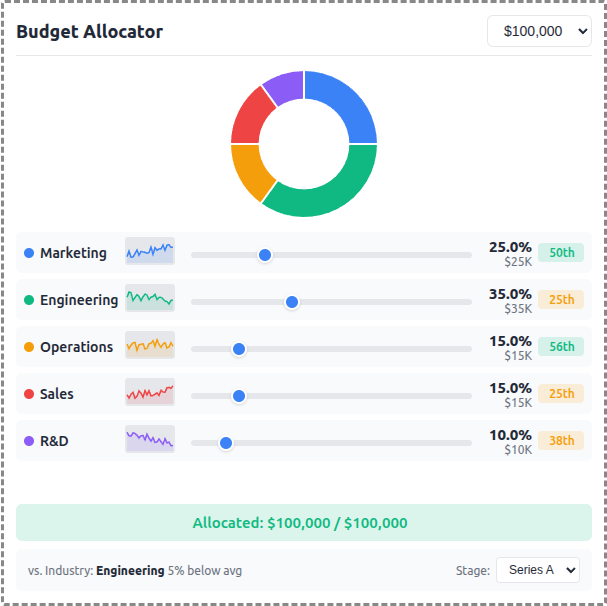
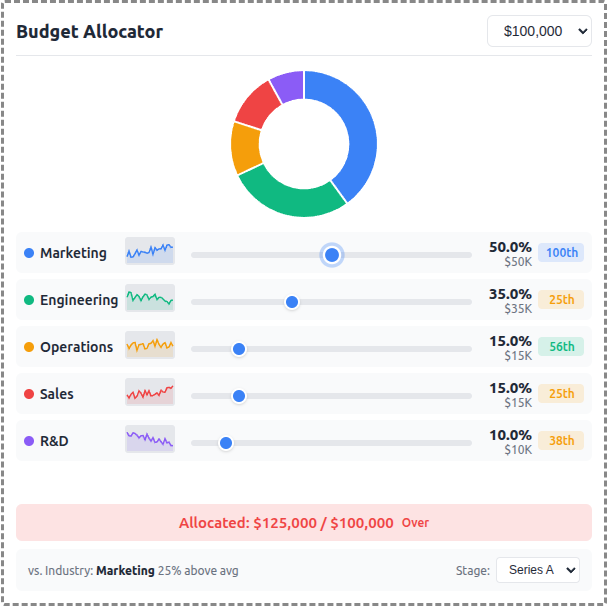
An interactive budget allocation tool demonstrating real-time data visualization with MCP Apps.
 |
 |
 |
Features
- Interactive Sliders: Adjust budget allocation across 5 categories (Marketing, Engineering, Operations, Sales, R&D)
- Donut Chart: Real-time visualization of allocation distribution using Chart.js
- Sparkline Trends: 24-month historical allocation data per category
- Percentile Badges: Compare your allocation vs. industry benchmarks
- Stage Selector: Switch between Seed, Series A, Series B, and Growth benchmarks
- Budget Presets: Quick selection of $50K, $100K, $250K, or $500K totals
Running
-
Install dependencies:
npm install -
Build and start the server:
npm run start:http # for Streamable HTTP transport # OR npm run start:stdio # for stdio transport -
View using the
basic-hostexample or another MCP Apps-compatible host.
Architecture
Server (server.ts)
Exposes a single get-budget-data tool that returns:
- Category definitions with colors and default allocations
- Historical data (~120 data points) - 24 months of allocation history per category
- Industry benchmarks (~60 data points) - Aggregated percentile data by company stage
The tool is linked to a UI resource via _meta.ui.resourceUri.
App (src/mcp-app.ts)
- Uses Chart.js for the donut chart visualization
- Renders sparkline trends using inline SVG
- Computes percentile rankings client-side from benchmark data
- Updates all UI elements reactively on slider changes