| Filename | Latest commit message | Latest commit date |
|---|---|---|
 bea0ae27f5
* feat: add server helpers and optional connect() transport Add `src/server/` with convenience functions for registering MCP App tools and resources: - `registerAppTool(server, name, config, handler)` - `registerAppResource(server, name, uri, config, callback)` The `transport` parameter in `App.connect()` is now optional, defaulting to `PostMessageTransport(window.parent)`. 🤖 Generated with [Claude Code](https://claude.com/claude-code) Co-Authored-By: Claude <noreply@anthropic.com> * Update src/server/index.ts Co-authored-by: Jonathan Hefner <jonathan@hefner.pro> * fix: refine server helper types - Make RESOURCE_URI_META_KEY required in McpUiAppToolConfig (tools need a UI resource) - Make _meta optional in McpUiAppResourceConfig (not all resources need custom metadata) 🤖 Generated with [Claude Code](https://claude.com/claude-code) Co-Authored-By: Claude <noreply@anthropic.com> * refactor: simplify RESOURCE_URI_META_KEY re-export * refactor: consolidate export statements --------- Co-authored-by: Claude <noreply@anthropic.com> Co-authored-by: Jonathan Hefner <jonathan@hefner.pro> |
||
| .. | ||
| src | ||
| mcp-app.html | ||
| package.json | ||
| README.md | ||
| server.ts | ||
| tsconfig.json | ||
| vite.config.ts | ||
Example: SaaS Scenario Modeler
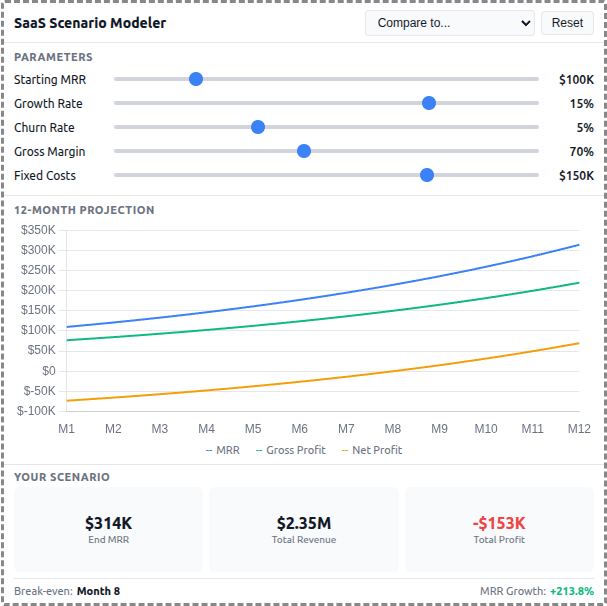
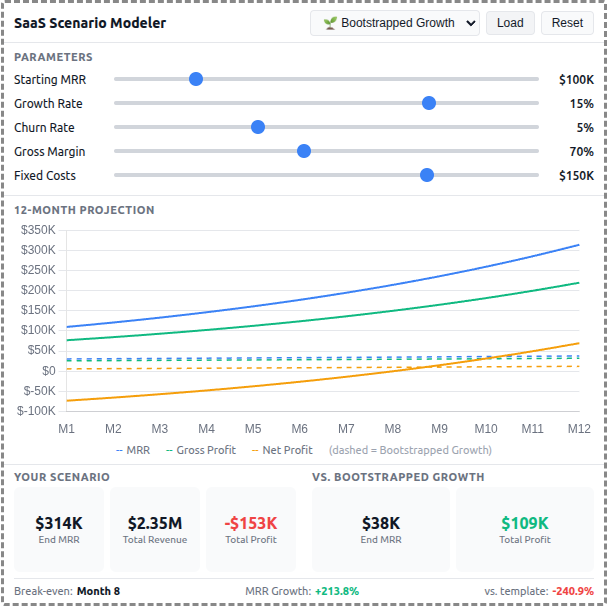
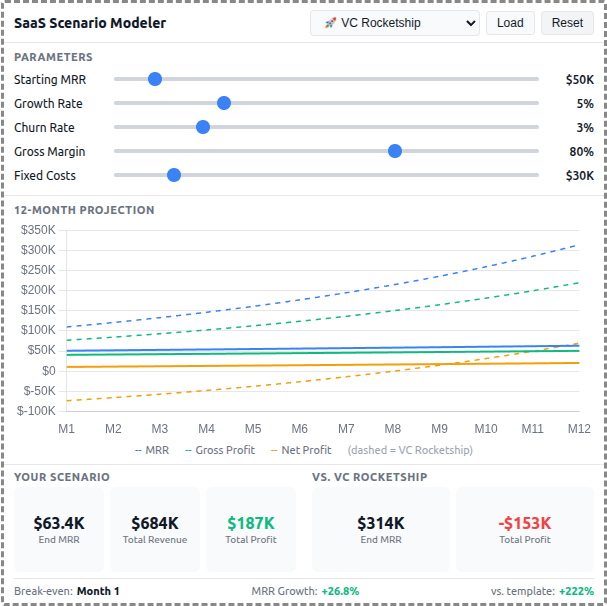
A React-based demo MCP App that lets users adjust SaaS business parameters and see real-time 12-month projections of revenue, costs, and profitability with comparison against pre-built scenario templates.
 |
 |
 |
Features
- Interactive Parameters: 5 sliders for Starting MRR, Growth Rate, Churn Rate, Gross Margin, and Fixed Costs
- 12-Month Projections: Line chart showing MRR, Gross Profit, and Net Profit over time
- Scenario Templates: 5 pre-built business strategies (Bootstrapped, VC Rocketship, Cash Cow, Turnaround, Efficient Growth)
- Template Comparison: Overlay dashed lines to compare your scenario against any template
- Summary Metrics: Key metrics including Ending MRR, Total Revenue, Total Profit, and break-even month
- Theme Support: Adapts to light/dark mode preferences
Running
-
Install dependencies:
npm install -
Build and start the server:
npm run start:http # for Streamable HTTP transport # OR npm run start:stdio # for stdio transport -
View using the
basic-hostexample or another MCP Apps-compatible host.
Architecture
Server (server.ts)
Exposes a single get-scenario-data tool that returns:
- 5 pre-built scenario templates with parameters, projections, and summaries
- Default input values for the sliders
- Optionally computes custom projections when
customInputsare provided
The tool is linked to a UI resource via _meta[RESOURCE_URI_META_KEY].
App (src/)
- Built with React for reactive slider updates and derived state management
- Uses Chart.js for the line chart visualization
- All projection calculations run client-side for instant slider feedback
- Components:
SliderRow,MetricCard,ProjectionChart - Template comparison shown as dashed overlay lines on the chart