- TypeScript 76.4%
- MDX 19.3%
- JavaScript 4.3%
| Filename | Latest commit message | Latest commit date |
|---|---|---|
 e6983b36d0
* Add say-server: streaming TTS MCP App with karaoke UI - Streaming TTS MCP App with real-time word highlighting - React widget with pause/resume controls - Debounced model context updates - Self-contained server.py for standalone uv run Co-authored-by: Claude <noreply@anthropic.com> * Update server.py * fix(say-server): fix React/Zod version conflicts in widget - Pin Zod to v3.25.1 via esm.sh deps param (fixes .custom() error) - Add external=react,react-dom to prevent duplicate React instances - Update React from 19.1.0 to 19.2.0 - Import React for Babel's classic JSX transform - Consolidate imports: only use @modelcontextprotocol/ext-apps/react - Use Babel from unpkg.com instead of esm.sh - Simplify resource decorator with meta= parameter - Update CSP to allow both esm.sh and unpkg.com * fix(say-server): show play button when paused, restart when finished * feat(say-server): add fullscreen button, remove inline scroll - Add fullscreen toggle button (appears on hover when available) - Remove max-height/scroll in inline mode for cleaner display - Enable scrolling only in fullscreen mode - Track displayMode and fullscreenAvailable state - Handle onHostContextChanged to detect fullscreen support * fix(say-server): fix fullscreen button visibility and prevent multiple audio streams - Check initial host context for fullscreen availability (not just updates) - Add audioOperationInProgressRef guard to prevent concurrent audio operations - Prevents race conditions from rapid clicks/double-clicks * fix(qr-server): use meta parameter instead of manual handler patching Simplified CSP metadata handling to match say-server's approach: - Use meta parameter on @mcp.resource decorator directly - Removed custom _read_resource_with_meta handler and handler replacement * fix(say-server): simplify controls to prevent multiple audio streams - Remove onClick from text display (was conflicting with double-click) - Always show overlay button (with pause icon when playing) - Lower opacity (0.3) when playing, full on hover - Button shows: ▶️ (play), ⏸️ (pause), 🔄 (restart) - Double-click text to restart still works - Eliminates click/dblclick race condition * fix(say-server): only show pause button on hover - Play/restart buttons visible normally - Pause button hidden until hover (doesn't block karaoke text) * fix(say-server): fix partial input handling and session management - Add promise lock to initTTSQueue to prevent concurrent initialization - Reset queueIdRef and lastTextRef in ontoolresult for next tool call - Close existing AudioContext when starting new session - Reset all playback state (chunks, timings, position) on new session - Fixes: text deltas not sent when new tool call has shorter text * fix(say-server): detect new sessions by text comparison, not queueIdRef reset - Don't reset queueIdRef in ontoolresult - audio should keep playing - Detect new sessions in ontoolinputpartial/ontoolinput by checking if new text starts with lastTextRef (continuation) or not (new session) - Only reset and create new queue when genuinely new session detected - Fixes: pause/play was creating new streams because queueIdRef was reset * feat(say-server): add theming, floating button, and keyboard shortcuts Theming: - Use CSS variables (--font-sans, --color-text-primary/secondary) with fallbacks - Apply host fonts via applyHostFonts() on connect and context changes - Apply host style variables via applyHostStyleVariables() - Apply document theme via applyDocumentTheme() Floating button: - Button follows cursor position (below current line being spoken) - Uses invisible cursor marker element for accurate positioning - Shows ⏸️ when playing, ▶️ when paused, 🔄 when finished - Low opacity when playing, full on hover Keyboard shortcuts: - Space: toggle play/pause - Enter: toggle fullscreen (when available) UI changes: - Large overlay only shown for initial play (idle state) - Floating button used during playback for less intrusive controls * docs(say-server): add TODO items for future improvements * fix(say-server): simplify to fixed play button at top right - Remove floating cursor-following button (was too complex) - Fixed play button at top-right corner - Low opacity when playing, full on hover - Keep theming and keyboard shortcuts (Space/Enter) - Add say-server to E2E tests * test(e2e): add say-server to tests but skip in CI Say-server requires Pocket TTS model (~500MB) and GPU support, which isn't available in the Docker CI environment. Skip it for now. * test(e2e): add say-server and qr-server to screenshot generation - Remove say-server from SKIP_SERVERS (widget works without TTS model) - Add say-server masks for play buttons - Add both say-server and qr-server to grid screenshot generator * fix(say-server): restore working play/pause overlay, keep theming and keyboard shortcuts Reverted to working commit 413beca and carefully reapplied: - CSS variables for theming (--font-sans, --color-text-primary/secondary) - Dark mode support via @media (prefers-color-scheme) - Host theming via applyHostStyleVariables/applyHostFonts/applyDocumentTheme - Keyboard shortcuts: Space = play/pause, Enter = fullscreen Preserved working behavior: - Play overlay visible when not playing, hover to show when playing - Pause on click works correctly - Karaoke highlighting works * fix(say-server): minimal CSS-only theming, no JS changes from working version Only CSS changes from working commit 413beca: - Added CSS variables for theming foundation - No JavaScript changes (reverted theming calls and keyboard shortcuts) This isolates whether the issue is CSS or JS related. * feat(say-server): add autoPlay param and Reset button - Add autoPlay parameter (default: true) with Pydantic Field description - Description visible in MCP tool schema: 'browsers may block autoplay' - Add Reset button next to Fullscreen button (bottom right) - Both buttons share controlBtn base styles, shown on hover - Widget reads autoPlay from tool input params * fix(say-server): update FastMCP API for new SDK version Python SDK refactored transport params from constructor to run(): - Remove port, stateless_http from FastMCP() constructor - Pass stateless_http=True to streamable_http_app() instead * debug(say-server): add console logs to trace audio stream issue Logging added to: - togglePlayPause (all branches) - initTTSQueue (entry and AudioContext creation) - restartPlayback (entry) - ontoolinputpartial/ontoolinput (entry and new session detection) Open browser DevTools console and reproduce the issue - logs will show what's being called. * feat(say-server): add play/pause buttons in top-left and bottom-right corners - Top left: playPauseTopBtn for quick access - Bottom right: playPauseBtn alongside reset and fullscreen - Both show on hover with same styling as other control buttons - Icons: ▶️ (play), ⏸️ (pause), 🔄 (restart when finished) * fix(say-server): simplify UI and fix pause/resume audio duplication - Remove central play overlay, use single toolbar in top-right - Fix audio duplication on pause/resume (only defer to pendingChunks for initial autoplay) - Remove double-click to restart (use toolbar restart button) - Sync displayMode when host changes it externally - Click on text to play/pause * feat(say-server): add voice selection support - Add list_voices tool to show available voices - Add voice parameter to say tool (predefined names, HuggingFace URLs, or local paths) - Predefined voices: alba, marius, javert, jean, cosette, eponine, azelma, fantine - Update README with voice documentation * docs(say-server): improve tool description for better LLM triggering - Add English-only constraint prominently in first line and note - List common trigger patterns (say, speak, read aloud, etc.) - Update text parameter description to mention English - Keep description concise for quick LLM scanning * feat(say-server): add speak lock for multi-widget coordination When multiple TTS widgets exist, only one plays at a time: - Widget announces to localStorage when starting playback - Playing widgets poll localStorage every 200ms - If another widget starts, previous one pauses automatically - Lock is cleared on pause/finish/teardown Uses _meta.widgetUUID in tool result for widget identification. * update package.json of say * feat(say-server): add screenshots and update README gallery - Add say-server to demo gallery with 300x300 grid-cell.png - Fix qr-server grid-cell.png dimensions (was 672x668, now 300x300) - Add golden snapshot for say-server E2E tests - Add full screenshot and grid-cell thumbnail for say-server 🤖 Generated with [Claude Code](https://claude.com/claude-code) Co-Authored-By: Claude <noreply@anthropic.com> * style(say-server): apply prettier formatting - Add blank lines in README for better readability - Add trailing newline to package.json 🤖 Generated with [Claude Code](https://claude.com/claude-code) Co-Authored-By: Claude <noreply@anthropic.com> * feat(say-server): add Escape key to exit fullscreen and update docs - Add onKeyDown handler to main element for Escape key - Update README with full list of MCP App features: - Model context updates - Native theming - Fullscreen mode - Multi-widget speak lock - Update server.py docstring with feature documentation 🤖 Generated with [Claude Code](https://claude.com/claude-code) Co-Authored-By: Claude <noreply@anthropic.com> * fix(say-server): add queue timeout to prevent infinite polling The TTS queue could hang forever if: - The LLM stops generating mid-stream (no end signal) - User cancels before tool completes - Network interruption prevents end_tts_queue call Changes: - Add last_activity timestamp to track queue activity - Add 30-second timeout (QUEUE_TIMEOUT_SECONDS) - Poll with 5-second timeout, checking for stale queues - Mark stale queues as "error" so widget stops polling - Return error message in poll_tts_audio response - Add error logging in widget polling loop This prevents tool calls from running forever when queues are abandoned. 🤖 Generated with [Claude Code](https://claude.com/claude-code) Co-Authored-By: Claude <noreply@anthropic.com> * debug(say-server): add logging to track queue lifecycle Add console logging to debug why end_tts_queue might not be called: Widget-side: - Log queueId in ontoolinputpartial, ontoolinput, ontoolresult - Log when new session is detected (queue reset) - Log when initTTSQueue fails - Log when end_tts_queue is called/not called Server-side: - Log when end_tts_queue is called - Log warnings for unknown queues - Log info for already-ended queues This will help identify if the issue is: - User interruption (ontoolresult never called) - Session reset (queueId becomes null) - Host bug (callback dropped) 🤖 Generated with [Claude Code](https://claude.com/claude-code) Co-Authored-By: Claude <noreply@anthropic.com> * perf(say-server): add initial delay before polling Add 150ms delay before first poll to give TTS model time to generate the first audio chunk. This reduces unnecessary polling and server load. Current backoff after that: - 30ms if chunks received (keep streaming fast) - 80ms if no chunks (wait longer for generation) 🤖 Generated with [Claude Code](https://claude.com/claude-code) Co-Authored-By: Claude <noreply@anthropic.com> * fix(say-server): use adaptive polling instead of fixed initial delay Previous approach: Always wait 150ms before first poll Problem: Even when chunks are ready, we wait unnecessarily New approach: Adaptive polling - Start polling immediately (no initial delay) - 20ms backoff when receiving chunks (fast streaming) - Exponential backoff when no chunks: 50ms → 100ms → 150ms max - Reset backoff when chunks start flowing This reduces latency when TTS is fast while being polite when it's slow. 🤖 Generated with [Claude Code](https://claude.com/claude-code) Co-Authored-By: Claude <noreply@anthropic.com> * feat(say-server): add speaker icon to server info Uses SVG data URI for a speaker with sound waves icon. * docs(say-server): add comprehensive third-party licensing information - Expand License section in README with component attribution table - Add voice collection license matrix with commercial use indicators - Add warning about non-commercial expresso/ears voice collections - Clarify NON-COMMERCIAL restriction in list_voices() output - Use consistent CC-BY formatting (hyphenated) * Update last activity to prevent timeout during active polling * feat(say-server): add info button, SVG icons, and UI fixes - Replace emoji play/pause buttons with neutral white SVG icons - Add (i) info button in bottom-right with attribution popup - Use app.openLink() API for external links in popup - Add dynamic padding to fit popup when shown - Make create_tts_queue async to fix AnyIO event loop error - Add better error logging for TTS queue initialization - Update README with openLink feature documentation - Remove unnecessary HuggingFace login prerequisites * docs(say-server): document multi-widget speak lock mechanism * prettier:fix --------- Co-authored-by: Claude <noreply@anthropic.com> |
||
| .github/workflows | ||
| .husky | ||
| docs | ||
| examples | ||
| plugins/mcp-apps | ||
| scripts | ||
| specification/draft | ||
| src | ||
| tests/e2e | ||
| .gitattributes | ||
| .gitignore | ||
| .prettierignore | ||
| .prettierrc.json | ||
| AGENTS.md | ||
| build.bun.ts | ||
| CLAUDE.md | ||
| CONTRIBUTING.md | ||
| LICENSE | ||
| package-lock.json | ||
| package.json | ||
| playwright.config.ts | ||
| README.md | ||
| RELEASES.md | ||
| tsconfig.json | ||
| typedoc.config.mjs | ||
@modelcontextprotocol/ext-apps


This repo contains the SDK and specification for MCP Apps Extension (SEP-1865).
MCP Apps are a proposed standard inspired by MCP-UI and OpenAI's Apps SDK to allow MCP Servers to display interactive UI elements in conversational MCP clients / chatbots.
How It Works
MCP Apps extend the Model Context Protocol to let servers deliver interactive UIs to MCP hosts. Here's how it works:
- Tool call — The LLM calls a tool on your server
- UI Resource — The tool's definition links to a predeclared
ui://resource containing its HTML interface - Host renders — The host fetches the resource and displays it in a sandboxed iframe
- Bidirectional communication — The host passes tool data to the UI via notifications, and the UI can call other tools through the host
This enables dashboards, forms, visualizations, and other rich experiences inside chat interfaces.
Overview
This SDK serves two audiences:
App Developers
Build interactive UIs that run inside MCP-enabled chat clients.
- SDK for Apps:
@modelcontextprotocol/ext-apps— API Docs - React hooks:
@modelcontextprotocol/ext-apps/react— API Docs
Host Developers
Embed and communicate with MCP Apps in your chat application.
- SDK for Hosts:
@modelcontextprotocol/ext-apps/app-bridge— API Docs
There's no supported host implementation in this repo (beyond the examples/basic-host example).
We have contributed a tentative implementation of hosting / iframing / sandboxing logic to the MCP-UI repository, and expect OSS clients may use it, while other clients might roll their own hosting logic.
Installation
npm install -S @modelcontextprotocol/ext-apps
Or edit your package.json manually:
{
  "dependencies": {
    "@modelcontextprotocol/ext-apps": "^0.0.1"
  }
}
Examples
 |
 |
 |
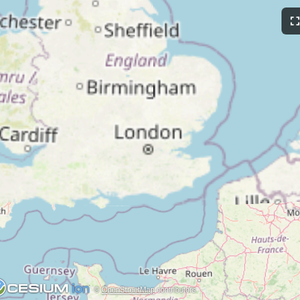
| Map | Three.js | ShaderToy |
 |
 |
 |
| Sheet Music | Wiki Explorer | Cohort Heatmap |
 |
 |
 |
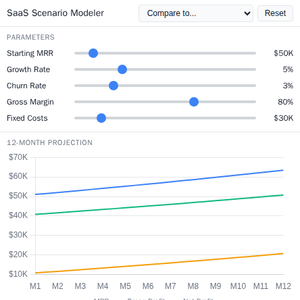
| Scenario Modeler | Budget Allocator | Customer Segmentation |
 |
 |
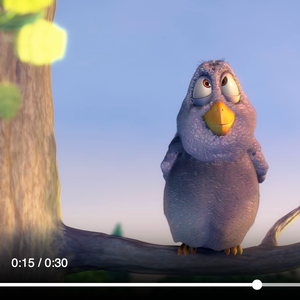 |
| System Monitor | Transcript | Video Resource |
 |
 |
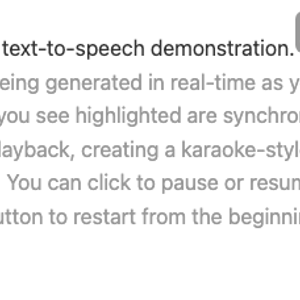 |
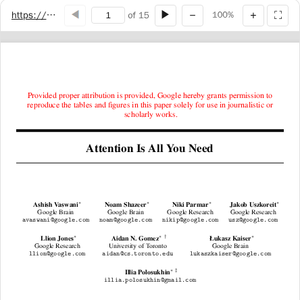
| PDF Server | QR Code (Python) | Say Demo |
Starter Templates
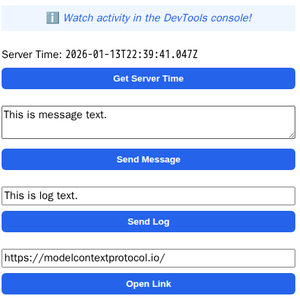 |
The same app built with different frameworks — pick your favorite! React · Vue · Svelte · Preact · Solid · Vanilla JS |
The examples/ directory contains additional demo apps showcasing real-world use cases.
To run all examples:
npm install
npm start
Then open http://localhost:8080/.