| Filename | Latest commit message | Latest commit date |
|---|---|---|
 a0dcf16843
The Windows WSL job is the critical path of every CI run (589 to 752 s). Its checkout sits on the Windows drive, which WSL reaches over 9P, and writing node_modules there is what makes npm ci take about three minutes where the Linux job takes 23 s. The step now copies the tree onto the distro's ext4 filesystem before installing and building, as Microsoft's WSL guidance recommends for I/O-heavy work. The e2e job downloaded the full Chromium build (about 165 MB) on every run, but a headless run with no channel launches chromium-headless-shell and never opens it. `--only-shell` skips that download. Every tsconfig now lists the @types packages it uses (node, bun, vite/client, dom-speech-recognition) instead of relying on TypeScript auto-including everything under node_modules/@types. On TypeScript 5.9 this is a no-op: identical diagnostics across all 48 projects and byte-identical emitted .d.ts files. It is a prerequisite for TypeScript 7, which drops the auto-inclusion; with these lists the Go compiler passes all 48 projects, so that upgrade becomes a version bump once TypeDoc supports it. Two cache-based approaches were evaluated and rejected: an npm cache for the WSL job (npm ci is slow there because of 9P, not downloads, and a prefix-restored cache grows without bound) and a Playwright browser cache (Playwright's docs advise against it; the download is under 10 s). |
||
| .. | ||
| src | ||
| grid-cell.png | ||
| main.ts | ||
| mcp-app.html | ||
| package.json | ||
| README.md | ||
| screenshot.png | ||
| server.ts | ||
| tsconfig.json | ||
| tsconfig.server.json | ||
| vite.config.ts | ||


Transcript Server
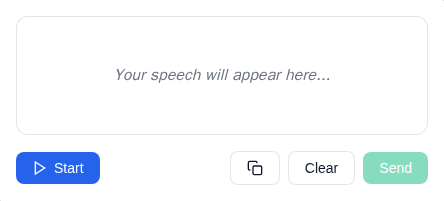
An MCP App Server for live speech transcription using the Web Speech API.
MCP Client Configuration
Add to your MCP client configuration (stdio transport):
{
  "mcpServers": {
    "transcript": {
      "command": "npx",
      "args": [
        "-y",
        "--silent",
        "--registry=https://registry.npmjs.org/",
        "@modelcontextprotocol/server-transcript",
        "--stdio"
      ]
    }
  }
}
Local Development
To test local modifications, use this configuration (replace ~/code/ext-apps with your clone path):
{
  "mcpServers": {
    "transcript": {
      "command": "bash",
      "args": [
        "-c",
        "cd ~/code/ext-apps/examples/transcript-server && npm run build >&2 && node dist/index.js --stdio"
      ]
    }
  }
}
Features
- Live Transcription: Real-time speech-to-text using browser's Web Speech API
- Transitional Model Context: Streams interim transcriptions to the model via
ui/update-model-context, allowing the model to see what the user is saying as they speak - Audio Level Indicator: Visual feedback showing microphone input levels
- Send to Host: Button to send completed transcriptions as a
ui/messageto the MCP host - Start/Stop Control: Toggle listening on and off
- Clear Transcript: Reset the transcript area
Setup
Prerequisites
- Node.js 20+
- Chrome, Edge, or Safari (Web Speech API support)
Installation
npm install
Running
# Development mode (with hot reload)
npm run dev

# Production build and serve
npm run start
Usage
The server exposes a single tool:
transcribe
Opens a live speech transcription interface.
Parameters: None
Example:
{
  "name": "transcribe",
  "arguments": {}
}
How It Works
- Click Start to begin listening
- Speak into your microphone
- Watch your speech appear as text in real-time (interim text is streamed to model context via
ui/update-model-context) - Click Send to send the transcript as a
ui/messageto the host (clears the model context) - Click Clear to reset the transcript
Architecture
transcript-server/
├── server.ts          # MCP server with transcribe tool
├── server-utils.ts    # HTTP transport utilities
├── mcp-app.html       # Transcript UI entry point
├── src/
│   ├── mcp-app.ts     # App logic, Web Speech API integration
│   ├── mcp-app.css    # Transcript UI styles
│   └── global.css     # Base styles
└── dist/              # Built output (single HTML file)
Notes
- Microphone Permission: Requires
allow="microphone"on the sandbox iframe (configured viapermissions: { microphone: {} }in the resource_meta.ui) - Browser Support: Web Speech API is well-supported in Chrome/Edge, with Safari support. Firefox has limited support.
- Continuous Mode: Recognition automatically restarts when it ends, for seamless transcription
Future Enhancements
- Language selection dropdown
- Whisper-based offline transcription (see TRANSCRIPTION.md)
- Export transcript to file
- Timestamps toggle