# Java MCP SDK
Java SDK implementation of the Model Context Protocol, enabling seamless integration with language models and AI tools.
## Features
- Synchronous and Asynchronous MCP Client and MCP Server implementations
- Standard MCP operations support:
- Protocol version compatibility negotiation
- Tool discovery and execution with change notifications
- Tool list change notifications with non-blocking consumer support
- Resource management with URI templates
- Resource subscription system
- Roots list management and notifications
- Prompt handling and management
- Multiple transport implementations:
- Stdio-based transport for process-based communication
- SSE-based transport for HTTP streaming
- Configurable request timeouts
## Installation
Add the following dependency to your Maven project:
```xml
org.springframework.experimental
mcp
0.4.0-SNAPSHOT
```
## Architecture
The SDK follows a layered architecture with clear separation of concerns:
### Core Components Hierarchy
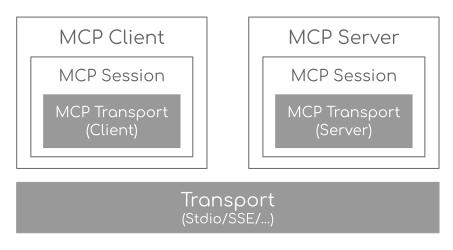 - **Transport Layer (McpTransport)**: Handles JSON-RPC message serialization/deserialization via StdioTransport (stdin/stdout) and SseTransport (HTTP streaming).
- **Session Layer (McpSession)**: Manages communication patterns and state using DefaultMcpSession implementation.
- **Client/Server Layer**: Both use McpSession for sync/async operations, with McpClient handling client-side protocol operations and McpServer managing server-side protocol operations.
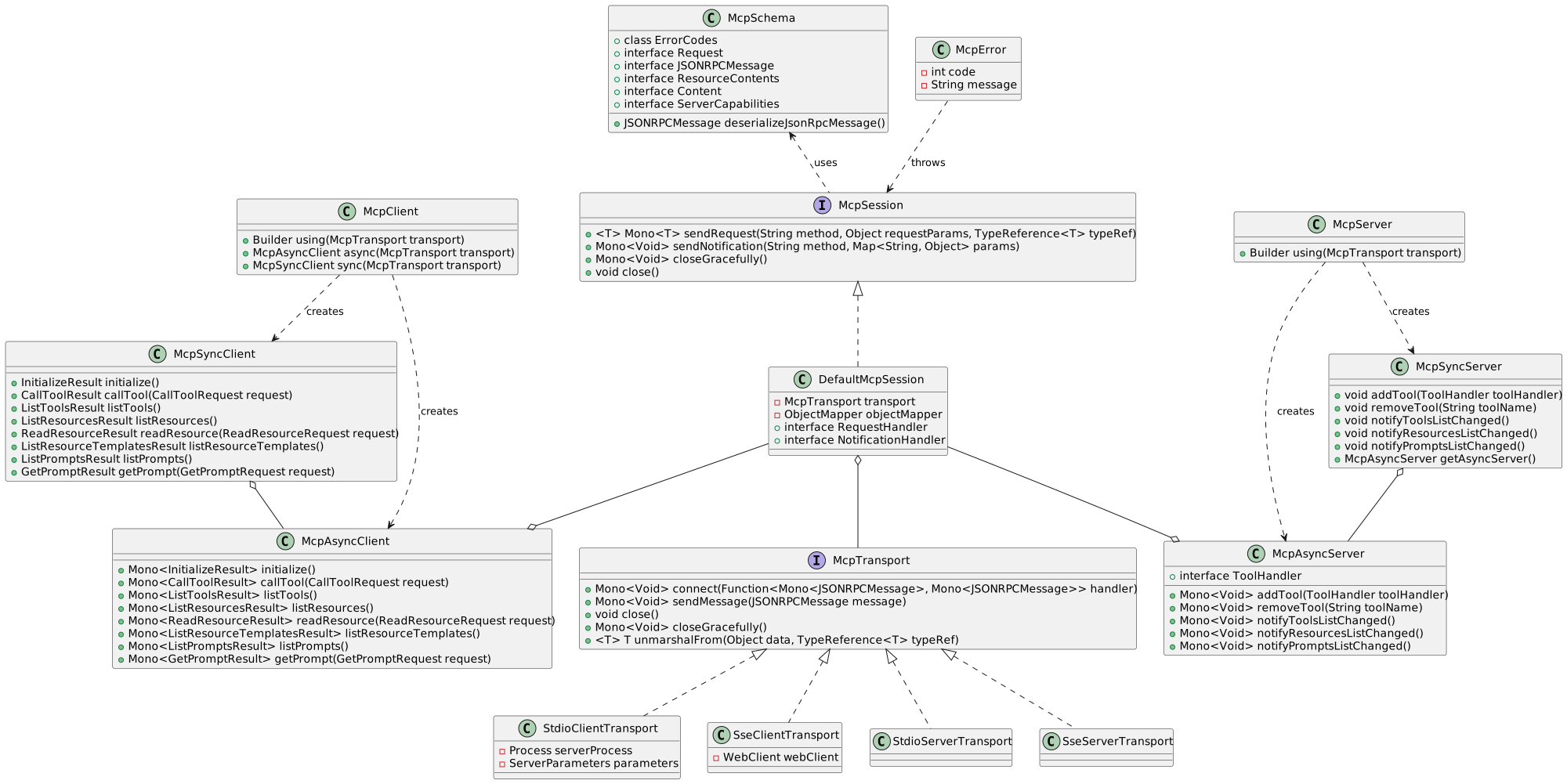
Following class diagram illustrates the layered architecture of the MCP SDK, showing the relationships between core interfaces (McpTransport, McpSession), their implementations, and the client/server components. It highlights how the transport layer connects to sessions, which in turn support both synchronous and asynchronous client/server implementations.
- **Transport Layer (McpTransport)**: Handles JSON-RPC message serialization/deserialization via StdioTransport (stdin/stdout) and SseTransport (HTTP streaming).
- **Session Layer (McpSession)**: Manages communication patterns and state using DefaultMcpSession implementation.
- **Client/Server Layer**: Both use McpSession for sync/async operations, with McpClient handling client-side protocol operations and McpServer managing server-side protocol operations.
Following class diagram illustrates the layered architecture of the MCP SDK, showing the relationships between core interfaces (McpTransport, McpSession), their implementations, and the client/server components. It highlights how the transport layer connects to sessions, which in turn support both synchronous and asynchronous client/server implementations.
 ### Key Interactions
- **Client/Server Initialization**: Transport setup, protocol compatibility check, capability negotiation, and implementation details exchange.
- **Message Flow**: JSON-RPC message handling with validation, type-safe response processing, and error handling.
- **Resource Management**: Resource discovery, URI template-based access, subscription system, and content retrieval.
- **Prompt System**: Discovery, parameter-based retrieval, change notifications, and content management.
- **Tool Execution**: Discovery, parameter validation, timeout-aware execution, and result processing.
## Client Usage Examples
### MCP Client (Sync API)
```java
// Create a sync client with custom configuration
McpSyncClient client = McpClient.using(transport)
.requestTimeout(Duration.ofSeconds(10))
.capabilities(ClientCapabilities.builder()
.roots(true) // Enable roots capability
.sampling() // Enable sampling capability
.build())
.sync();
// Initialize connection
client.initialize();
// List available tools
ListToolsResult tools = client.listTools();
// Call a tool
CallToolResult result = client.callTool(
new CallToolRequest("calculator",
Map.of("operation", "add", "a", 2, "b", 3))
);
// List and read resources
ListResourcesResult resources = client.listResources();
ReadResourceResult resource = client.readResource(
new ReadResourceRequest("resource://uri")
);
// List and use prompts
ListPromptsResult prompts = client.listPrompts();
GetPromptResult prompt = client.getPrompt(
new GetPromptRequest("greeting", Map.of("name", "Spring"))
);
// Add/remove roots
client.addRoot(new Root("file:///path", "description"));
client.removeRoot("file:///path");
client.rootsListChangedNotification();
// Close client
client.closeGracefully();
```
### MCP Client (Async API)
```java
// Create an async client with custom configuration
McpAsyncClient client = McpClient.using(transport)
.requestTimeout(Duration.ofSeconds(10))
.capabilities(ClientCapabilities.builder()
.roots(true) // Enable roots capability
.sampling() // Enable sampling capability
.build())
.toolsChangeConsumer(tools -> {
logger.info("Tools updated: {}", tools);
})
.resourcesChangeConsumer(resources -> {
logger.info("Resources updated: {}", resources);
})
.promptsChangeConsumer(prompts -> {
logger.info("Prompts updated: {}", prompts);
})
.async();
// Initialize connection
client.initialize()
.flatMap(initResult -> {
// List available tools
return client.listTools();
})
.flatMap(tools -> {
// Call a tool
return client.callTool(new CallToolRequest(
"calculator",
Map.of("operation", "add", "a", 2, "b", 3)
));
})
.flatMap(result -> {
// List and read resources
return client.listResources()
.flatMap(resources ->
client.readResource(new ReadResourceRequest("resource://uri"))
);
})
.flatMap(resource -> {
// List and use prompts
return client.listPrompts()
.flatMap(prompts ->
client.getPrompt(new GetPromptRequest(
"greeting",
Map.of("name", "Spring")
))
);
})
.flatMap(prompt -> {
// Add/remove roots
return client.addRoot(new Root("file:///path", "description"))
.then(client.removeRoot("file:///path"))
.then(client.rootsListChangedNotification());
})
.doFinally(signalType -> {
// Close client
client.closeGracefully().subscribe();
})
.subscribe();
```
### Client Transport Options
#### StdioClientTransport
```java
// Create transport for process-based communication
ServerParameters params = ServerParameters.builder("npx")
.args("-y", "@modelcontextprotocol/server-everything", "dir")
.build();
McpTransport transport = new StdioClientTransport(params);
```
#### SseClientTransport
```java
// Create transport for HTTP streaming
WebClient.Builder webClientBuilder = WebClient.builder()
.baseUrl("http://your-mcp-server");
McpTransport transport = new SseClientTransport(webClientBuilder);
```
## Server Usage Examples
### MCP Server (Sync API)
```java
// Create a server with custom configuration
McpSyncServer syncServer = McpServer.using(transport)
.info("my-server", "1.0.0")
.capabilities(ServerCapabilities.builder()...build())
.tools(new CalculatorTool())
.resources(resourceRegistration)
.prompts(promptRegistration)
.sync();
// Add a tool handler at runtime
syncServer.addTool(new CalculatorTool());
// Remove a tool handler at runtime
syncServer.removeTool("calculator");
// Add a resource at runtime
syncServer.addResource(resourceRegistration);
// Remove a resource at runtime
syncServer.removeResource(resourceUri);
// Add a prompt at runtime
syncServer.addPrompt(promptRegistration);
// Remove a prompt at runtime
syncServer.removePrompt(promptName);
// Graceful shutdown
syncServer.closeGracefully();
```
### MCP Server (Async API)
```java
// Create an async server with custom configuration
McpAsyncServer asyncServer = McpServer.using(transport)
.info("my-server", "1.0.0")
.capabilities(ServerCapabilities.builder()...build())
.tools(new CalculatorTool())
.resources(resourceRegistration)
.prompts(promptRegistration)
.async();
// Add a tool handler at runtime
asyncServer.addTool(new CalculatorTool())
.doOnSuccess(v -> logger.info("Tool added"))
.subscribe();
// Remove a tool handler at runtime
asyncServer.removeTool("calculator")
.doOnSuccess(v -> logger.info("Tool removed"))
.subscribe();
// Add a resource at runtime
asyncServer.addResource(resourceRegistration)
.doOnSuccess(v -> logger.info("Resource added"))
.subscribe();
// Remove a resource at runtime
asyncServer.removeResource(resourceUri)
.doOnSuccess(v -> logger.info("Resource removed"))
.subscribe();
// Add a prompt at runtime
asyncServer.addPrompt(promptRegistration)
.doOnSuccess(v -> logger.info("Prompt added"))
.subscribe();
// Remove a prompt at runtime
asyncServer.removePrompt(promptName)
.doOnSuccess(v -> logger.info("Prompt removed"))
.subscribe();
// Notify clients of changes
asyncServer.notifyToolsListChanged().subscribe();
asyncServer.notifyResourcesListChanged().subscribe();
asyncServer.notifyPromptsListChanged().subscribe();
// Graceful shutdown
asyncServer.closeGracefully().subscribe();
```
### Server Transport Options
#### StdioServerTransport
```java
// Create transport with custom ObjectMapper
ObjectMapper mapper = new ObjectMapper();
StdioServerTransport transport = new StdioServerTransport(mapper);
```
Provides bidirectional JSON-RPC message handling over standard input/output streams with non-blocking message processing, serialization/deserialization, and graceful shutdown support.
#### SseServerTransport
```java
// Create SSE transport
ObjectMapper mapper = new ObjectMapper();
String messageEndpoint = "/mcp/message";
SseServerTransport transport = new SseServerTransport(mapper, messageEndpoint);
// Get router function for web server configuration
RouterFunction router = transport.getRouterFunction();
```
Implements the MCP HTTP with SSE transport specification, providing concurrent client connections through SSE endpoints with message routing, session management, and graceful shutdown capabilities.
### Server Capabilities
The server can be configured with various capabilities:
```java
var capabilities = ServerCapabilities.builder()
.resources(false, true) // Resource support with list changes notifications
.tools(true) // Tool support with list changes notifications
.prompts(true) // Prompt support with list changes notifications
.build();
```
### Tool Registration
```java
var toolRegistration = new ToolRegistration(
new Tool("calculator", "Basic calculator", Map.of(
"operation", "string",
"a", "number",
"b", "number"
)),
arguments -> {
// Tool implementation
return new CallToolResult(result, false);
}
);
```
### Resource Registration
```java
var resourceRegistration = new ResourceRegistration(
new Resource("custom://resource", "name", "description", "mime-type", null),
request -> {
// Resource read implementation
return new ReadResourceResult(contents);
}
);
```
### Prompt Registration
```java
var promptRegistration = new PromptRegistration(
new Prompt("greeting", "description", List.of(
new PromptArgument("name", "description", true)
)),
request -> {
// Prompt implementation
return new GetPromptResult(description, messages);
}
);
```
## Error Handling
The SDK provides comprehensive error handling through the McpError class, covering protocol compatibility, transport communication, JSON-RPC messaging, tool execution, resource management, prompt handling, timeouts, and connection issues. This unified error handling approach ensures consistent and reliable error management across both synchronous and asynchronous operations.
## Contributing
See [CONTRIBUTING.md](../CONTRIBUTING.md) for details on our code of conduct and the process for submitting pull requests.
### Key Interactions
- **Client/Server Initialization**: Transport setup, protocol compatibility check, capability negotiation, and implementation details exchange.
- **Message Flow**: JSON-RPC message handling with validation, type-safe response processing, and error handling.
- **Resource Management**: Resource discovery, URI template-based access, subscription system, and content retrieval.
- **Prompt System**: Discovery, parameter-based retrieval, change notifications, and content management.
- **Tool Execution**: Discovery, parameter validation, timeout-aware execution, and result processing.
## Client Usage Examples
### MCP Client (Sync API)
```java
// Create a sync client with custom configuration
McpSyncClient client = McpClient.using(transport)
.requestTimeout(Duration.ofSeconds(10))
.capabilities(ClientCapabilities.builder()
.roots(true) // Enable roots capability
.sampling() // Enable sampling capability
.build())
.sync();
// Initialize connection
client.initialize();
// List available tools
ListToolsResult tools = client.listTools();
// Call a tool
CallToolResult result = client.callTool(
new CallToolRequest("calculator",
Map.of("operation", "add", "a", 2, "b", 3))
);
// List and read resources
ListResourcesResult resources = client.listResources();
ReadResourceResult resource = client.readResource(
new ReadResourceRequest("resource://uri")
);
// List and use prompts
ListPromptsResult prompts = client.listPrompts();
GetPromptResult prompt = client.getPrompt(
new GetPromptRequest("greeting", Map.of("name", "Spring"))
);
// Add/remove roots
client.addRoot(new Root("file:///path", "description"));
client.removeRoot("file:///path");
client.rootsListChangedNotification();
// Close client
client.closeGracefully();
```
### MCP Client (Async API)
```java
// Create an async client with custom configuration
McpAsyncClient client = McpClient.using(transport)
.requestTimeout(Duration.ofSeconds(10))
.capabilities(ClientCapabilities.builder()
.roots(true) // Enable roots capability
.sampling() // Enable sampling capability
.build())
.toolsChangeConsumer(tools -> {
logger.info("Tools updated: {}", tools);
})
.resourcesChangeConsumer(resources -> {
logger.info("Resources updated: {}", resources);
})
.promptsChangeConsumer(prompts -> {
logger.info("Prompts updated: {}", prompts);
})
.async();
// Initialize connection
client.initialize()
.flatMap(initResult -> {
// List available tools
return client.listTools();
})
.flatMap(tools -> {
// Call a tool
return client.callTool(new CallToolRequest(
"calculator",
Map.of("operation", "add", "a", 2, "b", 3)
));
})
.flatMap(result -> {
// List and read resources
return client.listResources()
.flatMap(resources ->
client.readResource(new ReadResourceRequest("resource://uri"))
);
})
.flatMap(resource -> {
// List and use prompts
return client.listPrompts()
.flatMap(prompts ->
client.getPrompt(new GetPromptRequest(
"greeting",
Map.of("name", "Spring")
))
);
})
.flatMap(prompt -> {
// Add/remove roots
return client.addRoot(new Root("file:///path", "description"))
.then(client.removeRoot("file:///path"))
.then(client.rootsListChangedNotification());
})
.doFinally(signalType -> {
// Close client
client.closeGracefully().subscribe();
})
.subscribe();
```
### Client Transport Options
#### StdioClientTransport
```java
// Create transport for process-based communication
ServerParameters params = ServerParameters.builder("npx")
.args("-y", "@modelcontextprotocol/server-everything", "dir")
.build();
McpTransport transport = new StdioClientTransport(params);
```
#### SseClientTransport
```java
// Create transport for HTTP streaming
WebClient.Builder webClientBuilder = WebClient.builder()
.baseUrl("http://your-mcp-server");
McpTransport transport = new SseClientTransport(webClientBuilder);
```
## Server Usage Examples
### MCP Server (Sync API)
```java
// Create a server with custom configuration
McpSyncServer syncServer = McpServer.using(transport)
.info("my-server", "1.0.0")
.capabilities(ServerCapabilities.builder()...build())
.tools(new CalculatorTool())
.resources(resourceRegistration)
.prompts(promptRegistration)
.sync();
// Add a tool handler at runtime
syncServer.addTool(new CalculatorTool());
// Remove a tool handler at runtime
syncServer.removeTool("calculator");
// Add a resource at runtime
syncServer.addResource(resourceRegistration);
// Remove a resource at runtime
syncServer.removeResource(resourceUri);
// Add a prompt at runtime
syncServer.addPrompt(promptRegistration);
// Remove a prompt at runtime
syncServer.removePrompt(promptName);
// Graceful shutdown
syncServer.closeGracefully();
```
### MCP Server (Async API)
```java
// Create an async server with custom configuration
McpAsyncServer asyncServer = McpServer.using(transport)
.info("my-server", "1.0.0")
.capabilities(ServerCapabilities.builder()...build())
.tools(new CalculatorTool())
.resources(resourceRegistration)
.prompts(promptRegistration)
.async();
// Add a tool handler at runtime
asyncServer.addTool(new CalculatorTool())
.doOnSuccess(v -> logger.info("Tool added"))
.subscribe();
// Remove a tool handler at runtime
asyncServer.removeTool("calculator")
.doOnSuccess(v -> logger.info("Tool removed"))
.subscribe();
// Add a resource at runtime
asyncServer.addResource(resourceRegistration)
.doOnSuccess(v -> logger.info("Resource added"))
.subscribe();
// Remove a resource at runtime
asyncServer.removeResource(resourceUri)
.doOnSuccess(v -> logger.info("Resource removed"))
.subscribe();
// Add a prompt at runtime
asyncServer.addPrompt(promptRegistration)
.doOnSuccess(v -> logger.info("Prompt added"))
.subscribe();
// Remove a prompt at runtime
asyncServer.removePrompt(promptName)
.doOnSuccess(v -> logger.info("Prompt removed"))
.subscribe();
// Notify clients of changes
asyncServer.notifyToolsListChanged().subscribe();
asyncServer.notifyResourcesListChanged().subscribe();
asyncServer.notifyPromptsListChanged().subscribe();
// Graceful shutdown
asyncServer.closeGracefully().subscribe();
```
### Server Transport Options
#### StdioServerTransport
```java
// Create transport with custom ObjectMapper
ObjectMapper mapper = new ObjectMapper();
StdioServerTransport transport = new StdioServerTransport(mapper);
```
Provides bidirectional JSON-RPC message handling over standard input/output streams with non-blocking message processing, serialization/deserialization, and graceful shutdown support.
#### SseServerTransport
```java
// Create SSE transport
ObjectMapper mapper = new ObjectMapper();
String messageEndpoint = "/mcp/message";
SseServerTransport transport = new SseServerTransport(mapper, messageEndpoint);
// Get router function for web server configuration
RouterFunction router = transport.getRouterFunction();
```
Implements the MCP HTTP with SSE transport specification, providing concurrent client connections through SSE endpoints with message routing, session management, and graceful shutdown capabilities.
### Server Capabilities
The server can be configured with various capabilities:
```java
var capabilities = ServerCapabilities.builder()
.resources(false, true) // Resource support with list changes notifications
.tools(true) // Tool support with list changes notifications
.prompts(true) // Prompt support with list changes notifications
.build();
```
### Tool Registration
```java
var toolRegistration = new ToolRegistration(
new Tool("calculator", "Basic calculator", Map.of(
"operation", "string",
"a", "number",
"b", "number"
)),
arguments -> {
// Tool implementation
return new CallToolResult(result, false);
}
);
```
### Resource Registration
```java
var resourceRegistration = new ResourceRegistration(
new Resource("custom://resource", "name", "description", "mime-type", null),
request -> {
// Resource read implementation
return new ReadResourceResult(contents);
}
);
```
### Prompt Registration
```java
var promptRegistration = new PromptRegistration(
new Prompt("greeting", "description", List.of(
new PromptArgument("name", "description", true)
)),
request -> {
// Prompt implementation
return new GetPromptResult(description, messages);
}
);
```
## Error Handling
The SDK provides comprehensive error handling through the McpError class, covering protocol compatibility, transport communication, JSON-RPC messaging, tool execution, resource management, prompt handling, timeouts, and connection issues. This unified error handling approach ensures consistent and reliable error management across both synchronous and asynchronous operations.
## Contributing
See [CONTRIBUTING.md](../CONTRIBUTING.md) for details on our code of conduct and the process for submitting pull requests.