 298e884ec3
* chore: add stable spec release 2026-01-26 - Use git mv to copy specification from draft to specification/2026-01-26/apps.mdx (preserves history) - Update status from 'Draft' to 'Stable (2026-01-26)' - Add specification version table to README - Update Resources section with links to both stable and draft specs * chore: bump version to 1.0.0 - Update main package version from 0.4.2 to 1.0.0 - Update all example package versions to 1.0.0 - Regenerate package-lock.json * prettier * chore: align protocol version with spec release 2026-01-26 - Add 'Protocol Version: 2026-01-26' to spec header - Update LATEST_PROTOCOL_VERSION from '2025-11-21' to '2026-01-26' - Update spec examples to use '2026-01-26' protocol version - Add '2025-11-21' to SUPPORTED_PROTOCOL_VERSIONS for backwards compatibility * chore: update spec references to stable 2026-01-26 - Update typedoc.config.mjs navigation link - Update docs/overview.md spec links (10 occurrences) - Update plugins/mcp-apps/skills/create-mcp-app/SKILL.md spec link - Update src/spec.types.ts @see links - Update AGENTS.md spec path - Regenerate src/generated/schema.ts with updated links * chore: simplify versioning - first stable release - Remove backwards compatibility version (2025-11-21) - this is the first stable release - Remove redundant 'Protocol Version' header - spec version IS the protocol version * chore: add history reference comment to stable spec
2.6 KiB
2.6 KiB
Example: Basic Server (React)
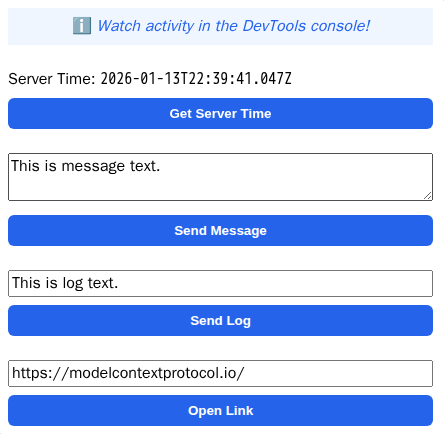
An MCP App example with a React UI.
Tip
Looking for a vanilla JavaScript example? See
basic-server-vanillajs!
MCP Client Configuration
Add to your MCP client configuration (stdio transport):
{
  "mcpServers": {
    "basic-react": {
      "command": "npx",
      "args": [
        "-y",
        "--silent",
        "--registry=https://registry.npmjs.org/",
        "@modelcontextprotocol/server-basic-react",
        "--stdio"
      ]
    }
  }
}
Local Development
To test local modifications, use this configuration (replace ~/code/ext-apps with your clone path):
{
  "mcpServers": {
    "basic-react": {
      "command": "bash",
      "args": [
        "-c",
        "cd ~/code/ext-apps/examples/basic-server-react && npm run build >&2 && node dist/index.js --stdio"
      ]
    }
  }
}
Overview
- Tool registration with a linked UI resource
- React UI using the
useApp()hook - App communication APIs:
callServerTool,sendMessage,sendLog,openLink
Key Files
server.ts- MCP server with tool and resource registrationmcp-app.html/src/mcp-app.tsx- React UI usinguseApp()hook
Getting Started
npm install
npm run dev
How It Works
- The server registers a
get-timetool with metadata linking it to a UI HTML resource (ui://get-time/mcp-app.html). - When the tool is invoked, the Host renders the UI from the resource.
- The UI uses the MCP App SDK API to communicate with the host and call server tools.
Build System
This example bundles into a single HTML file using Vite with vite-plugin-singlefile — see vite.config.ts. This allows all UI content to be served as a single MCP resource. Alternatively, MCP apps can load external resources by defining _meta.ui.csp.resourceDomains in the UI resource metadata.