| Filename | Latest commit message | Latest commit date |
|---|---|---|
 574a768e09
* feat: add script to generate 300x300 grid-cell.png screenshots for examples
- Add generate-grid-screenshots.spec.ts Playwright test to capture screenshots
- Add npm run generate:screenshots command (Docker-based for Santa compatibility)
- Add sharp dependency for image resizing with centered-fill mode
- Generate grid-cell.png for 14 example servers (only React for basic-server-* series)
The screenshots are 300x300 PNG images cropped with centered fill mode,
suitable for use in a grid layout showcasing the examples.
* docs: add example gallery grid to README
Add a 3-column visual grid showcasing 14 example MCP Apps with:
- Thumbnail screenshots (300x300 grid-cell.png)
- Clickable links to example directories
- Hover tooltips with brief descriptions
Organized by visual impact: 3D/WebGL examples first, then
visualizations, charts, monitoring, and starter templates.
* fix: use aspect-fit instead of crop for screenshots
Change from fit: 'cover' (crops) to fit: 'contain' (letterbox)
so the full app content is visible without cropping.
* feat: improve screenshot generation
- Constrain viewport to 500px width for consistent rendering
- Wait 5 seconds for full app load (tiles, animations, data)
- Screenshot just the inner iframe (no extra whitespace)
- Save both screenshot.png (full-size) and grid-cell.png (300x300 thumbnail)
- Use contain mode to preserve aspect ratio
* fix: use cover mode with top alignment for grid thumbnails
No letterboxing - crops to fill 300x300, aligned to top so headers
and important content are always visible.
* feat: improve screenshot gallery
- Remove integration-server from gallery (it's for E2E testing only)
- Add 30s extra wait for Map and Video servers to load fully
- Improve Three.js default scene: isometric rotation + better lighting
- Update README: Starter Templates row with links to all framework variants
(React, Vue, Svelte, Preact, Solid, Vanilla JS)
- Regenerate all screenshots with updated settings
* fix: improve README gallery layout
- Fix uneven column widths by using minimal separator
- Move Starter Templates to separate 2-cell table with description
- Add screenshot.png to top of each example README (13 examples)
- Shorten tooltips for cleaner table
* revert to document.write again; cesiumjs doesn't like srcdoc, period.
* fix: map-server screenshot now renders properly
- Merged ochafik/post-fixes which reverts sandbox from srcdoc to document.write
(CesiumJS doesn't work with srcdoc iframes)
- Fixed map-server name in screenshot test ('Map Server' not 'CesiumJS Map Server')
- Simplified screenshot generation script (removed complex debugging code)
- Increased map-server wait time to 45s for reliable tile loading
- Regenerated all 13 screenshots
* fix: remove redundant screenshots from READMEs
Remove the simple \ line from READMEs that
already had nicer HTML table screenshots. Keep it only for examples
that didn't have existing screenshots.
* docs: move gallery to Examples section
- Move screenshot gallery from top of README to Examples section
- Remove redundant list of basic examples (now shown visually in gallery)
- Clean up duplicate run instructions
* fix: remove empty header row from starter templates table
* fix: remove empty header rows from both tables
* fix: add prettier-ignore to prevent table header expansion
* feat: use custom screenshot for video-resource-server
- Use better screenshot from PR #253 comment showing actual video playback
- Skip video-resource-server in screenshot generation script
- Add SKIP_SERVERS set for manually maintained screenshots
* fix: revert unrelated map-server name change
* fix: use correct server name 'CesiumJS Map Server' in screenshot test
|
||
| .. | ||
| src | ||
| grid-cell.png | ||
| mcp-app.html | ||
| package.json | ||
| README.md | ||
| screenshot.png | ||
| server-utils.ts | ||
| server.ts | ||
| tsconfig.json | ||
| vite.config.ts | ||


Example: Budget Allocator App
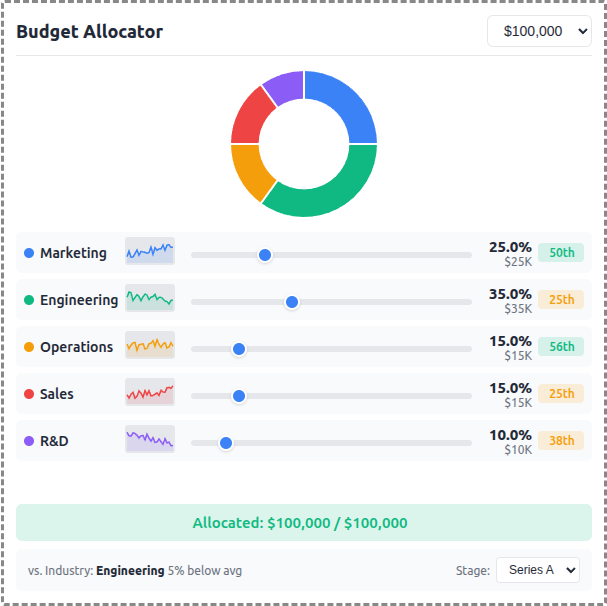
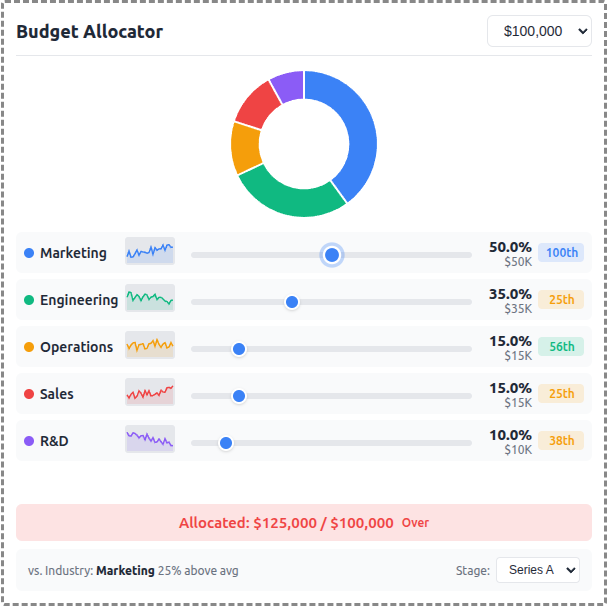
An interactive budget allocation tool demonstrating real-time data visualization with MCP Apps.
 |
 |
 |
Features
- Interactive Sliders: Adjust budget allocation across 5 categories (Marketing, Engineering, Operations, Sales, R&D)
- Donut Chart: Real-time visualization of allocation distribution using Chart.js
- Sparkline Trends: 24-month historical allocation data per category
- Percentile Badges: Compare your allocation vs. industry benchmarks
- Stage Selector: Switch between Seed, Series A, Series B, and Growth benchmarks
- Budget Presets: Quick selection of $50K, $100K, $250K, or $500K totals
Running
-
Install dependencies:
npm install -
Build and start the server:
npm run start:http # for Streamable HTTP transport # OR npm run start:stdio # for stdio transport -
View using the
basic-hostexample or another MCP Apps-compatible host.
Architecture
Server (server.ts)
Exposes a single get-budget-data tool that returns:
- Category definitions with colors and default allocations
- Historical data (~120 data points) - 24 months of allocation history per category
- Industry benchmarks (~60 data points) - Aggregated percentile data by company stage
The tool is linked to a UI resource via _meta.ui.resourceUri.
App (src/mcp-app.ts)
- Uses Chart.js for the donut chart visualization
- Renders sparkline trends using inline SVG
- Computes percentile rankings client-side from benchmark data
- Updates all UI elements reactively on slider changes