| Filename | Latest commit message | Latest commit date |
|---|---|---|
 68c58b60b7
* feat(pdf-server): refit on inline→fullscreen + pinch-to-zoom in fullscreen
Two related fixes for the fullscreen reading experience:
1) Inline → fullscreen left the page at the cramped inline scale.
computeFitToWidthScale() returned null when the natural page
already fit (availableWidth >= pageWidth), so going from a
narrow inline iframe (~67%) to a wide fullscreen container
produced null → no rescale. Now caps at min(1.0, fit) so the
refit handler sees 1.0 ≠ 0.67 and re-renders. Display-mode
handling moves before the containerDimensions refit so the
.fullscreen padding lands before we measure clientWidth, and
the inline→fullscreen edge triggers refit explicitly (some
hosts send displayMode without containerDimensions).
2) Pinch-to-zoom in fullscreen. Two input paths:
- wheel + ctrlKey → trackpad pinch (Chrome/FF/Edge/Safari).
exp(-deltaY/100) per pdf.js; 150ms settle then commit.
- two-finger touch → mobile. Distance ratio against touchstart;
commit on touchend, revert on touchcancel.
Both apply a CSS transform to .page-wrapper for live feedback,
then commit one renderPage() at gesture end (renderPage is
heavy: PDF.js raster + TextLayer + AnnotationLayer rebuild).
touch-action: pan-x pan-y on the fullscreen canvas-container
keeps native panning working while we own the pinch.
Incidental: resetZoom (Cmd+0) now snaps to fit, not blindly 1.0,
so it doesn't overflow a narrow inline iframe; ZOOM_MIN/MAX
constants; shared pageWrapperEl ref.
* test(pdf-viewer-zoom): start narrow — basic-host doesn't emit containerDimensions on resize
The first test loaded at 1400w then resized to 500w expecting the
viewer to refit, but basic-host only sends containerDimensions at
init (implementation.ts:297) — never on window resize. Start narrow
so the initial fit lands <100%, then widen + fullscreen. Matches
the webtop verification flow that confirmed 67% → 100%.
* fix(pdf-server): drive fullscreen refit from ResizeObserver, not host messages
The displayMode hook ran refitToWidth() but Claude Desktop resizes
the iframe element AFTER (or independently of) sending the displayMode
update — clientWidth was still the inline width when we measured.
ResizeObserver on the canvas-container fires after the iframe has
actually laid out at the new size, so the measurement is fresh.
Gated to width-growth only: in inline mode renderPage() →
requestFitToContent() → host shrinks iframe to page width, which
would otherwise loop the scale down to ZOOM_MIN. Growth-only covers
inline→fullscreen and window-widen without the feedback loop.
* fix(basic-host): emit containerDimensions on iframe resize
Per spec, hosts notify views of container dimension changes via
host-context-changed. basic-host only sent containerDimensions once
at init — never on window resize or after the fullscreen panel
toggle. ResizeObserver on the iframe sends {width, maxHeight: 6000}
on every layout change; height stays flexible so views can keep
driving it via sendSizeChanged.
Doesn't replace the viewer-side ResizeObserver (defensive against
hosts we don't control), but makes the reference host spec-compliant.
* fix(pdf-server): scale UP to fill width in fullscreen, not just down
The previous fit cap of 1.0 meant a 612pt page in a 1400px fullscreen
container stayed at 100% — natural size, acres of empty space.
Fullscreen now caps at ZOOM_MAX so the page fills the available
width. Inline keeps the 1.0 cap (the iframe sizes to the page via
sendSizeChanged; growing past 1.0 would just make the iframe huge).
Exit-fullscreen refits back down to ≤1.0; if userHasZoomed (so
refit no-ops) fall back to requestFitToContent so the iframe still
shrinks to whatever scale they left it at.
* test(pdf-viewer-zoom): expect fullscreen to fill width (>100%), pinch out
Fullscreen fit now scales up past 100%, so the entering-fullscreen
assertion is >inlineZoom+50, not =100. The pinch test pinches OUT
(deltaY>0) so it doesn't immediately hit ZOOM_MAX from a ~220%
starting point.
* fix(pdf-server): fullscreen fit-to-PAGE, not fit-to-width
Fit-to-width on a wide screen filled the width but left the page
scrolling vertically — "fits" should mean the whole page is visible.
computeFitScale (renamed) now returns min(widthFit, heightFit) in
fullscreen so the page sits centred without scroll. Inline keeps
fit-to-width capped at 1.0 (height is host-driven via sendSizeChanged).
ResizeObserver now reacts to height changes too in fullscreen — the
inline width-growth-only gate stays (requestFitToContent loop guard),
but in fullscreen requestFitToContent early-returns so any size change
is safe to refit on.
e2e: assert no overflow in fullscreen instead of a magic zoom %.
* fix(pdf-server): respect safe-area insets in fullscreen fit-to-page
The host's chat input / home indicator overlays the bottom of the
fullscreen iframe (reported via safeAreaInsets). The toolbar already
honoured top/left/right; the canvas-container now adds the bottom +
side insets to its padding so the page sits above the overlay.
computeFitScale subtracts padding, so fit-to-page lands clear.
ResizeObserver watches the content box, so inset changes re-trigger
the fit.
* fix(pdf-server): clear pinch transform in same frame as canvas resize
commitPinch cleared the CSS transform BEFORE renderPage's first
await — for one frame the page snapped back to the old rendered
size, then jumped forward when the canvas resized. renderPage now
clears the transform immediately after setting canvas.style.width/
height, so the size handoff is atomic.
Also bump the wheel settle timer 150→200ms; slow trackpad pinches
can leave >150ms gaps and would commit mid-gesture.
* fix(pdf-server): no blank flash on pinch commit; clamp Ctrl+mousewheel; basic-host observer cleanup
Three review follow-ups:
1) Snap on pinch release: setting canvasEl.width clears the backing
store, so between the resize and page.render() completing the
page was blank. Snapshot the old bitmap first and drawImage it
scaled as a placeholder; the real render paints over it. Gated
on a transform being present so page-nav renders aren't affected.
2) Ctrl + physical mouse wheel sent deltaY≈±100 → exp(±1)≈2.7× per
notch, slamming straight to ZOOM_MIN/MAX. Clamp per-event delta
to ±25 (≈±28% per notch); trackpad pinch deltas are ~±1-10 so
the clamp is a no-op there.
3) basic-host's iframe ResizeObserver had no disposal path. Chained
disconnect() into appBridge.onclose (Protocol base class hook).
* simplify(pdf-server): pinch snap was transform-origin mismatch, not bitmap
The snap on pinch release was the page jumping vertically:
transform-origin: center center scales around the wrapper's middle,
but the flex container is align-items: flex-start so on commit the
canvas grows from the TOP. Preview top edge moved up; committed top
edge stays put → jump down. transform-origin: 50% 0 matches the
layout anchor, no jump.
Drop the canvas-snapshot placeholder (over-engineered, wrong fix),
the dead transition='' lines (.page-wrapper has no CSS transition),
and the containerDimensions→refit hook (ResizeObserver covers actual
size changes; the host message isn't load-bearing).
|
||
| .. | ||
| src | ||
| .gitignore | ||
| .mcpbignore | ||
| grid-cell.png | ||
| icon.png | ||
| main.ts | ||
| manifest.json | ||
| mcp-app.html | ||
| package.json | ||
| pdf-icon.svg | ||
| README.md | ||
| screenshot.png | ||
| server.test.ts | ||
| server.ts | ||
| tsconfig.json | ||
| tsconfig.server.json | ||
| vite.config.ts | ||


PDF Server
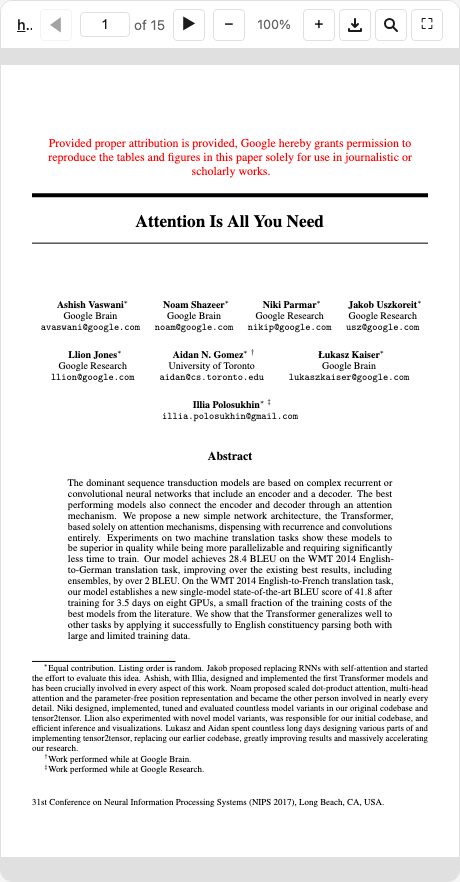
An interactive PDF viewer using PDF.js. Supports local files and remote URLs from academic sources (arxiv, biorxiv, zenodo, etc).
MCP Client Configuration
Add to your MCP client configuration (stdio transport):
{
  "mcpServers": {
    "pdf": {
      "command": "npx",
      "args": [
        "-y",
        "--silent",
        "--registry=https://registry.npmjs.org/",
        "@modelcontextprotocol/server-pdf",
        "--stdio"
      ]
    }
  }
}
Local Development
To test local modifications, use this configuration (replace ~/code/ext-apps with your clone path):
{
  "mcpServers": {
    "pdf": {
      "command": "bash",
      "args": [
        "-c",
        "cd ~/code/ext-apps/examples/pdf-server && npm run build >&2 && node dist/index.js --stdio"
      ]
    }
  }
}
What This Example Demonstrates
1. Chunked Data Through Size-Limited Tool Calls
On some host platforms, tool calls have size limits, so large PDFs cannot be sent in a single response. This example streams PDFs in chunks using HTTP Range requests:
Server side (server.ts):
// Returns chunks with pagination metadata
{
  (bytes, offset, byteCount, totalBytes, hasMore);
}
Client side (mcp-app.ts):
// Load in chunks with progress
while (hasMore) {
  const chunk = await app.callServerTool({
    name: "read_pdf_bytes",
    arguments: { url, offset },
  });
  chunks.push(base64ToBytes(chunk.bytes));
  offset += chunk.byteCount;
  hasMore = chunk.hasMore;
  updateProgress(offset, chunk.totalBytes);
}
2. Model Context Updates
The viewer keeps the model informed about what the user is seeing:
app.updateModelContext({
  content: [
    {
      type: "text",
      text: `PDF viewer | "${title}" | Current Page: ${page}/${total}\n\nPage content:\n${pageText}`,
    },
  ],
});
This enables the model to answer questions about the current page or selected text.
3. Display Modes: Fullscreen vs Inline
- Inline mode: App requests height changes to fit content
- Fullscreen mode: App fills the screen with internal scrolling
// Request fullscreen
app.requestDisplayMode({ mode: "fullscreen" });

// Listen for mode changes
app.ondisplaymodechange = (mode) => {
  if (mode === "fullscreen") enableScrolling();
  else disableScrolling();
};
4. External Links (openLink)
The viewer demonstrates opening external links (e.g., to the original arxiv page):
titleEl.onclick = () => app.openLink(sourceUrl);
5. View Persistence
Page position is saved per-view using viewUUID and localStorage.
6. Dark Mode / Theming
The viewer syncs with the host's theme using CSS light-dark() and the SDK's theming APIs:
app.onhostcontextchanged = (ctx) => {
  if (ctx.theme) applyDocumentTheme(ctx.theme);
  if (ctx.styles?.variables) applyHostStyleVariables(ctx.styles.variables);
};
Usage
# Default: loads a sample arxiv paper
bun examples/pdf-server/main.ts

# Load local files (converted to file:// URLs)
bun examples/pdf-server/main.ts ./docs/paper.pdf /path/to/thesis.pdf

# Load from URLs
bun examples/pdf-server/main.ts https://arxiv.org/pdf/2401.00001.pdf

# Mix local and remote
bun examples/pdf-server/main.ts ./local.pdf https://arxiv.org/pdf/2401.00001.pdf

# stdio mode for MCP clients
bun examples/pdf-server/main.ts --stdio ./papers/
Additional Flags
--debug— Enable verbose server-side logging.--enable-interact— Enable theinteracttool in HTTP mode (see Deployment). Not needed for stdio.--writeable-uploads-root— Allow saving annotated PDFs back to files under client roots nameduploads(Claude Desktop mounts attachments there; writes are refused by default).
Deployment
The interact tool relies on an in-memory command queue (server enqueues → viewer polls). This constrains how the server can be deployed:
- stdio (Claude Desktop) —
interactis always enabled. The server runs as a single long-lived process, so the in-memory queue works. - HTTP, single instance — Pass
--enable-interactto opt in. Works as long as all requests land on the same process. - HTTP, stateless / multi-instance —
interactwill not work. Commands enqueued on one instance are invisible to viewers polling another. Leave the flag off; the tool will not be registered.
Security: Client Roots
MCP clients may advertise roots — file:// URIs pointing to directories on the client's file system. The server uses these to allow access to local files under those directories.
- Stdio mode (
--stdio): Client roots are always enabled — the client is typically on the same machine (e.g. Claude Desktop), so the roots are safe. - HTTP mode (default): Client roots are ignored by default — the client may be remote, and its roots would be resolved against the server's filesystem. To opt in, pass
--use-client-roots:
# Trust that the HTTP client is local and its roots are safe
bun examples/pdf-server/main.ts --use-client-roots
When roots are ignored the server logs:
[pdf-server] Client roots are ignored (default for remote transports). Pass --use-client-roots to allow the client to expose local directories.
Allowed Sources
- Local files: Must be passed as CLI arguments (or via client roots when enabled)
- Remote URLs: arxiv.org, biorxiv.org, medrxiv.org, chemrxiv.org, zenodo.org, osf.io, hal.science, ssrn.com, and more
Tools
| Tool | Visibility | Purpose |
|---|---|---|
list_pdfs |
Model | List available local files and origins |
display_pdf |
Model + UI | Display interactive viewer |
interact¹ |
Model | Navigate, annotate, search, extract pages, fill forms, save to file |
read_pdf_bytes |
App only | Stream PDF data in chunks |
save_pdf |
App only | Save annotated PDF back to local file |
¹ stdio only by default; in HTTP mode requires --enable-interact — see Deployment.
Example Prompts
After the model calls display_pdf, it receives the viewUUID and a description of all capabilities. Here are example prompts and follow-ups that exercise annotation features:
Annotating
User: Show me the Attention Is All You Need paper
Model calls
display_pdf→ viewer opensUser: Highlight the title and add an APPROVED stamp on the first page.
Model calls
interactwithhighlight_textfor the title andadd_annotationswith a stamp
User: Can you annotate this PDF? Mark important sections for me.
Model calls
interactwithget_textto read content first, thenadd_annotationswith highlights/notes
User: Add a note on page 1 saying "Key contribution" at position (200, 500), and highlight the abstract.
Model calls
interactwithadd_annotationscontaining anoteand eitherhighlight_textor ahighlightannotation
Navigation & Search
User: Search for "self-attention" in the paper.
Model calls
interactwith actionsearch, query"self-attention"
User: Go to page 5.
Model calls
interactwith actionnavigate, page5
Page Extraction
User: Give me the text of pages 1–3.
Model calls
interactwith actionget_text, intervals[{start:1, end:3}]
User: Take a screenshot of the first page.
Model calls
interactwith actionget_screenshot, page1
Stamps & Form Filling
User: Stamp this document as CONFIDENTIAL on every page.
Model calls
interactwithadd_annotationscontainingstampannotations on each page
User: Fill in the "Name" field with "Alice" and "Date" with "2026-02-26".
Model calls
interactwith actionfill_form, fields[{name:"Name", value:"Alice"}, {name:"Date", value:"2026-02-26"}]
Saving
User: Save the annotated version as
/docs/contract-signed.pdf.Model calls
interactwith actionsave_as, path/docs/contract-signed.pdf. Fails if the file exists; passoverwrite: trueto replace. The target path must be under a mounted directory root.
User: Save my changes back to the file.
Model calls
interactwith actionsave_as,overwrite: true(nopath). Overwrites the original — same writability gate as the viewer's save button. Only works for local files; remote PDFs need an explicitpath.
Testing
E2E Tests (Playwright)
# Run annotation E2E tests (renders annotations in a real browser)
npx playwright test tests/e2e/pdf-annotations.spec.ts

# Run all PDF server tests
npx playwright test -g "PDF Server"
API Prompt Discovery Tests
These tests verify that Claude can discover and use annotation capabilities by calling the Anthropic Messages API with the tool schemas. They are disabled by default — skipped unless ANTHROPIC_API_KEY is set:
ANTHROPIC_API_KEY=sk-ant-... npx playwright test tests/e2e/pdf-annotations-api.spec.ts
The API tests simulate a conversation where display_pdf has already been called, then send a follow-up user message and verify the model uses annotation actions (or at least the interact tool). Three scenarios are tested:
| Scenario | User prompt | Expected model behavior |
|---|---|---|
| Direct annotation | "Highlight the title and add an APPROVED stamp" | Uses highlight_text or add_annotations |
| Capability discovery | "Can you annotate this PDF?" | Uses interact or mentions annotations |
| Specific notes | "Add a note saying 'Key contribution' and highlight the abstract" | Uses interact tool |
Architecture
server.ts                  # MCP server + tools
main.ts                    # CLI entry point
src/
├── mcp-app.ts             # Interactive viewer UI (PDF.js)
├── pdf-annotations.ts     # Annotation types, diff model, PDF import/export
└── pdf-annotations.test.ts # Unit tests for annotation module
Key Patterns Shown
| Pattern | Implementation |
|---|---|
| App-only tools | _meta: { ui: { visibility: ["app"] } } |
| Chunked responses | hasMore + offset pagination |
| Model context | app.updateModelContext() |
| Display modes | app.requestDisplayMode() |
| External links | app.openLink() |
| View persistence | viewUUID + localStorage |
| Theming | applyDocumentTheme() + CSS light-dark() |
| Annotations | DOM overlays synced with proper PDF annotation dicts |
| Annotation import | Load existing PDF annotations via PDF.js getAnnotations() |
| Diff-based persistence | localStorage stores only additions/removals vs PDF baseline |
| Proper PDF export | pdf-lib low-level API creates real /Type /Annot dictionaries |
| Save to file | App-only save_pdf tool writes annotated bytes back to disk |
| Dirty flag | * prefix on title when unsaved local changes exist |
| Command queue | Server enqueues → client polls + processes |
| File download | app.downloadFile() for annotated PDF |
| Floating panel with anchoring | Magnetic corner-snapping panel for annotation list |
| Drag, resize, rotate | Interactive annotation handles with undo/redo |
| Keyboard shortcuts | Ctrl+Z/Y (undo/redo), Ctrl+S (save), Ctrl+F (search), ⌘Enter |
Annotation Types
Supported annotation types (synced with PDF.js):
| Type | Properties | PDF Subtype |
|---|---|---|
highlight |
rects, color?, content? |
/Highlight |
underline |
rects, color? |
/Underline |
strikethrough |
rects, color? |
/StrikeOut |
note |
x, y, content, color? |
/Text |
rectangle |
x, y, width, height, color?, etc. |
/Square |
circle |
x, y, width, height, color?, etc. |
/Circle |
line |
x1, y1, x2, y2, color? |
/Line |
freetext |
x, y, content, fontSize?, color? |
/FreeText |
stamp |
x, y, label, color?, rotation? |
/Stamp |
image |
x, y, width, height, imageData?/imageUrl?, rotation? |
/Stamp |
Dependencies
pdfjs-dist: PDF rendering and annotation import (frontend only)pdf-lib: Client-side PDF modification — creates proper PDF annotation dictionaries for export@modelcontextprotocol/ext-apps: MCP Apps SDK