| Filename | Latest commit message | Latest commit date |
|---|---|---|
 cce8d5c7a3
Add stdio transport configuration snippets near the top of each example README to help users quickly set up the servers in their MCP clients. - Node.js examples use npx with the published npm packages - Python qr-server uses uv with local path - Removed Claude Desktop-specific references from qr-server |
||
| .. | ||
| src | ||
| .gitignore | ||
| grid-cell.png | ||
| main.ts | ||
| mcp-app.html | ||
| package.json | ||
| README.md | ||
| screenshot.png | ||
| server.ts | ||
| tsconfig.json | ||
| tsconfig.server.json | ||
| vite.config.ts | ||


PDF Server
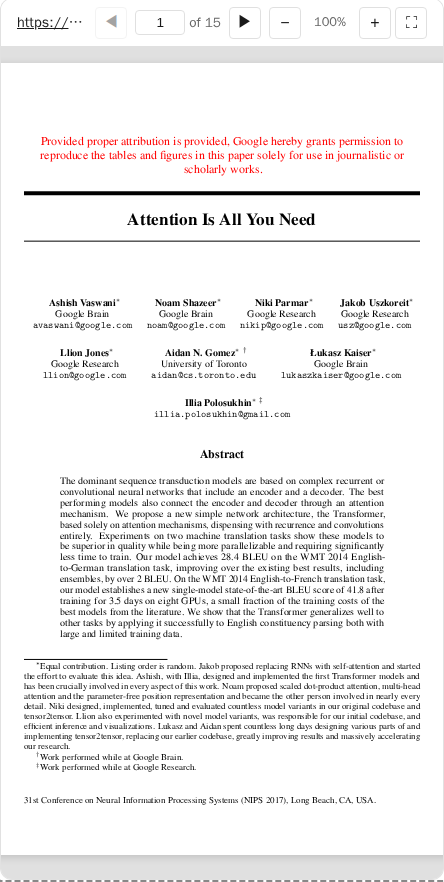
A simple interactive PDF viewer that uses PDF.js. Launch it w/ a few PDF files and/or URLs as CLI args (+ support loading any additional pdf from arxiv.org).
MCP Client Configuration
Add to your MCP client configuration (stdio transport):
{
  "mcpServers": {
    "pdf": {
      "command": "npx",
      "args": [
        "-y",
        "--silent",
        "--registry=https://registry.npmjs.org/",
        "@modelcontextprotocol/server-pdf",
        "--stdio"
      ]
    }
  }
}
What This Example Demonstrates
1. Chunked Data Through Size-Limited Tool Calls
On some host platforms, tool calls have size limits, so large PDFs cannot be sent in a single response. This example shows a possible workaround:
Server side (pdf-loader.ts):
// Returns chunks with pagination metadata
async function loadPdfBytesChunk(entry, offset, byteCount) {
  return {
    bytes: base64Chunk,
    offset,
    byteCount,
    totalBytes,
    hasMore: offset + byteCount < totalBytes,
  };
}
Client side (mcp-app.ts):
// Load in chunks with progress
while (hasMore) {
  const chunk = await app.callServerTool("read_pdf_bytes", { pdfId, offset });
  chunks.push(base64ToBytes(chunk.bytes));
  offset += chunk.byteCount;
  hasMore = chunk.hasMore;
  updateProgress(offset, chunk.totalBytes);
}
2. Model Context Updates
The viewer keeps the model informed about what the user is seeing:
app.updateModelContext({
  structuredContent: {
    title: pdfTitle,
    currentPage,
    totalPages,
    pageText: pageText.slice(0, 5000),
    selection: selectedText ? { text, start, end } : undefined,
  },
});
This enables the model to answer questions about the current page or selected text.
3. Display Modes: Fullscreen vs Inline
- Inline mode: App requests height changes to fit content
- Fullscreen mode: App fills the screen with internal scrolling
// Request fullscreen
app.requestDisplayMode({ mode: "fullscreen" });

// Listen for mode changes
app.ondisplaymodechange = (mode) => {
  if (mode === "fullscreen") enableScrolling();
  else disableScrolling();
};
4. External Links (openLink)
The viewer demonstrates opening external links (e.g., to the original arxiv page):
titleEl.onclick = () => app.openLink(sourceUrl);
Usage
# Default: loads a sample arxiv paper
bun examples/pdf-server/server.ts

# Load local files (converted to file:// URLs)
bun examples/pdf-server/server.ts ./docs/paper.pdf /path/to/thesis.pdf

# Load from URLs
bun examples/pdf-server/server.ts https://arxiv.org/pdf/2401.00001.pdf

# Mix local and remote
bun examples/pdf-server/server.ts ./local.pdf https://arxiv.org/pdf/2401.00001.pdf

# stdio mode for MCP clients
bun examples/pdf-server/server.ts --stdio ./papers/
Security: Dynamic URLs (via view_pdf tool) are restricted to arxiv.org. Local files must be in the initial list.
Tools
| Tool | Visibility | Purpose |
|---|---|---|
list_pdfs |
Model | List indexed PDFs |
display_pdf |
Model + UI | Display interactive viewer in chat |
read_pdf_bytes |
App only | Chunked binary loading |
Architecture
server.ts           # MCP server (233 lines)
├── src/
│   ├── types.ts        # Zod schemas (75 lines)
│   ├── pdf-indexer.ts  # URL-based indexing (44 lines)
│   ├── pdf-loader.ts   # Chunked loading (171 lines)
│   └── mcp-app.ts      # Interactive viewer UI
Key Patterns Shown
| Pattern | Implementation |
|---|---|
| App-only tools | _meta: { ui: { visibility: ["app"] } } |
| Chunked responses | hasMore + offset pagination |
| Model context | app.updateModelContext() |
| Display modes | app.requestDisplayMode() |
| External links | app.openLink() |
| Size negotiation | app.sendSizeChanged() |
Dependencies
pdfjs-dist: PDF rendering@modelcontextprotocol/ext-apps: MCP Apps SDK