 4ca20f21c4
* Restructure threejs-server README to match marketing examples - Update title format to "Example: Three.js App" - Constrain screenshot width using table layout - Add Features section with key capabilities - Reorganize Running section with Tool Input subsection - Add Architecture section describing server and app components - Remove implementation-focused sections (WidgetProps, Creating a New Widget) 🤖 Generated with [Claude Code](https://claude.com/claude-code) Co-Authored-By: Claude Opus 4.5 <noreply@anthropic.com> * Add bun as devDependency to example packages npm install now automatically installs bun, eliminating the need for separate installation instructions. Removed manual bun install step from customer-segmentation-server README. 🤖 Generated with [Claude Code](https://claude.com/claude-code) Co-Authored-By: Claude Opus 4.5 <noreply@anthropic.com> * Add start:http and start:stdio npm scripts to examples For the 6 examples supporting --stdio transport, add explicit scripts: - serve:http / serve:stdio for running the server - start:http / start:stdio for build + serve - start now aliases to start:http for backward compatibility Update READMEs to document both transport options. 🤖 Generated with [Claude Code](https://claude.com/claude-code) Co-Authored-By: Claude Opus 4.5 <noreply@anthropic.com> * Default basic-host SERVERS to localhost:3001/mcp - Change threejs-server default port from 3109 to 3001 for consistency - Add default SERVERS value in basic-host serve.ts - Document SERVERS env var in basic-host README 🤖 Generated with [Claude Code](https://claude.com/claude-code) Co-Authored-By: Claude Opus 4.5 <noreply@anthropic.com> * Improve Examples section in README Frame the three basic examples as foundational starting points and add a link to the examples directory for additional demo apps. 🤖 Generated with [Claude Code](https://claude.com/claude-code) Co-Authored-By: Claude Opus 4.5 <noreply@anthropic.com> --------- Co-authored-by: Claude Opus 4.5 <noreply@anthropic.com>
2.8 KiB
2.8 KiB
Example: SaaS Scenario Modeler
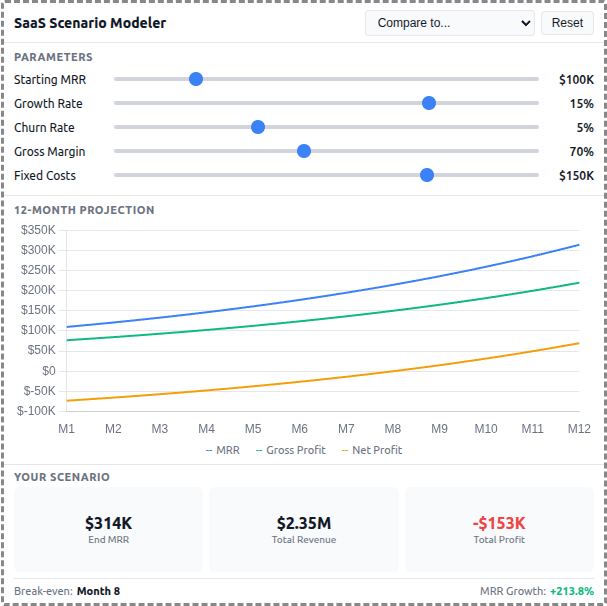
A React-based demo MCP App that lets users adjust SaaS business parameters and see real-time 12-month projections of revenue, costs, and profitability with comparison against pre-built scenario templates.
 |
 |
 |
Features
- Interactive Parameters: 5 sliders for Starting MRR, Growth Rate, Churn Rate, Gross Margin, and Fixed Costs
- 12-Month Projections: Line chart showing MRR, Gross Profit, and Net Profit over time
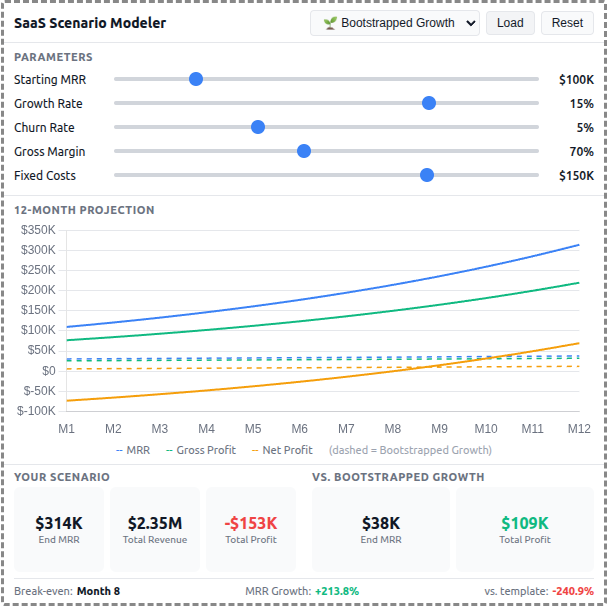
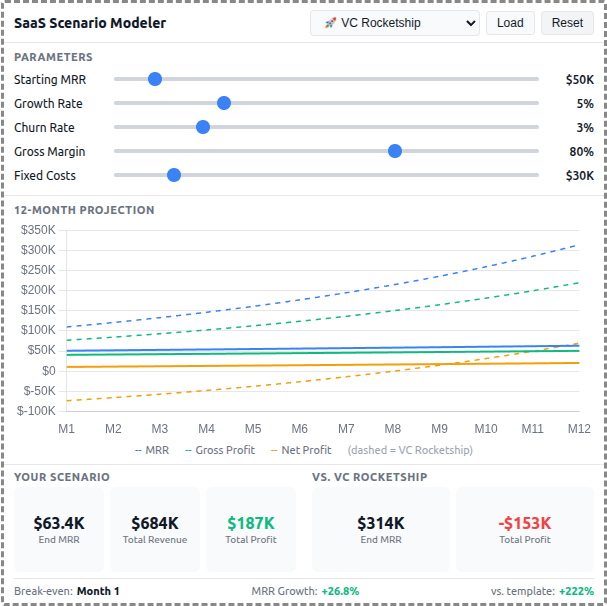
- Scenario Templates: 5 pre-built business strategies (Bootstrapped, VC Rocketship, Cash Cow, Turnaround, Efficient Growth)
- Template Comparison: Overlay dashed lines to compare your scenario against any template
- Summary Metrics: Key metrics including Ending MRR, Total Revenue, Total Profit, and break-even month
- Theme Support: Adapts to light/dark mode preferences
Running
-
Install dependencies:
npm install -
Build and start the server:
npm run start:http # for Streamable HTTP transport # OR npm run start:stdio # for stdio transport -
View using the
basic-hostexample or another MCP Apps-compatible host.
Architecture
Server (server.ts)
Exposes a single get-scenario-data tool that returns:
- 5 pre-built scenario templates with parameters, projections, and summaries
- Default input values for the sliders
- Optionally computes custom projections when
customInputsare provided
The tool is linked to a UI resource via _meta[RESOURCE_URI_META_KEY].
App (src/)
- Built with React for reactive slider updates and derived state management
- Uses Chart.js for the line chart visualization
- All projection calculations run client-side for instant slider feedback
- Components:
SliderRow,MetricCard,ProjectionChart - Template comparison shown as dashed overlay lines on the chart