 37aab03de0
* docs: add tool visibility and restructure _meta.ui - Restructure tool metadata: `_meta["ui/resourceUri"]` → `_meta.ui.resourceUri` - Add `visibility` array field: ["model"], ["apps"], or ["model", "apps"] - Default ["model"] preserves standard MCP behavior - ["apps"] enables widget-only tools hidden from agent - Add McpUiToolMeta interface for type safety - Add Design Decision #4 explaining approach vs OpenAI's two-field model 🤖 Generated with [Claude Code](https://claude.com/claude-code) Co-Authored-By: Claude <noreply@anthropic.com> * address PR review comments - Change default visibility to ["model", "apps"] - Add deprecation notice for flat ui/resourceUri format - Add McpUiToolMeta and McpUiToolVisibility to spec.types.ts - Improve tools/list and tools/call behavior wording 🤖 Generated with [Claude Code](https://claude.com/claude-code) Co-Authored-By: Claude <noreply@anthropic.com> * chore: regenerate schemas for McpUiToolMeta types 🤖 Generated with [Claude Code](https://claude.com/claude-code) Co-Authored-By: Claude <noreply@anthropic.com> * feat: tool visibility and nested _meta.ui format - Rename visibility "apps" → "app" in McpUiToolVisibility type - Add _meta.ui.resourceUri nested format (deprecate flat format) - Add getToolUiResourceUri() utility with backward compatibility - Add visibility demo to system-monitor-server: - get-system-stats: visibility ["model"] with resourceUri - refresh-stats: visibility ["app"] (app-only polling) - Update all example servers to use new _meta.ui format - Add 11 unit tests for getToolUiResourceUri() 🤖 Generated with [Claude Code](https://claude.com/claude-code) Co-Authored-By: Claude <noreply@anthropic.com> * chore: regenerate schemas with updated dependencies * feat: export McpUiToolMeta type and add type annotations - Export McpUiToolMeta and McpUiToolVisibility types from types.ts - Export corresponding Zod schemas (McpUiToolMetaSchema, McpUiToolVisibilitySchema) - Add `as McpUiToolMeta` type annotations to all example servers - Update docs/quickstart.md with proper typing Ensures type safety for `_meta.ui` tool metadata across the codebase. 🤖 Generated with [Claude Code](https://claude.com/claude-code) Co-Authored-By: Claude <noreply@anthropic.com> * feat: add server helpers and optional connect() transport Add `src/server/` with convenience functions for registering MCP App tools and resources: - `registerAppTool(server, name, config, handler)` - `registerAppResource(server, name, uri, config, callback)` The `transport` parameter in `App.connect()` is now optional, defaulting to `PostMessageTransport(window.parent)`. 🤖 Generated with [Claude Code](https://claude.com/claude-code) Co-Authored-By: Claude <noreply@anthropic.com> * Update src/server/index.ts Co-authored-by: Jonathan Hefner <jonathan@hefner.pro> * feat: update McpUiAppToolConfig to support both _meta.ui and flat formats * refactor: simplify server helper imports * docs: add deprecation notice and improve resourceUri documentation * feat: add backward compat normalization in registerAppTool - If _meta.ui.resourceUri is set, also set legacy flat key - If legacy flat key is set, also set _meta.ui.resourceUri - Preserves existing visibility when merging - Does not overwrite if both formats already set * refactor: avoid mutating config arg in registerAppTool * style: format with prettier --------- Co-authored-by: Claude <noreply@anthropic.com> Co-authored-by: Olivier Chafik <ochafik@anthropic.com> Co-authored-by: Jonathan Hefner <jonathan@hefner.pro>
3.2 KiB
3.2 KiB
Example: Customer Segmentation Explorer
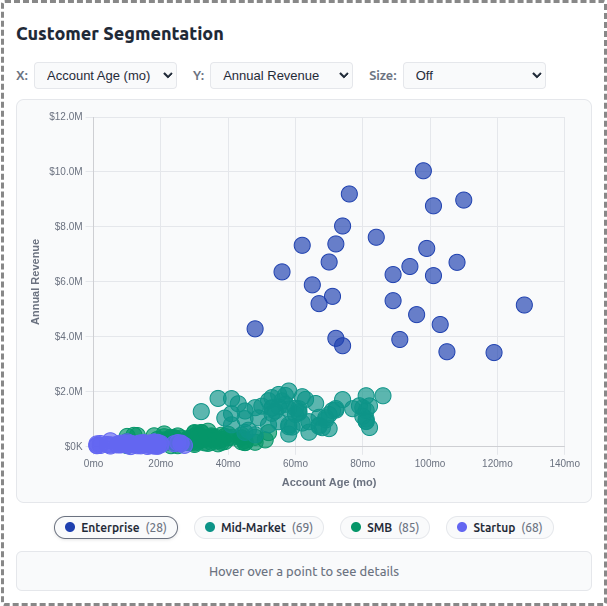
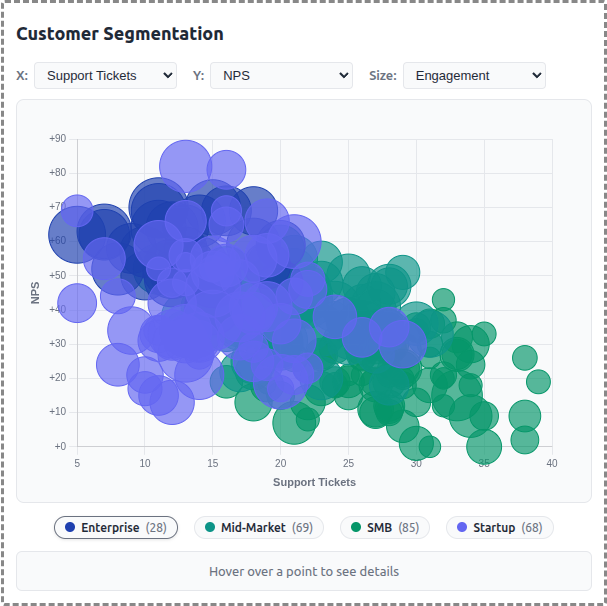
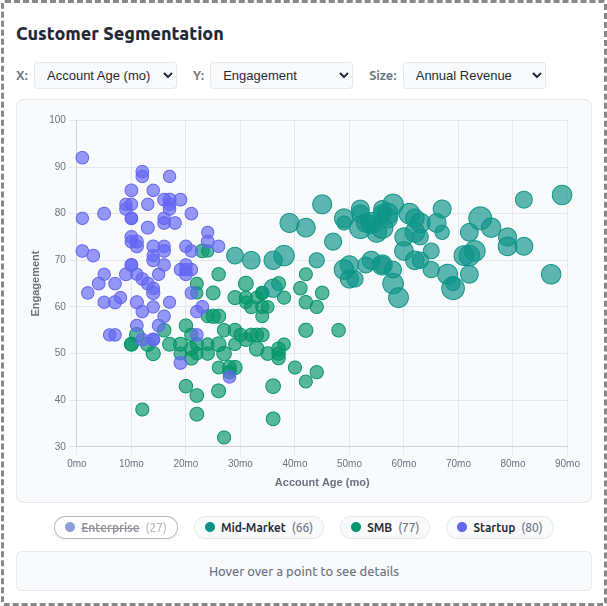
A demo MCP App that displays customer data as an interactive scatter/bubble chart with segment-based clustering. Users can explore different metrics, filter by segment, and click to see detailed customer information.
 |
 |
 |
Features
- Interactive Scatter Plot: Bubble chart visualization using Chart.js with configurable X/Y axes
- Segment Clustering: 250 customers grouped into 4 segments (Enterprise, Mid-Market, SMB, Startup)
- Axis Selection: Choose from 6 metrics for each axis (Revenue, Employees, Account Age, Engagement, Tickets, NPS)
- Size Mapping: Optional bubble sizing by a third metric for additional data dimension
- Legend Filtering: Click segment pills to show/hide customer groups
- Detail Panel: Hover or click customers to see name, segment, revenue, engagement, and NPS
- Theme Support: Adapts to light/dark mode preferences
Running
-
Install dependencies:
npm install -
Build and start the server:
npm run start:http # for Streamable HTTP transport # OR npm run start:stdio # for stdio transport -
View using the
basic-hostexample or another MCP Apps-compatible host.
Architecture
Server (server.ts)
Exposes a single get-customer-data tool that returns:
- Array of 250 generated customer records with segment assignments
- Segment summary with counts and colors for each group
- Optional segment filter parameter
The tool is linked to a UI resource via _meta.ui.resourceUri.
App (src/mcp-app.ts)
- Uses Chart.js bubble chart for the visualization
- Fetches data once on connection
- Dropdown controls update chart axes and bubble sizing
- Custom legend with clickable segment toggles
- Detail panel updates on hover/click interactions
Data Generator (src/data-generator.ts)
- Generates realistic customer data with Gaussian clustering around segment centers
- Each segment has characteristic ranges for revenue, employees, engagement, etc.
- Company names generated from word-list combinations (e.g., "Apex Data Corp")
- Data cached in memory for session consistency