
11 KiB
Spring AI MCP SDK
This SDK implements the Model Context Protocol, enabling seamless integration with language models and AI tools.
Features
- Synchronous and Asynchronous MCP Client and MCP Server implementations
- Standard MCP operations support:
- Protocol version compatibility negotiation
- Tool discovery and execution with change notifications
- Tool list change notifications with non-blocking consumer support
- Resource management with URI templates
- Resource subscription system
- Roots list management and notifications
- Prompt handling and management
- Multiple transport implementations:
- Stdio-based transport for process-based communication
- SSE-based transport for HTTP streaming
- Configurable request timeouts
Installation
Add the following dependency to your Maven project:
<dependency>
    <groupId>org.springframework.experimental</groupId>
    <artifactId>mcp</artifactId>
    <version>0.3.0-SNAPSHOT</version>
</dependency>
Architecture
The SDK follows a layered architecture with clear separation of concerns:
Core Components Hierarchy
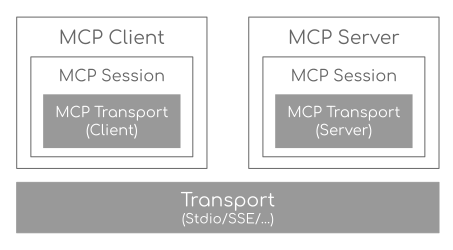
- Transport Layer (McpTransport): Handles JSON-RPC message serialization/deserialization via StdioTransport (stdin/stdout) and SseTransport (HTTP streaming).
- Session Layer (McpSession): Manages communication patterns and state using DefaultMcpSession implementation.
- Client/Server Layer: Both use McpSession for sync/async operations, with McpClient handling client-side protocol operations and McpServer managing server-side protocol operations.
Key Interactions
- Client/Server Initialization: Transport setup, protocol compatibility check, capability negotiation, and implementation details exchange.
- Message Flow: JSON-RPC message handling with validation, type-safe response processing, and error handling.
- Resource Management: Resource discovery, URI template-based access, subscription system, and content retrieval.
- Prompt System: Discovery, parameter-based retrieval, change notifications, and content management.
- Tool Execution: Discovery, parameter validation, timeout-aware execution, and result processing.
Client Usage Examples
MCP Client (Sync API)
// Create a sync client with custom configuration
McpSyncClient client = McpClient.using(transport)
    .requestTimeout(Duration.ofSeconds(10))
    .capabilities(ClientCapabilities.builder()
        .roots(true)      // Enable roots capability
        .sampling()       // Enable sampling capability
        .build())
    .sync();

// Initialize connection
client.initialize();

// List available tools
ListToolsResult tools = client.listTools();

// Call a tool
CallToolResult result = client.callTool(
    new CallToolRequest("calculator",
        Map.of("operation", "add", "a", 2, "b", 3))
);

// List and read resources
ListResourcesResult resources = client.listResources();
ReadResourceResult resource = client.readResource(
    new ReadResourceRequest("resource://uri")
);

// List and use prompts
ListPromptsResult prompts = client.listPrompts();
GetPromptResult prompt = client.getPrompt(
    new GetPromptRequest("greeting", Map.of("name", "Spring"))
);

// Add/remove roots
client.addRoot(new Root("file:///path", "description"));
client.removeRoot("file:///path");
client.rootsListChangedNotification();

// Close client
client.closeGracefully();
MCP Client (Async API)
// Create an async client with custom configuration
McpAsyncClient client = McpClient.using(transport)
    .requestTimeout(Duration.ofSeconds(10))
    .capabilities(ClientCapabilities.builder()
        .roots(true)      // Enable roots capability
        .sampling()       // Enable sampling capability
        .build())
    .toolsChangeConsumer(tools -> {
        logger.info("Tools updated: {}", tools);
    })
    .resourcesChangeConsumer(resources -> {
        logger.info("Resources updated: {}", resources);
    })
    .promptsChangeConsumer(prompts -> {
        logger.info("Prompts updated: {}", prompts);
    })
    .async();

// Initialize connection
client.initialize()
    .flatMap(initResult -> {
        // List available tools
        return client.listTools();
    })
    .flatMap(tools -> {
        // Call a tool
        return client.callTool(new CallToolRequest(
            "calculator",
            Map.of("operation", "add", "a", 2, "b", 3)
        ));
    })
    .flatMap(result -> {
        // List and read resources
        return client.listResources()
            .flatMap(resources ->
                client.readResource(new ReadResourceRequest("resource://uri"))
            );
    })
    .flatMap(resource -> {
        // List and use prompts
        return client.listPrompts()
            .flatMap(prompts ->
                client.getPrompt(new GetPromptRequest(
                    "greeting",
                    Map.of("name", "Spring")
                ))
            );
    })
    .flatMap(prompt -> {
        // Add/remove roots
        return client.addRoot(new Root("file:///path", "description"))
            .then(client.removeRoot("file:///path"))
            .then(client.rootsListChangedNotification());
    })
    .doFinally(signalType -> {
        // Close client
        client.closeGracefully().subscribe();
    })
    .subscribe();
Client Transport Options
StdioClientTransport
// Create transport for process-based communication
ServerParameters params = ServerParameters.builder("npx")
    .args("-y", "@modelcontextprotocol/server-everything", "dir")
    .build();
McpTransport transport = new StdioClientTransport(params);
SseClientTransport
// Create transport for HTTP streaming
WebClient.Builder webClientBuilder = WebClient.builder()
    .baseUrl("http://your-mcp-server");
McpTransport transport = new SseClientTransport(webClientBuilder);
Server Usage Examples
MCP Server (Sync API)
// Create a server with custom configuration
McpSyncServer syncServer = McpServer.using(transport)
    .info("my-server", "1.0.0")
    .capabilities(ServerCapabilities.builder()...build())
    .tools(new CalculatorTool())
    .resources(resourceRegistration)
    .prompts(promptRegistration)
    .sync();

// Add a tool handler at runtime
syncServer.addTool(new CalculatorTool());

// Remove a tool handler at runtime
syncServer.removeTool("calculator");

// Add a resource at runtime
syncServer.addResource(resourceRegistration);

// Remove a resource at runtime
syncServer.removeResource(resourceUri);

// Add a prompt at runtime
syncServer.addPrompt(promptRegistration);

// Remove a prompt at runtime
syncServer.removePrompt(promptName);

// Graceful shutdown
syncServer.closeGracefully();
MCP Server (Async API)
// Create an async server with custom configuration
McpAsyncServer asyncServer = McpServer.using(transport)
    .info("my-server", "1.0.0")
    .capabilities(ServerCapabilities.builder()...build())
    .tools(new CalculatorTool())
    .resources(resourceRegistration)
    .prompts(promptRegistration)
    .async();

// Add a tool handler at runtime
asyncServer.addTool(new CalculatorTool())
    .doOnSuccess(v -> logger.info("Tool added"))
    .subscribe();

// Remove a tool handler at runtime
asyncServer.removeTool("calculator")
    .doOnSuccess(v -> logger.info("Tool removed"))
    .subscribe();

// Add a resource at runtime
asyncServer.addResource(resourceRegistration)
    .doOnSuccess(v -> logger.info("Resource added"))
    .subscribe();

// Remove a resource at runtime
asyncServer.removeResource(resourceUri)
    .doOnSuccess(v -> logger.info("Resource removed"))
    .subscribe();

// Add a prompt at runtime
asyncServer.addPrompt(promptRegistration)
    .doOnSuccess(v -> logger.info("Prompt added"))
    .subscribe();

// Remove a prompt at runtime
asyncServer.removePrompt(promptName)
    .doOnSuccess(v -> logger.info("Prompt removed"))
    .subscribe();

// Notify clients of changes
asyncServer.notifyToolsListChanged().subscribe();
asyncServer.notifyResourcesListChanged().subscribe();
asyncServer.notifyPromptsListChanged().subscribe();

// Graceful shutdown
asyncServer.closeGracefully().subscribe();
Server Transport Options
StdioServerTransport
// Create transport with custom ObjectMapper
ObjectMapper mapper = new ObjectMapper();
StdioServerTransport transport = new StdioServerTransport(mapper);
Provides bidirectional JSON-RPC message handling over standard input/output streams with non-blocking message processing, serialization/deserialization, and graceful shutdown support.
SseServerTransport
// Create SSE transport
ObjectMapper mapper = new ObjectMapper();
String messageEndpoint = "/mcp/message";
SseServerTransport transport = new SseServerTransport(mapper, messageEndpoint);

// Get router function for web server configuration
RouterFunction<?> router = transport.getRouterFunction();
Implements the MCP HTTP with SSE transport specification, providing concurrent client connections through SSE endpoints with message routing, session management, and graceful shutdown capabilities.
Server Capabilities
The server can be configured with various capabilities:
var capabilities = ServerCapabilities.builder()
    .resources(false, true)  // Resource support with list changes notifications
    .tools(true)            // Tool support with list changes notifications
    .prompts(true)          // Prompt support with list changes notifications
    .build();
Tool Registration
var toolRegistration = new ToolRegistration(
    new Tool("calculator", "Basic calculator", Map.of(
        "operation", "string",
        "a", "number",
        "b", "number"
    )),
    arguments -> {
        // Tool implementation
        return new CallToolResult(result, false);
    }
);
Resource Registration
var resourceRegistration = new ResourceRegistration(
    new Resource("custom://resource", "name", "description", "mime-type", null),
    request -> {
        // Resource read implementation
        return new ReadResourceResult(contents);
    }
);
Prompt Registration
var promptRegistration = new PromptRegistration(
    new Prompt("greeting", "description", List.of(
        new PromptArgument("name", "description", true)
    )),
    request -> {
        // Prompt implementation
        return new GetPromptResult(description, messages);
    }
);
Error Handling
The SDK provides comprehensive error handling through the McpError class, covering protocol compatibility, transport communication, JSON-RPC messaging, tool execution, resource management, prompt handling, timeouts, and connection issues. This unified error handling approach ensures consistent and reliable error management across both synchronous and asynchronous operations.
Contributing
See CONTRIBUTING.md for details on our code of conduct and the process for submitting pull requests.